Usingthe CordlessHeadphones
I IIIIIII I II IIII I IIII IIII I I I II I_ I
f
MUTING(_ (_SLEEP
"rVNIDEO
Q®®
®®®
®®®
VOL CH
To return to the normal screen
Press MENU,
To display O on the screen
Press DISPLAY,
• If you want to listen to the sound from the
headphones only, turn off the TV speaker
sound by pressing VOL - or setting
SPEAKER to OFF. For details on setting
SPEAKER to OFF, see "Turning the
Speaker On or Off," p. 34.
• To listen to the sound from the
headphones clearly, adjust the direction
and the position of the infrared emitter.
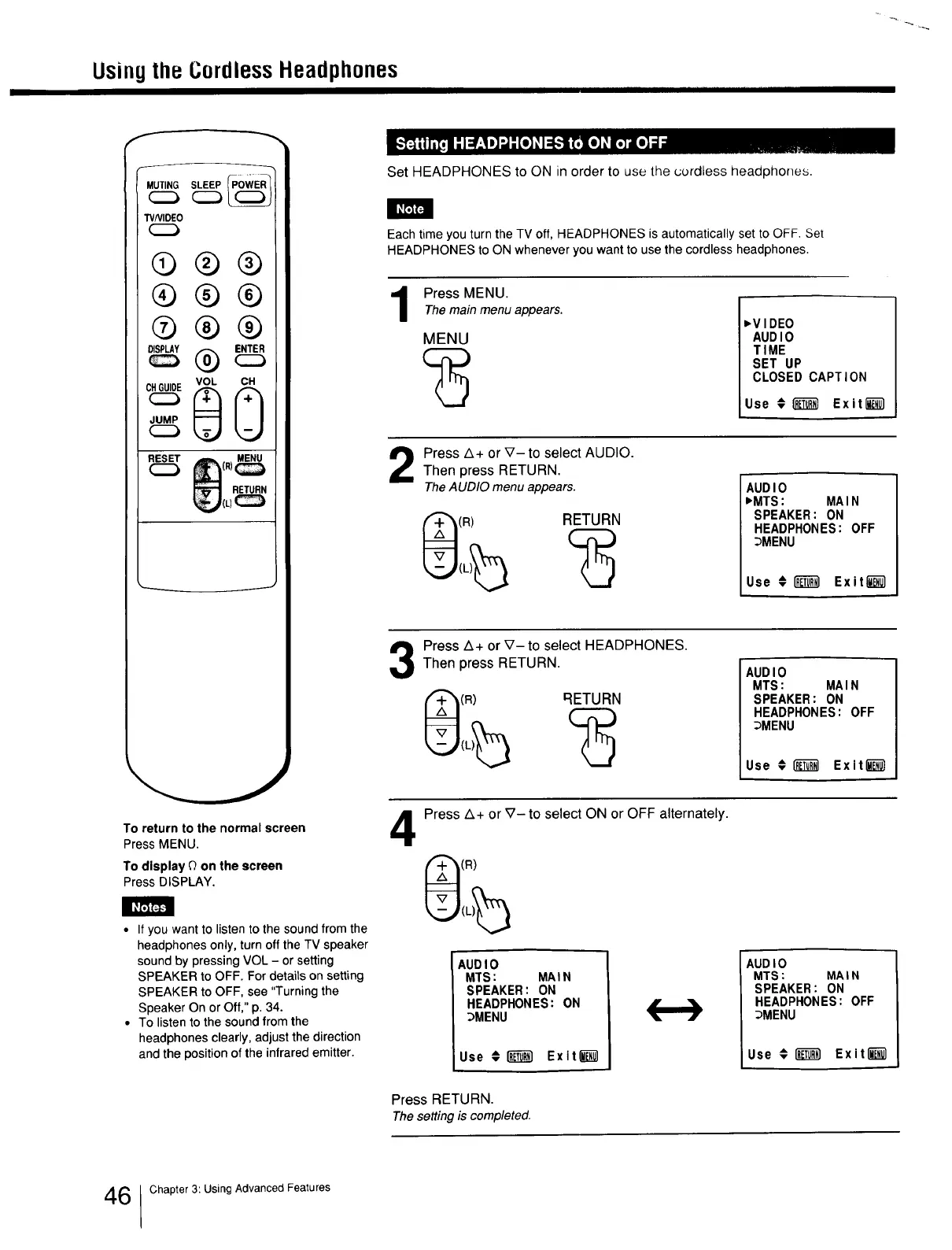
Set HEADPHONES to ON in order to use the cordless headphones.
Each time you turn the TV off, HEADPHONES is automatically set to OFF. Set
HEADPHONES to ON whenever you want to use the cordless headphones.
Press MENU.
Themain menu appears.
MENU
_VIDEO
AUDIO
TIME
SET UP
CLOSED CAPTION
Use € _ Exit l__
Press A+ or V- to select AUDIO.
Then press RETURN.
TheAUDIO menu appears.
(R) RETURN
AUDIO
_MTS: MAIN
SPEAKER: ON
HEADPHONES: OFF
_MENU
Use €1"_ Exit_
Press A+ or V- to select HEADPHONES.
Then press RETURN.
(R) RETURN
AUDIO
MTS: MAIN
SPEAKER: ON
HEADPHONES: OFF
_MENU
Use € _ Exit_
4
Press Z_+ or V- to select ON or OFF alternately.
(R)
AUDIO
MTS: MAIN
SPEAKER: ON
HEADPHONES: ON
_MENU
Use €18_ Exit_
AUDIO
MTS: MAIN
SPEAKER: ON
HEADPHONES: OFF
DMENU
Use € _ Exiti_
Press RETURN.
Thesetting is completed.
6 1Chapter 3: Using Advanced Features







 To Next Page