EasyManua.ls Logo

Sony Trinitron KV-20FV10 - Connecting Multiple AV Devices; TV, Satellite Receiver, and VCR Connections

Sony Trinitron KV-20FV10
41 pages
Print Icon
To Next Page IconTo Next Page
To Previous Page IconTo Previous Page
Loading...
User
Guide
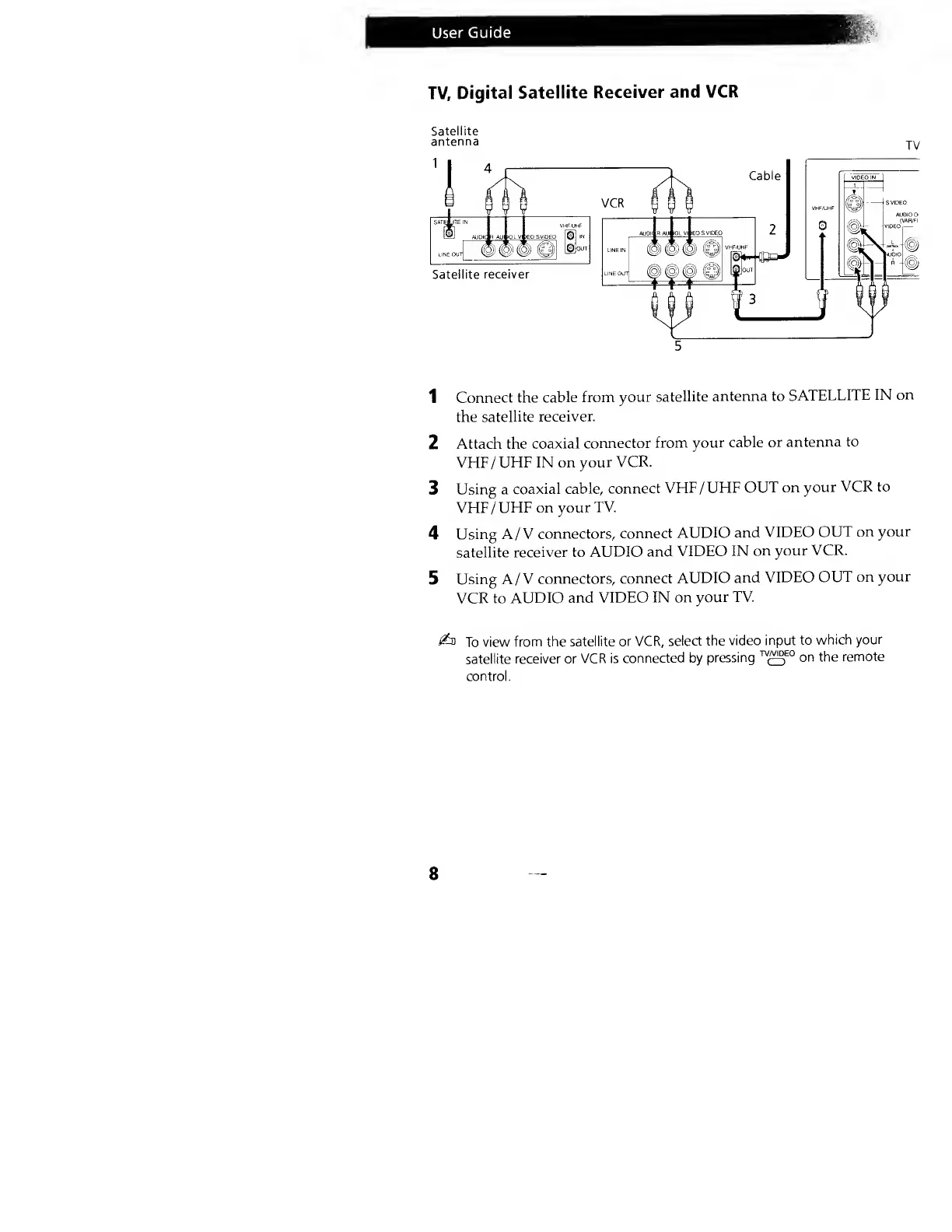
TV,
Digital
Satellite
Receiver
and VCR
Satellite
antenna
jy
5
1
Connect the
cable from
your
satellite
antenna to
SATELLITE
IN
on
the
satellite
receiver.
2 Attach the
coaxial
connector
from
your cable
or
antenna to
VHF/UHF IN on
your
VCR.
3
Using a
coaxial
cable, connect
VHF
/
UHF
OUT on
your
VCR to
VHF/UHF on
your TV.
4
Using A
/
V
connectors,
connect
AUDIO and
VIDEO
OUT
on
your
satellite
receiver to
AUDIO and
VIDEO
IN
on your
VCR.
5
Using A
/
V
connectors,
connect
AUDIO
and
VIDEO
OUT on
your
VCR to
AUDIO and
VIDEO IN
on
your TV.
i&
To
view from
the satellite
or VCR,
select the
video input
to
which
your
satellite
receiver or
VCR is
connected by
pressing
W
£5
E0
on the
remote
control.
8