EasyManua.ls Logo

Sony TRINITRON KV-M1620U - Page 5

Sony TRINITRON KV-M1620U
12 pages
Print Icon
To Next Page IconTo Next Page
To Previous Page IconTo Previous Page
Loading...
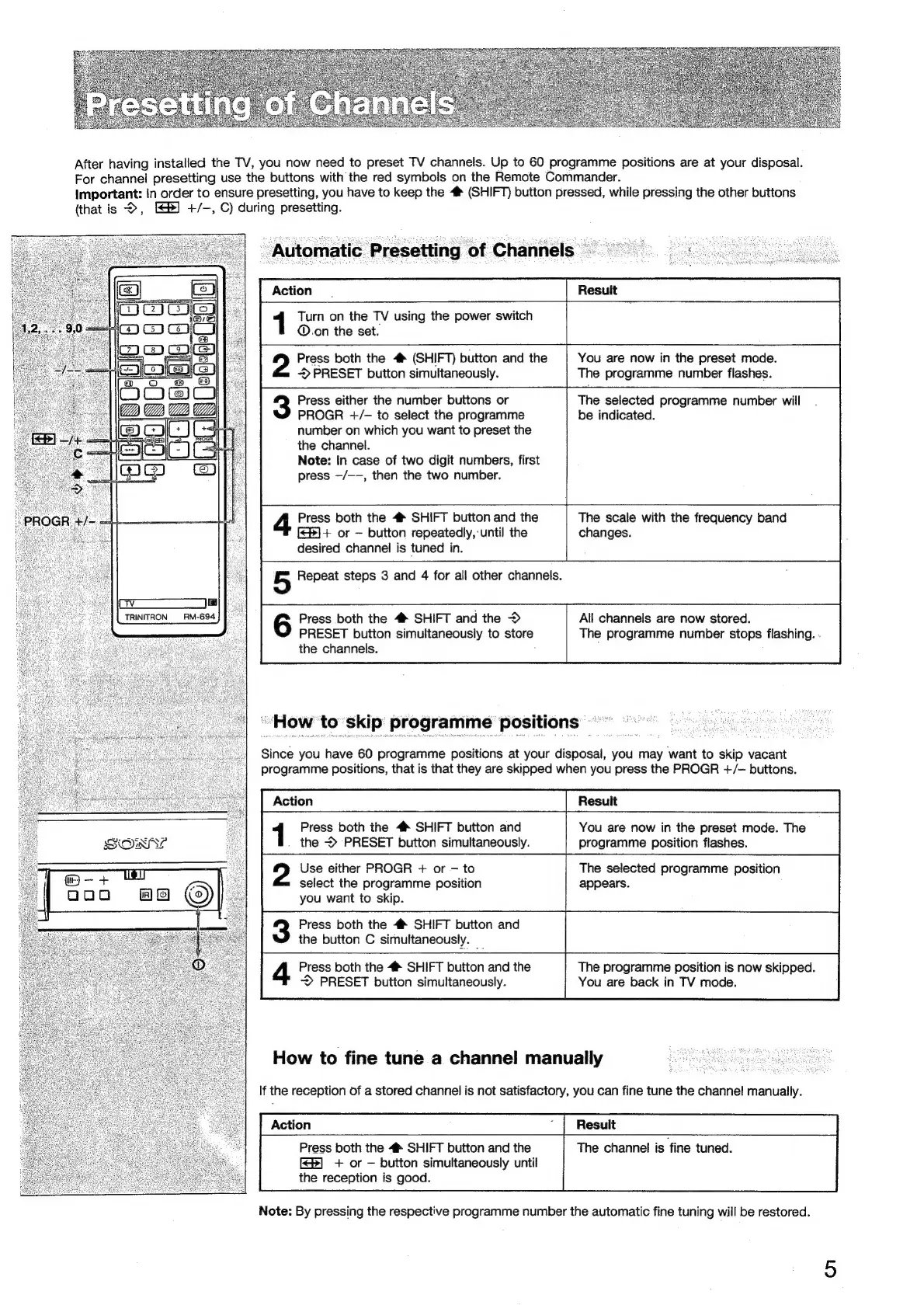
After
having
installed
the
TV,
you
now
need
to
preset
TV
channels.
Up
to
60
programme
positions
are
at
your
disposal.
For
channel
presetting
use
the
buttons
with
the red
symbols
on
the
Remote
Commander.
Important:
In
order
to
ensure
presetting,
you
have
to
keep
the
4
(SHIFT)
button
pressed,
while
pressing
the
other
buttons
(that
is
>,
[S8)
+/-,
C)
during
presetting.
_
Automatic
Presetting
of
Channels
Action
Turn
on
the
TV
using
the
power
switch
@.on
the
set.
Press
both
the
4
(SHIFT)
button
and
the
You
are
now
in
the
preset
mode.
>
PRESET
button
simultaneously.
The
programme
number
flashes.
Press
either
the
number
buttons
or
The
selected
programme
number
will
PROGR
+/-—
to
select
the
programme
be
indicated.
number
on
which
you
want
to
preset
the
the
channel.
Note:
In
case
of
two
digit
numbers,
first
press
—/--,
then
the
two
number.
Press
both
the
#
SHIFT
button
and
the
The
scale
with
the
frequency
band
[2)+
or
button
repeatedly,
until
the
changes.
desired
channel
is
tuned
in.
5
Repeat
steps
3
and
4
for
all
other
channels.
|
TRINITRON
|
_RM-694
Press
both
the
4*
SHIFT
and
the
>
All
channels
are
now
stored.
PRESET
button
simultaneously
to
sale
The
programme
number
stops
flashing.
-
the
channels.
“How
to
skip
programme
positions
Since
you
have
60
programme
positions
at
your
disposal,
you
may
want
to
Pe
vacant
programme
positions,
that
is
that
they
are
skipped
when
you
press
the
PROGR
+/-
buttons.
Press
both
the
4#
SHIFT
button
and
You
are
now
in
the
preset
mode.
The
the
PRESET
button
simultaneously.
programme
position
flashes.
Use
either
PROGR
+
or
to
The
selected
programme
position
select
the
programme
position
appears.
you
want
to
skip.
Press
both
the
#*
SHIFT
button
and
the
button
C
simultaneously.
_
Press
both
the
4
SHIFT
button
and
the
The
programme
position
is
now
skipped.
~>
PRESET
button
simultaneously.
You
are
back
in
TV
mode.
How
to
fine
tune
a
channel
manually
If
the
reception
of
a
stored
channel
is
not
satisfactory,
you
can
fine
tune
the
channel!
manually.
Press
both
the
4
SHIFT
button
and
the
The
channel
is
fine
tuned.
[8]
+
or
button
simultaneously
until
the
reception
is
good.
Note:
By
pressing
the
respective
programme
number
the
automatic
fine
tuning
will
be
restored.

Related product manuals