EasyManua.ls Logo

Sony Trinitron Multiscan CPD-1302 - Page 54

Sony Trinitron Multiscan CPD-1302
83 pages
Print Icon
To Next Page IconTo Next Page
To Previous Page IconTo Previous Page
Loading...
CPD-1302
ELECTROCUTIUN
S
TENSION,
UN
r
DOlT
ETRE
;T
DIRECTEMENT
TEUR.
ELATIFSA
LA
UNE
TRAME
ET
'AS
DE PRINCIPE,
STES
DE PIECES
IQUE
POUR
LA
NE LES REM·
; SONY
DONT
LE
~NS
LE PRESENT
TS
PUBLIES
PAR
DONT
L'IMPOR-
, SECURITE
DU
FIES
DANS
LE
DCEDURES LORS
E COMPOSANTS
~IS
FONCTIONNE·
CPD-1302
SAFETY
CHECK-OUT
(US
Model Only)
After
correcting
the
original service
problem,
perform
the
following
safety
checks
before
releasing
the set to
the
customer:
1.
Check
the
area
of
your
repair for
unsoldered
or
poorly-soldered
connections
. Check the
entire
board
surface for solder splashes
and
bridges.
2. Check
the
interboard
wiring
to
ensure
that
no
wires are
:'pinched"
or
contact
high-wattage
resistors.
3. Check
that
all
control
knobs,
shields, covers,
ground
straps,
and
mounting
hardware
have
been replaced.
Be
absolutely
certain
that
you
have replaced all
the
insulators.
4.
Look for
unauthorized
replacement
parts, par-
ticularly transistors,
that
were installed during a
previous repair. Point
them
out
to
the
customer
and
recommend
their
replacement.
5. Look for parts which,
though
functioning,
show
obvious signs
of
deterioration.
Point
them
out
to
the
customer
and
recommend
their
replace-
ment.
6. Check the line
cord
for cracks and ahrasion.
Recommend
the
replacement
of
any
such
line
cord
to
the
customer.
7. Check
the
condition
of
the
monopole
antenna
(if
any)
.
Make sure the end
is
not
broken
off,
a nd has
the
plastic cap
on
it. Point
out
the
danger
of
impalement
on
a
broken
antenna
to
the
customer,
and
recommend
the
antenna's
replacement.
8. Check
the
B+ and HV to see
they
are at
the
values specified. Make sure
your
instruments
are
accurate;
be suspicious
of
your
HV
meter
if sets always have low HV.
9. Check the
antenna
terminals, metal trim,
"metallized"
knobs,
screws, and all
other
exposed
metal
parts
for AC leakage. Check
leakage as described below.
To
Exposed
Metal
Parts
on
Set
-=-
Earth
Ground
AC
voltmeter
(0.75
V)
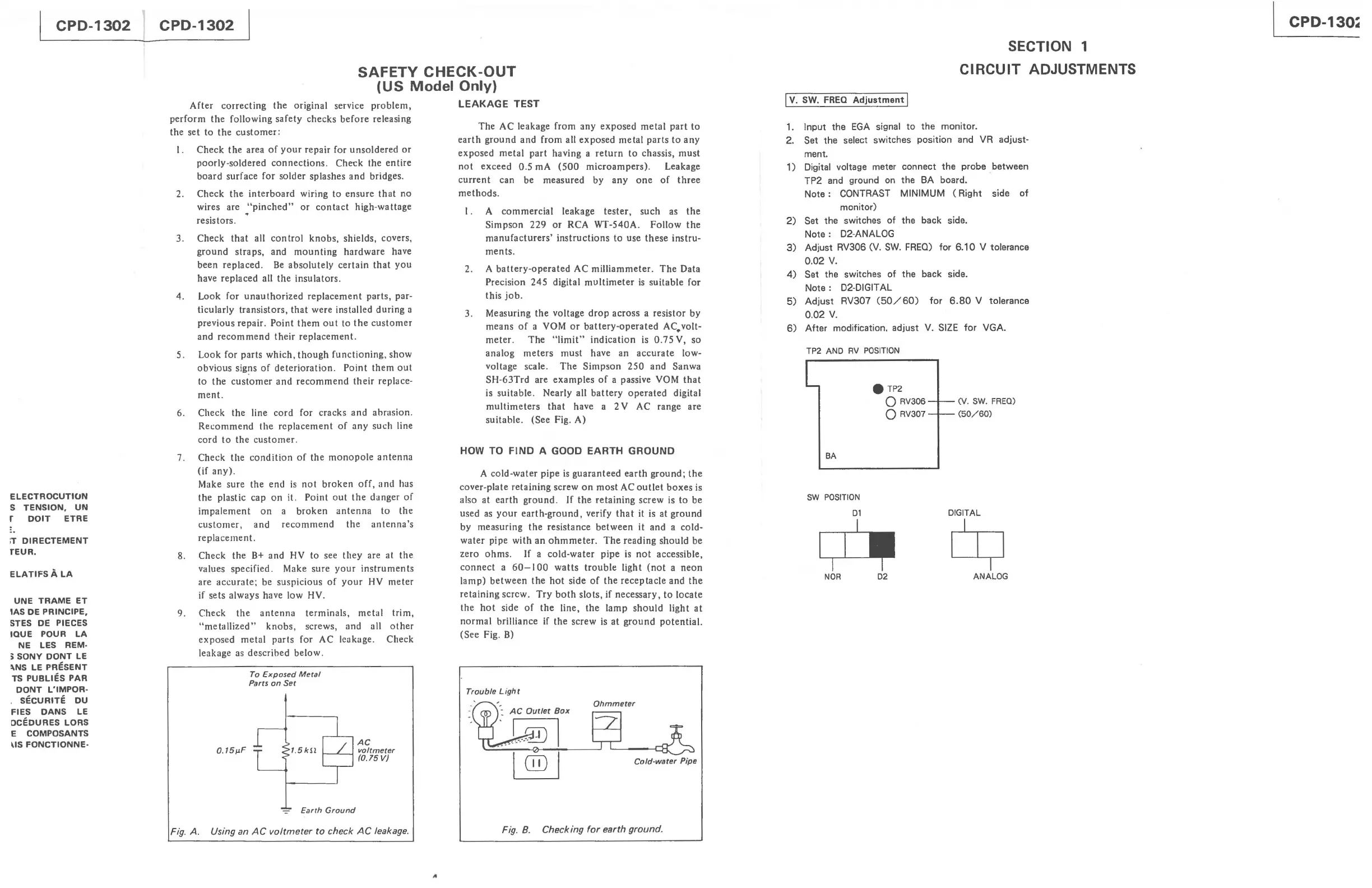
Fig. A. Using an
AC
voltmeter
to
check
AC
leakage.
"
LEAKAGE
TEST
The
AC leakage from any
exposed
metal
part
to
earth
ground
and from all exposed
metal
parts
to
any
exposed
metal
part
having a
return
to
chassis,
must
not
exceed
0.5 mA
(500
microampers).
Leakage
current
can be measured by
anyone
of
three
methods
.
1. A
commercial
leakage
tester,
such
as
the
Simpson 229
or
RCA WT-540A.
Follow
the
manufacturers'
instructions
to
use
these
instru-
ments.
2. A
battery-operated
AC milliammeter.
The
Data
Precision
245
digital
multimeter
is
suitable for
this
job.
3. Measuring
the
voltage
drop
across a resistor by
means
of
a YOM
or
battery-operated
AC. volt-
meter.
The
"limit"
indication
is
0.75
V, so
analog
meters
must
have an
accurate
low-
voltage scale.
The
Simpson
250
and Sanwa
SH-63Trd are
examples
of
a passive YOM
that
is
suitable
. Nearly all
battery
operated
digital
multimeters
that
have a 2 V AC range are
suitable. (See Fig. A)
HOW TO
FIND
A GOOD EARTH GROUND
A cold-water pipe
is
guaranteed
earth
ground;
the
cover-plate retaining screw
on
most
AC
outlet
boxes
is
also
at
earth
ground
.
If
the
retaining
screw is
to
be
used
as
your
earth-ground,
verify
that
it
is
at
ground
by measuring
the
resistance
between
it and a cold-
water
pipe with an
ohmmeter.
The
reading should be
zero
ohms.
If
a cold-water pipe
is
not
accessible,
connect
a
60-100
watts
trouble
light
(not
a
neon
lamp)
between
the
hot
side
of
the
receptacle
and
the
retaining screw.
Try
both
slots, if necessary,
to
locate
the
hot
side
of
the
line,
the
lamp
should
light
at
normal
brilliance if the screw
is
at
ground
potential.
(See Fig.
B)
Trouble Ligh t
-:
AC
Outlet
Box
Ohmmeter
Cold·water Pipe
Fig. 8. Checking
for
earth ground.
Iv.
SW.
FREQ
Adjustment
I
SECTION 1
CIRCUIT ADJUSTMENTS
1. Input
the
EGA
signal
to
the
monitor.
2.
Set
the
select switches position and
VR
adjust-
ment.
1)
Digital voltage meter
connect
the
probe
between
TP2 and ground on
the
BA
board.
Note:
CONTRAST
MINIMUM
(Right
side of
monitor)
2)
Set
the
switches of
the
back side.
Note:
D2-ANALOG
3)
Adjust RV306
(V.
SW.
FREQ)
for
6.10
V tolerance
0.02
V.
4)
Set
the switches of
the
back side.
Note:
D2-DIGIT
AL
5)
Adjust RV307
(50/60)
for
6.80
V tolerance
0.02
V.
6)
After modification,
adjust
V.
SIZE
for VGA.
TP2 AND
RV
POSITION
BA
SW
POSITION
D1
TP2
o RV306
o RV307
NOR
D2
(v.
SW. FREO)
(50/60)
DIGITAL
Cy
ANALOG
CPD-130~

Related product manuals