21
Additional Information
Sony KV-BT212M80 Group I15 (GB)_2-023-202-11 (1)
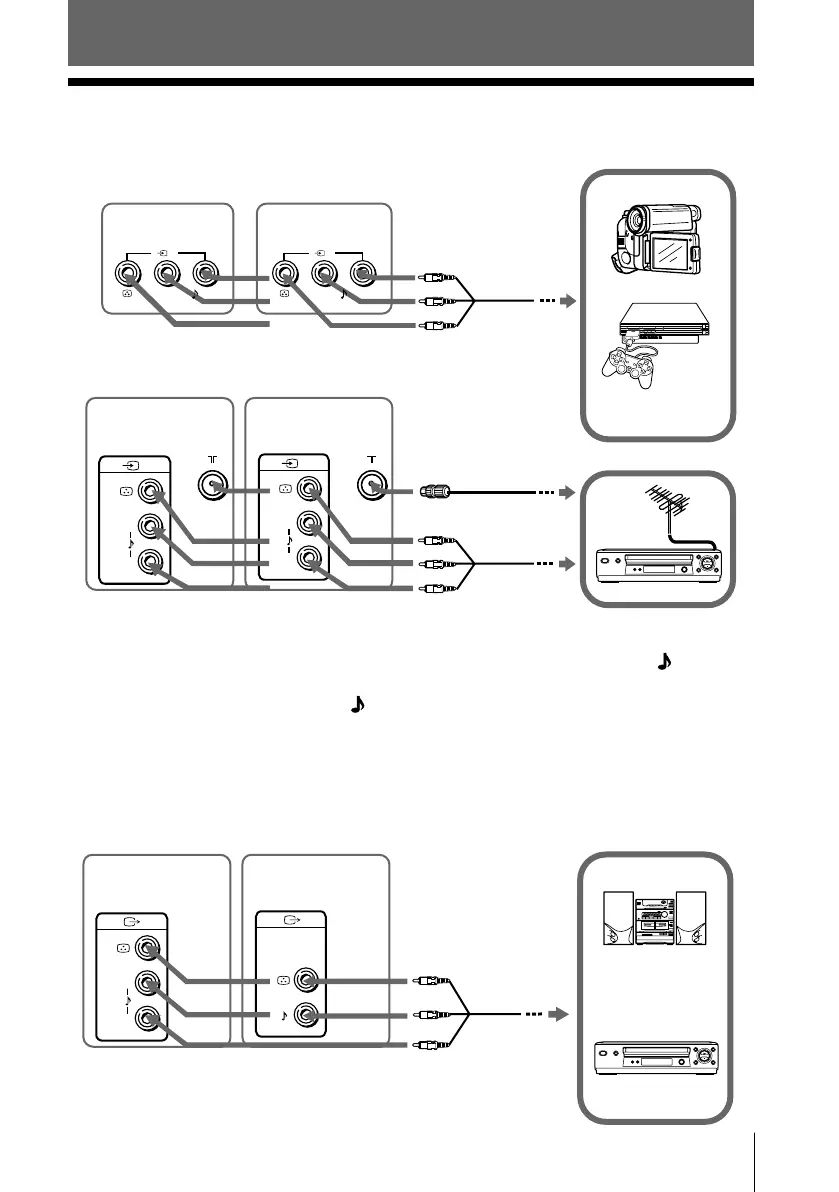
TV rear panel
Audio system
L
R
(MONO)
VCR
Audio/Video cable
(not supplied)
Connecting to the monitor output terminal ( T )
x Connecting optional components
Connecting to the video input terminal ( t )
Additional Information
TV front panel
Video game
equipment
2
(MONO)—
—(MONO)
2
L(MONO)—
—R
1
L
R
(MONO)
1
(MONO)
(MONO)
Audio/Video
cable
(not supplied)
Antenna cable
(not supplied)
VCR
TV rear panel
Audio/Video
cable
(not supplied)
Camcorder
* Sound Mix Terminal (KV-BM142M70 only)
You can connect the audio L and R jacks from your AV equipment to both (MONO)
jacks on the TV to enjoy mixed left and right sound. If you do not prefer the mixed
sound, disconnect either one of the
(MONO) jacks.
Note
• If you connect a VCR to 8 (antenna input), preset the signal output from the VCR to the
program number 0 on the TV (see page 19).
KV-BT212M80
KV-BM142M70*
KV-BT212M80
KV-BM142M70*
KV-BM142M70
KV-BT212M80
01GB07ADJ-SVAPAK.p65 5/21/04, 9:36 AM21
Black








 To Next Page