GB
16
Connecting the Projector
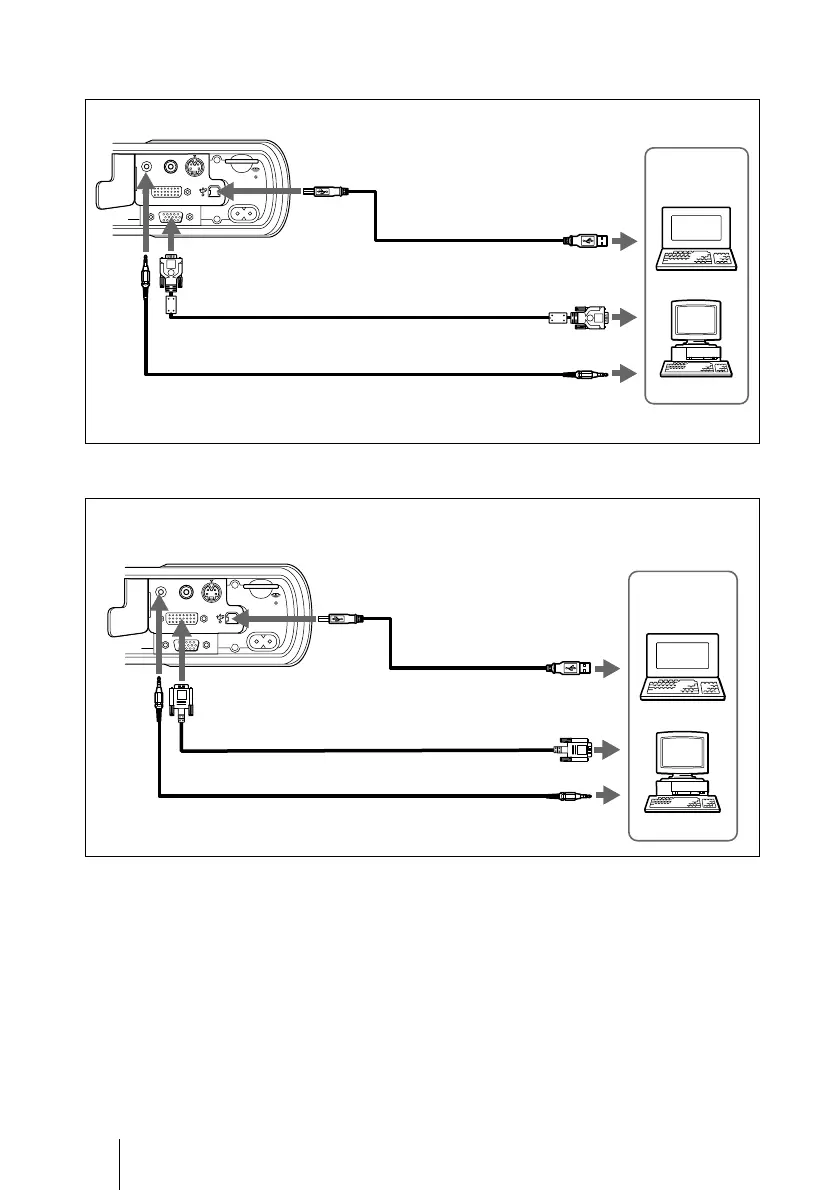
To connect an IBM PC/AT compatible computer
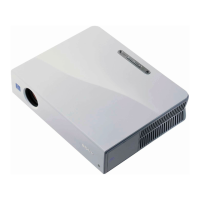
To connect a DVI compatible equipment
* When you want to use the wireless mouse function and the supplied application
software (Projector Station), connect your computer with the supplied USB cable.
S VIDEOVIDEOAUDIO
INPUT B
INPUT A
~AC IN
to USB connector
Left side
HD D-sub 15-pin cable (supplied)
Audio connecting cable (not supplied)
to monitor output
Computer
USB cable*
(supplied)
to audio output
S VIDEOVIDEOAUDIO
INPUT B
INPUT A
~AC IN
DVI cable SMF-421 (not supplied)
24 pins (male) (DVI ↔ DVI)
to DVI output
Left side
Computer
to USB connector
Audio connecting cable (not supplied)
USB cable*
(supplied)
to audio output



 To Next Page