GB
18
Connecting the Projector
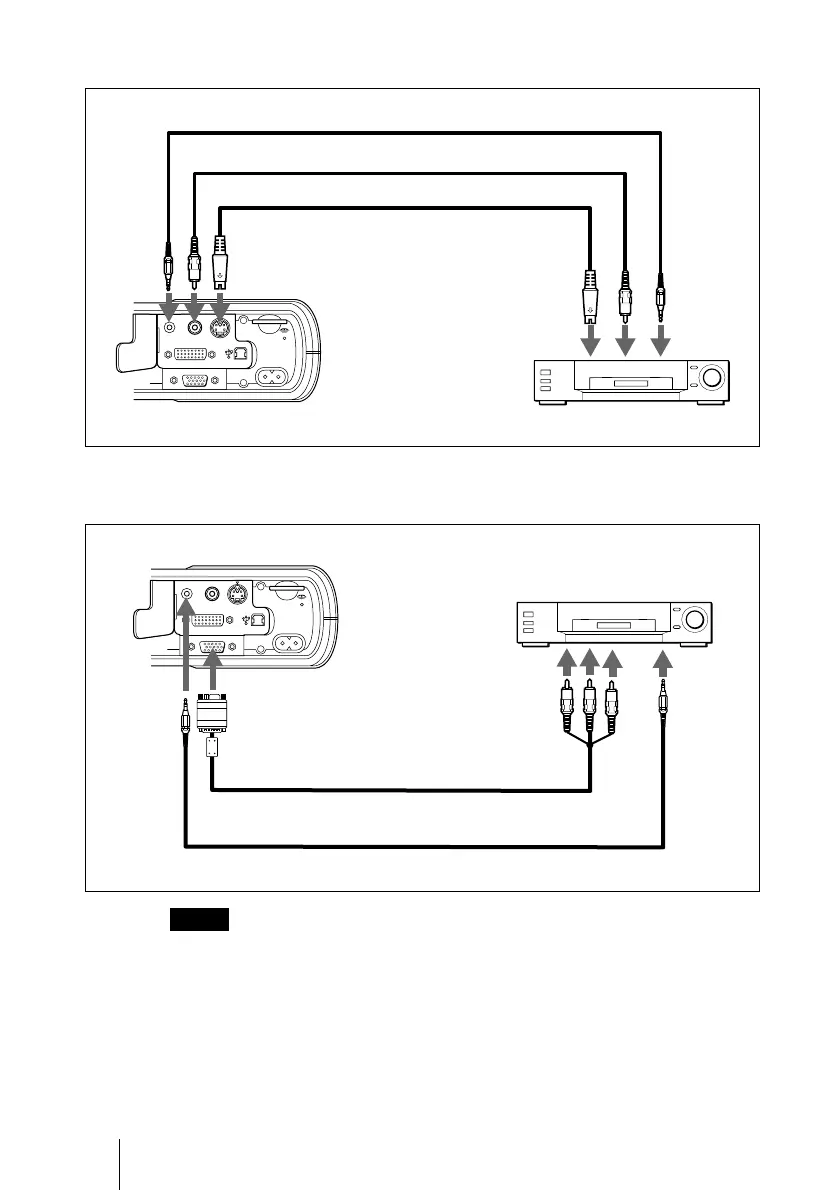
To connect a VCR
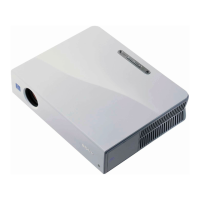
To connect a 15k RGB/Component equipment
• S
et the aspect ratio using ASPECT in the INPUT SETTING menu
according to the input signal.
• When
you connect the unit to 15k RGB or component video equipment,
select video GBR or component with the INPUT-A setting in the SET
SETTING menu.
• U
se the composite sync signal when you input the external sync signal
from 15k RGB/component equipment.
Notes
S VIDEOVIDEOAUDIO
INPUT B
INPUT A
~AC IN
Audio connecting cable (not supplied)
S-Video cable (not supplied)
VCR
to S video
output
Left side
to audio
output
Video cable (not supplied)
to video output
S VIDEOVIDEOAUDIO
INPUT B
INPUT A
~AC IN
Left side
Audio connecting cable (not supplied)
SMF-402 Signal Cable (not supplied)
HD D-sub 15-pin (male) ↔ 3 × phono jack
to audio
output
15k RGB/Component equipment
to RGB/
component
output



 To Next Page