GB
8
Location and Function of Controls
Location and
Function of Controls
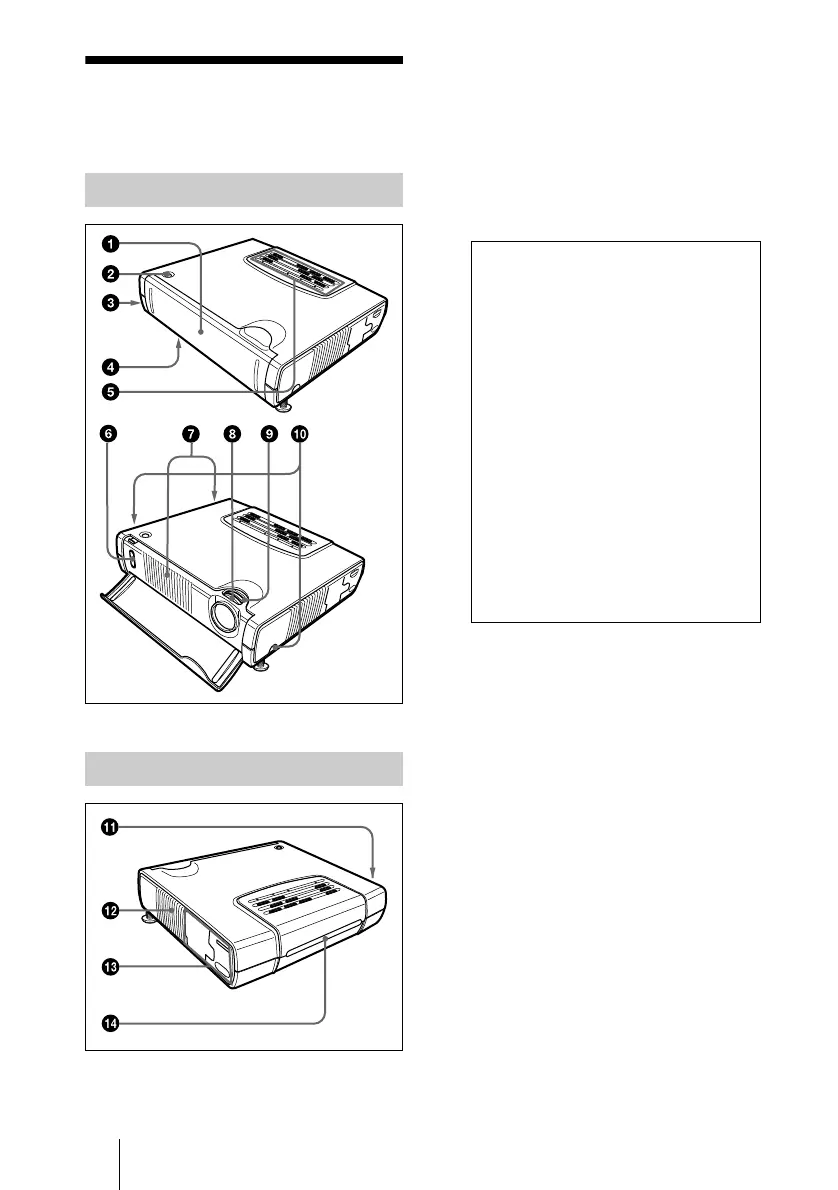
1 Front cover
Press the OPEN button to open the front
cover.
2 OPEN button
3 Security lock (right side)
Connects to an optional security cable
(Kensington’s).
4 Lamp cover (bottom)
5 Control panel
For details, see “Control Panel” on
page 10.
6 Front remote control detector
(SIRCS receiver)
7 Ventilation holes (exhaust)
8 Focus lever
Adjusts the picture focus.
9 Zoom lever
Adjusts the picture size.
q;
q;q;
q; Adjuster adjustment buttons
For details,see “How to use the
adjuster” on page 9.
qa
qaqa
qa Speaker
Front/Side/Bottom
Rear/Left Side
The security lock corresponds to
Kensington’s MicroSaver
®
Security
System.
If you require further information,
contact
Kensington
2855 Campus Drive
San Mateo, CA 94403
in North America
Phone: 800-235-6708
Fax: 800-247-1317
Outside North America
Phone: 847-541-9500
Home page address:
http://www.kensington.com/



 To Next Page