VPL-CS2/CX1
4-079-834-11 (1)
D:\Data\Oka\407983411VPLCS2CX1WW\02GB-
VPLCS2,CX1WW\03OVR.fm
masterpage:Left
13
GB
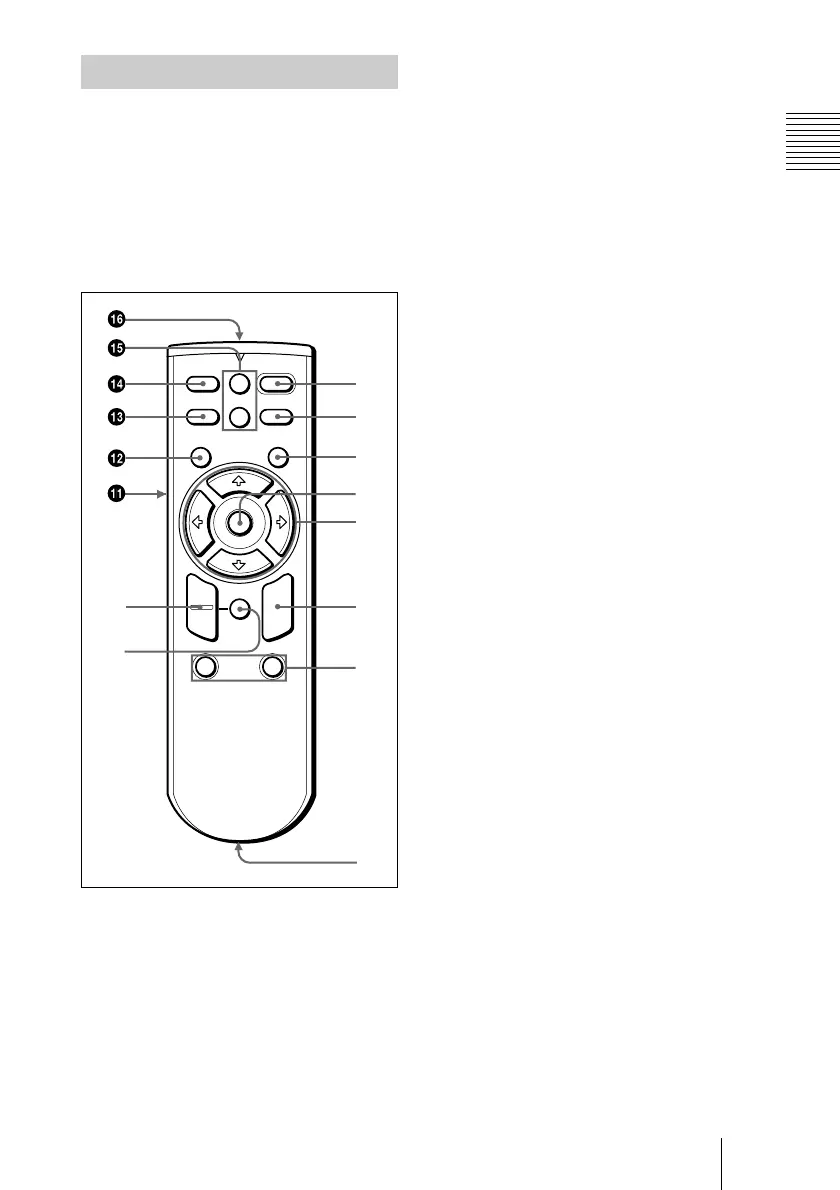
Location and Function of Controls
Overview
The keys that have the same names as those
on the control panel function identically.
You can control a connected computer using
the Remote Commander.
For details, see “To control the computer
using the supplied Remote Commander” on
page 23.
1 I / 1
11
1 key
2 APA (Auto Pixel Alignment) key
3 ENTER key
4 Joystick
Functions as the mouse of the computer
connected to the unit.
5 Arrow keys (M
MM
M/m
mm
m/<
<<
</,
,,
,)
6 R CLICK key
Functions as the right button on a mouse.
7 FUNCTION 1, 2 keys
These keys function when the supplied
application software is used.
When you connect the projector with a
computer, you can open a file on the
screen by just pressing the FUNCTION
key. This will enhance your
presentation. To use this function,
allocate a file to the FUNCTION key by
using the application software.
For details, see the README file and
the HELP file supplied with the
application software.
8 CONTROL S OUT jack (stereo
minijack)
This does not function with this
projector.
9 RESET (D ZOOM) key
Resets the value of an item back to its
factory preset value or returns the
enlarged image back to its original size.
0 D ZOOM +/– key
Enlarges the image at a desired location
on the screen.
+: Pressing the + key once highlights one
of the images divided into 16. Use an
arrow key (M/m/</,) to move the
highlight portion to the point in the
image to be enlarged. Press the + key
repeatedly until the image is enlarged
to your requirements.
–
:Pressing the
–
key reduces an image
that has been enlarged with the D
ZOOM + key.
Remote Commander
I / 1
PIC
INPUT
MUTING
MENU ENTER
VOLUME
RESET
FUNCTION
D ZOOM
12
(D ZOOM)
APA
+
–
+
–
R
CLICK
0
9
2
3
4
5
6
1
7



 To Next Page