VPL-CS2/CX1
4-079-834-11 (1)
D:\Data\Oka\407983411VPLCS2CX1WW\02GB-
VPLCS2,CX1WW\03OVR.fm
masterpage:Left
9
GB
Location and Function of Controls
Overview
Location and
Function of Controls
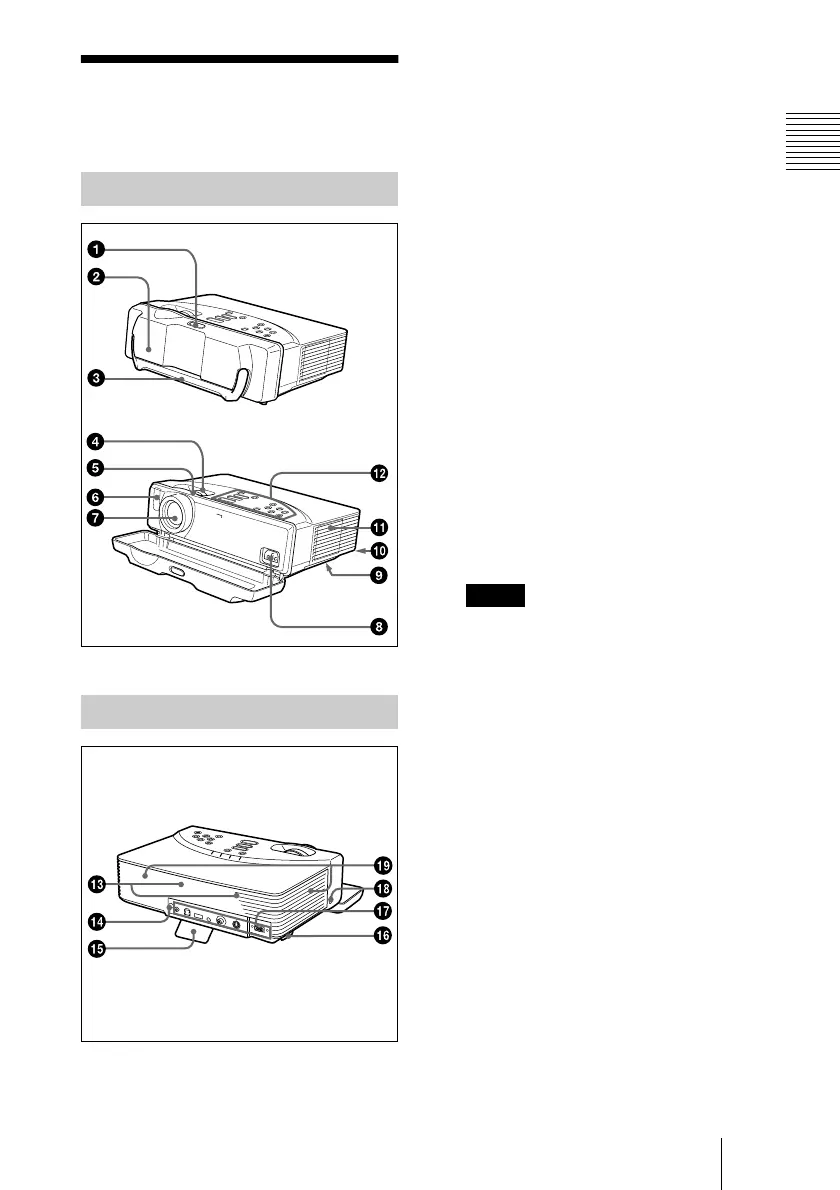
1 Lock button
2 Front cover
Slide the lock button to open the front
cover.
3 Carrying handle
Pull up the handle from the projector for
carrying.
4 Zoom ring
Adjusts the picture size.
5 Focus ring
Adjusts the picture focus.
6 Front remote control detector
(SIRCS receiver)
7 Lens
8 AC IN socket
Connects the supplied AC power cord.
9 Ventilation holes (intake)/air
filter cover (bottom)
• Do not place anything near the
ventilation holes as it may cause internal
heat build-up.
• Do not place your hand or objects near
the ventilation holes as it may cause the
air coming out heat build-up.
• To maintain optimal performance, clean
the air filter every 300 hours.
q;
q;q;
q; Lamp cover (bottom)
qa
qaqa
qa Ventilation holes (exhaust)
qs
qsqs
qs Control panel
For details, see “Control Panel” on
page 11.
qd
qdqd
qd Speakers
qf
qfqf
qf Rear remote control detector
(SIRCS receiver)
qg
qgqg
qg Adjuster
Front/Left Side/Bottom
Rear/Right Side
Notes



 To Next Page