11Location and Function of Controls
Overview
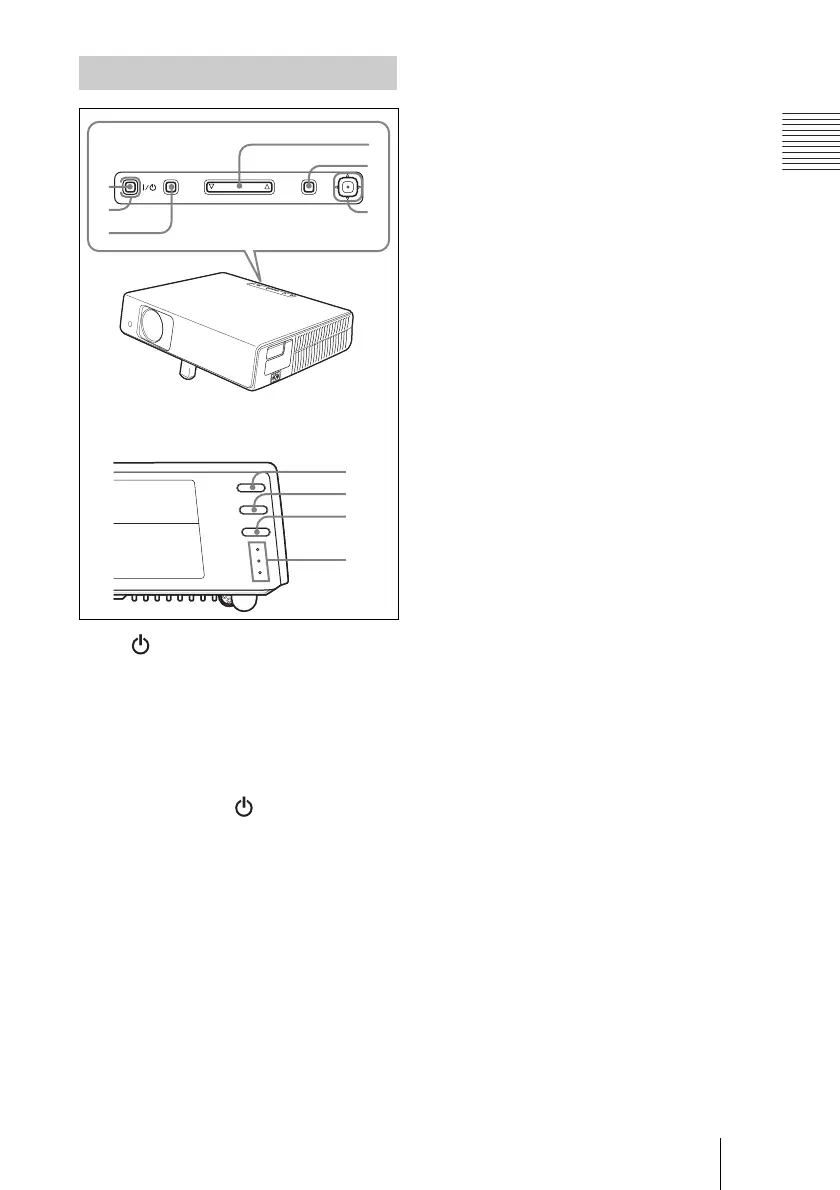
1 I / (on/standby) key
Turns on the projector when the
projector is in standby mode. The ON/
STANDBY indicator around the I / 1
key lights in green when the power is
turned on.
2 ON/STANDBY indicator (located
around the
I / key)
Lights up or flashes under the following
conditions:
– Lights in red when an AC power cord
is plugged into a wall outlet. Once in
standby mode, you can turn on the
projector with the I / 1 key.
– Lights in green when the power is
turned on.
– Flashes in green while the cooling fan
is running after the power is turned off
with the I / 1 key. The fan runs for
about 90 seconds after the power is
turned off.
For details, see page 21.
3 INPUT key
4 TILT adjustment key
For details, see “Projecting” on
page 18.
5 MENU key
Displays the on-screen menu. Press
again to clear the menu.
6 ENTER/Arrow(f/F/g/G) keys
Enter the settings of items in the menu
system.
Select the menu or make various
adjustments.
7 FOCUS +/– keys
Adjusts the picture focus.
8 ZOOM +/– keys
Adjusts the picture size.
9 SIDE SHOT +/– key
Adjusts the horizontal trapezoidal
distortion/H keystone correction of the
picture.
For details, see “Side Shot” on page 34
and ““Side Shot” and “V Keystone”
Adjustments” on page 50.
q; Indicators
• POWER SAVING
Lights when the projector is in power
saving mode.
• TEMP (Temperature)/FAN
Lights or flashes under the following
conditions:
– Lights when the temperature inside
the projector becomes unusually
high.
– Flashes when the fan is broken.
• LAMP/COVER
Lights or flashes under the following
conditions:
– Lights when the lamp has reached
the end of its life or reaches a high
temperature.
– Flashes when the lamp cover or air
filter cover is not secured firmly.
For details, see pages 43 and 44.
Control Panel
–
FOCUS
ZOOM
SIDE SHOT
POWER SAVING
TEMP/FAN
LAMP/COVER
+
–+
–+
MENUINPUT
TILT
PUSH
ENTER
1
4
5
6
2
3
7
8
9
0



 To Next Page