18 Projecting
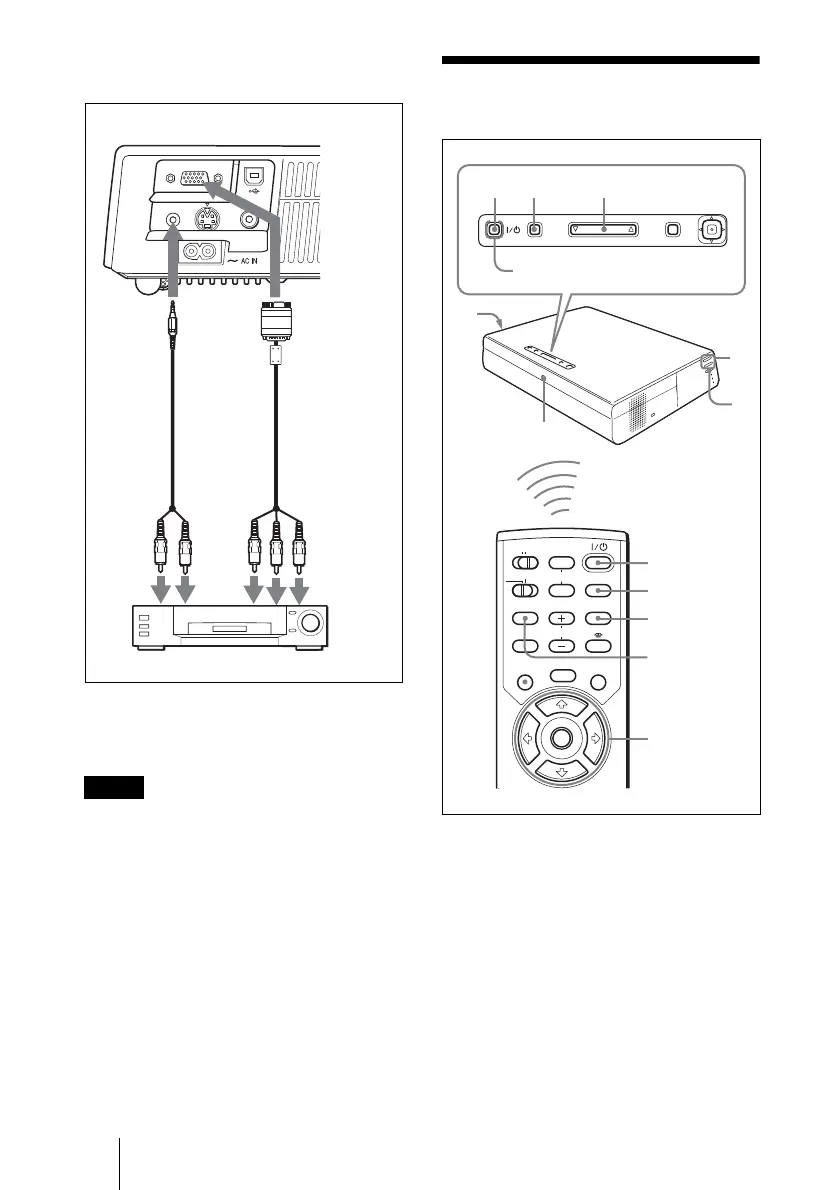
To connect to a video GBR/
Component output connector
1 SMF-402 Signal Cable (not supplied)
HD D-sub 15-pin (male) ↔ 3 × phono jack
2 Stereo audio connecting cable (not supplied)
(Use a no-resistance cable.)
• Set the aspect ratio using “Wide Mode” in
the INPUT SETTING menu according to the
input signal.
• When you connect the projector to a video
GBR output connector, select “Video GBR”
or when you connect the projector to a
component output connector, select
“Component” with the “Input-A Signal Sel.”
setting in the SET SETTING menu.
• Use the composite sync signal when you
input the external sync signal from video
GBR/component equipment.
Projecting
1 Plug the AC power cord into a wall
outlet, then connect all equipment.
The ON/STANDBY indicator lights in
red and the projector goes into standby
mode.
2 Press the I / 1 key.
The ON/STANDBY indicator lights in
green and the Advanced Intelligent
Auto-setup starts. The lens protector
opens, the powered tilt adjuster rises and
Notes
AUDIO S VIDEO
INPUT A
VIDEO
12
Left side
to
audio
output
(R)
VCR
to video
GBR/
component
output
to
audio
output
(L)
MENUINPUT
TILT
PUSH
ENTER
MUTING
PIC
AUDIO
LENS
APA
AIR SHOT
INPUT
TILT/KEYSTONE
PJ NETWORK
ON
COMMAND
OFF
VOLUME
MENU/
TAB
FREEZE
2
2
4
6,7
6,7,8
8
4
6
8
7
1
ON/STANDBY indicator
Rear remote
control detector



 To Next Page