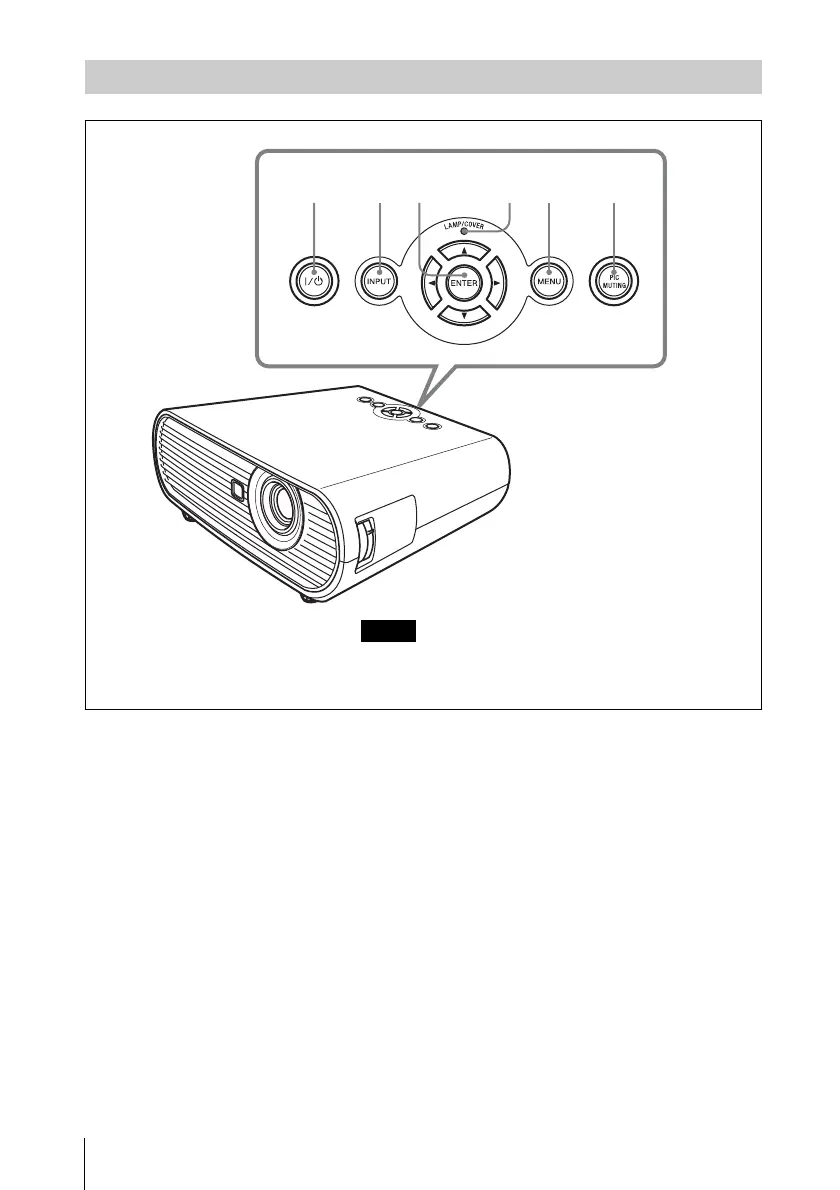
12
Location and Function of Controls
a ?/1 (On/Standby) key
Turns on the projector when the
projector is in standby mode. To turn off
the power, press the ?/1 key twice
according to the message or hold the ?/1
key for about one second.
Lights up or flashes under the following
conditions:
– Lights in red when the AC power cord
is plugged into a wall outlet. Once the
projector is in standby mode, you can
turn it on with the ?/1 key.
– Flashes in red when the temperature
becomes high inside the projector, or
when the projector fails to operate.
– Lights in green when the power is
turned on, and when it is ready to
operate.
– Flashes in green from the projector is
turned on until the projector is ready to
operate. Also, flashes in green while
the cooling fan is running after the
power is turned off with the ?/1 key.
The fan runs for about 90 seconds after
the power is turned off.
– Lights in orange when the power
saving mode is on.
For detail, see page 24.
b INPUT key
Selects an input signal. The input signal
will change whenever you press the key.
c ENTER/V/v/B/b (Arrow) keys
Used to enter the settings of items in the
menu system, select a menu, or make
various adjustments.
Control Panel
123 456
EX5U does not have the Control panel keys. Use the
Remote Commander for all operations.
Note




 To Next Page