LOUDNESS: Set the loudness on
or
off.
Rotate Volume knob on the front panel
or
press up/down arrow on the RC to select any items
and then press OK button on the panel
or
Enter button on the RC
to
confirm the item.
Rotate Volume knob
or
press LEFT/RIGHT buttons on the RC to adjust the audio setting. Press
OK
button on the panel
or
Enter button on the RC to confirm and again press SEL button return
to current mode.
Note:
{--
If
the unit is turned off, all the settings
of
each mode will be saved.
{--
If
cutting
off
battery power
or
resetting the unit, all the settings will return to factory default
settings.
{--
When EQ is set to any mode (except USER mode), Bass and Treble are not adjustable.
Mute function
Press POWER/MUTE button on the panel or MUTE button on the RC
to
turn the sound off. Press
it again to resume the volume.
Loudness
Press LOUD button on RC
or
long press the LOUD button on the front panel to set loudness or
off.
EQ
Short press the EQ button on the panel to choose sound effect in the sequence
of
FLAT-
CLASSIC-POP-ROCK-EO
OFF.
Menu
Press Menu button to show main menu. In DVD mode press and hold for two seconds to enter
title menu (Enable only if the DVD disc with title menu).
Setup
Press SETUP button on the RC
or
SETIING
icon on the main menu to
go
to setup pages.
1) Rotate Volume knob on the front panel
or
press up/down arrow on the RC to select any items
and then press OK button on the panel
or
Enter button on the RC
to
confirm the item
2) Rotate Volume knob
or
press LEFT/RIGHT buttons on the RC to adjust the audio setting.
Press
OK
button on the panel or Enter button on the RC to confirm.
3 ) Press SETUP button again return to current mode.
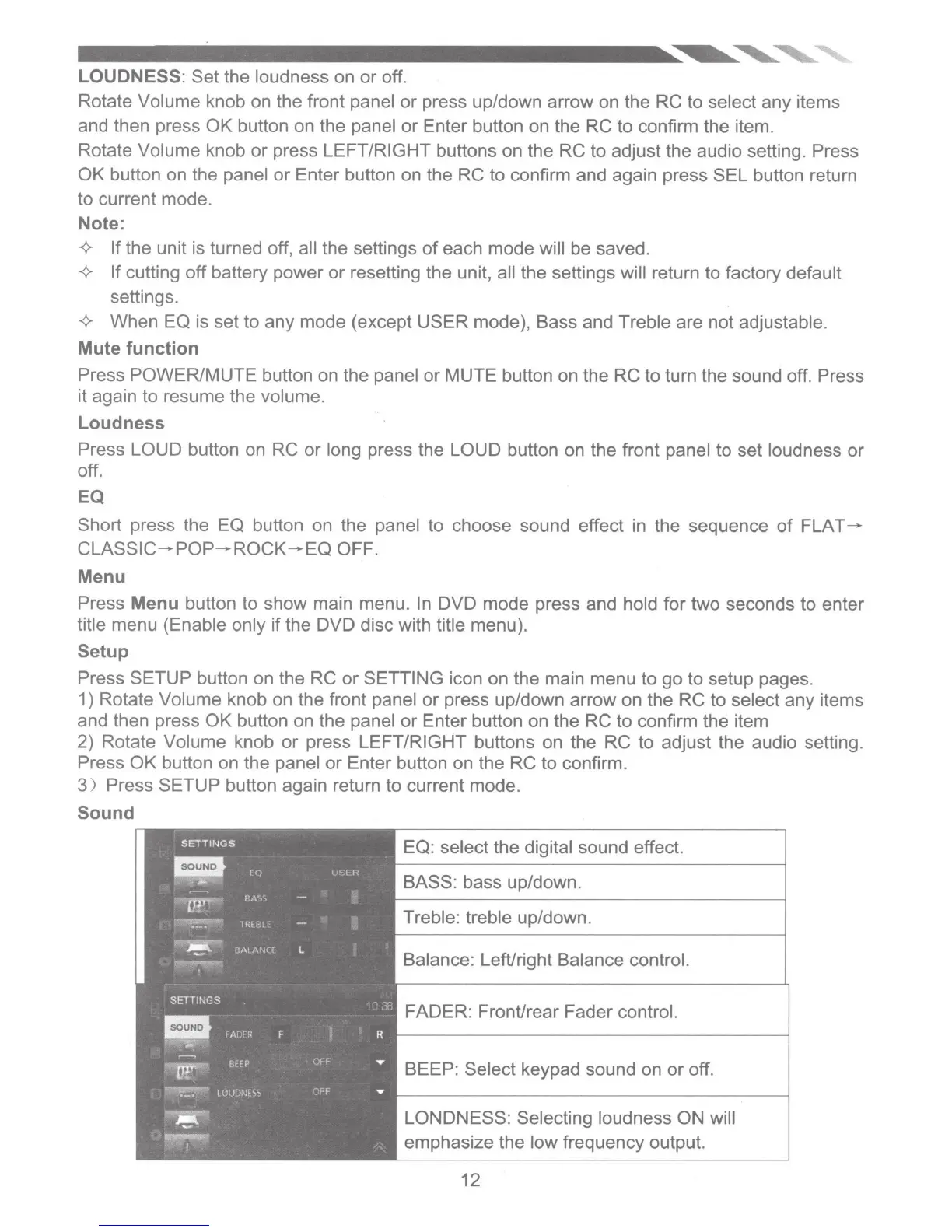
Sound
EQ: select the digital sound effect.
BASS: bass up/down.
Treble: treble up/down.
Balance: LefVright Balance control.
FADER: Front/rear Fader control.
BEEP: Select keypad sound on
or
off.
LONDNESS: Selecting loudness ON will
emphasize the low frequency output.
12













 To Next Page