------------
..
~
...............
~
~
'i%t
,,
~
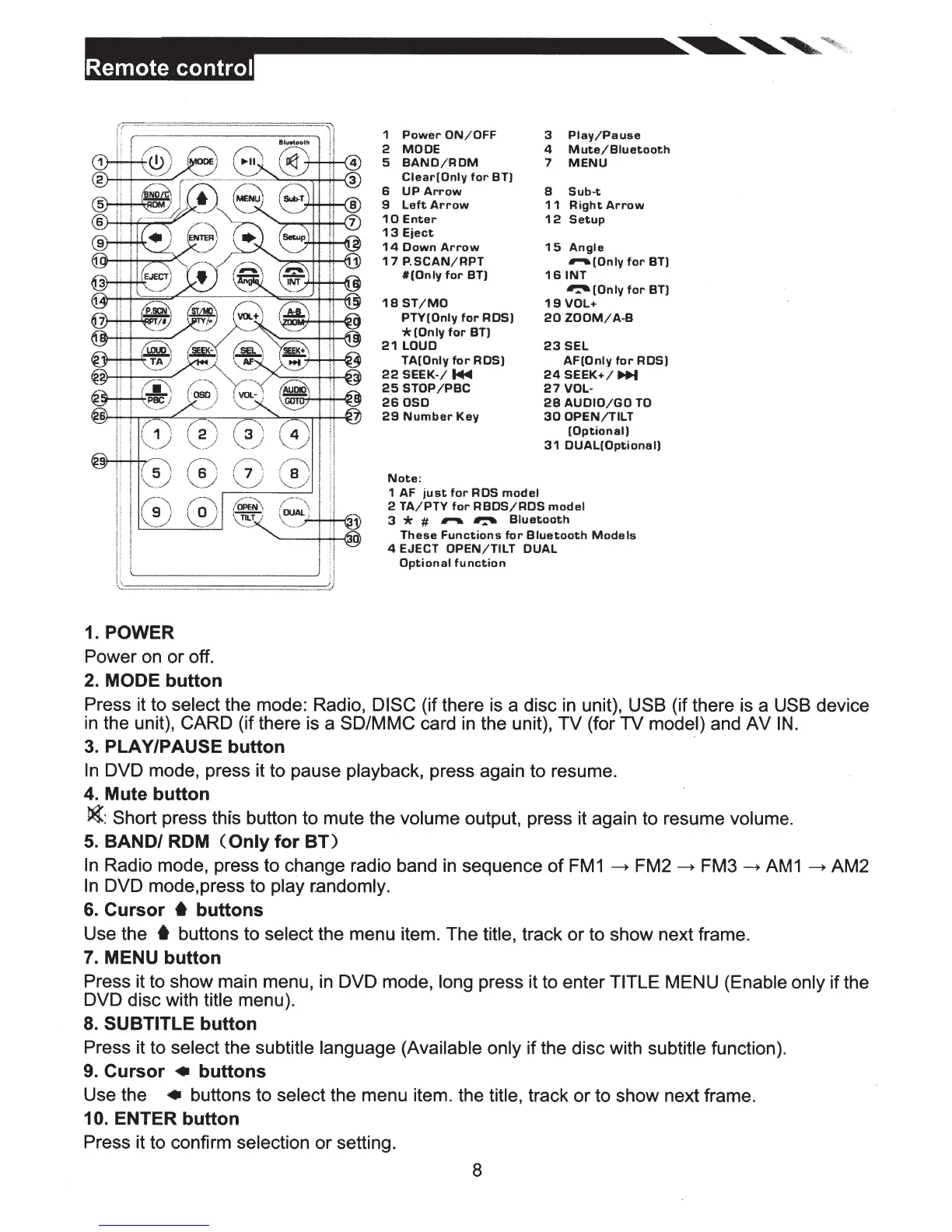
1.
POWER
Power on or off.
2.
MODE
button
1
Power
ON/OFF
2
MODE
5
BAND/ROM
Clear(Only
for
BT)
6
UP
Arrow
9
Left
Arrow
10
Enter
13
Eject
14
Down
Arrow
1 7
P.
SCAN/RPT
#(Only
for
BT)
18
ST/MO
PTY(Only
for
RDS)
*lOnly
for
BT)
21
LOUD
TA(Only
for
ROS)
22
SEEK-/
...
25
STOP/PBC
260SO
29
Number
Key
Note:
1 AF
just
for
RDS
model
3
Play/Pause
4
Mute/Biuetooth
7
MENU
8
Sub-t
11
Right
Arrow
12
Setup
15
Angle
,......(Only
for
BT)
16
INT
~(Only
for
BT)
19
VOL+
20
ZOOM/A-8
23SEL
AF(Only
for
RDS)
24SEEK+/
...
27
VOL-
28
AUDIO/GO
TO
30
OPEN/TILT
(Optional)
31
DUAL(Optional)
2
TA/PTY
for
RBDS/RDS
model
3
*
#
...,....
~
Bluetooth
These
Functions
for
Bluetooth
Models
4 EJECT
OPEN/TILT
DUAL
Optional
function
Press it to
select
the mode: Radio,
DISC
(if there is a disc
in
unit),
USB
(if there is a
USB
device
in
the unit),
CARD
(if there is a
SD/MMC
card
in
the unit), TV (for TV model) and
AV
IN.
3.
PLAY/PAUSE button
In
DVD mode, press it to pause
playback,
press again to resume.
4.
Mute button
~:Short
press this button to mute the
volume output, press it again to resume
volume.
5.
BAND/
ROM
(Only
for
BT)
In
Radio mode, press to change radio band
in
sequence
of
FM1
-----+
FM2-----+
FM3
~
AM1
~
AM2
In
DVD mode,press to play randomly.
6.
Cursor
6
buttons
Use the
t
buttons to
select
the menu item. The
title,
track or to show next frame.
7.
MENU button
Press it to show main menu,
in
DVD mode,
long press it to enter
TITLE
MENU
(Enable only
if the
DVD disc with
title menu).
8.
SUBTITLE
button
Press it to
select
the
subtitle language (Available only
if the disc with
subtitle
function).
9.
Cursor • buttons
Use the • buttons to select
the menu item. the
title,
track or to show
next frame.
10. ENTER button
Press it to confirm
selection or setting.
8













 To Next Page