EasyManua.ls Logo

Soundstream VR-74H2B - Setup Menu: Other & Calibration; Other Setup Options; Touch Calibration

Soundstream VR-74H2B
31 pages
Print Icon
To Next Page IconTo Next Page
To Previous Page IconTo Previous Page
Loading...
OTHER SETUP
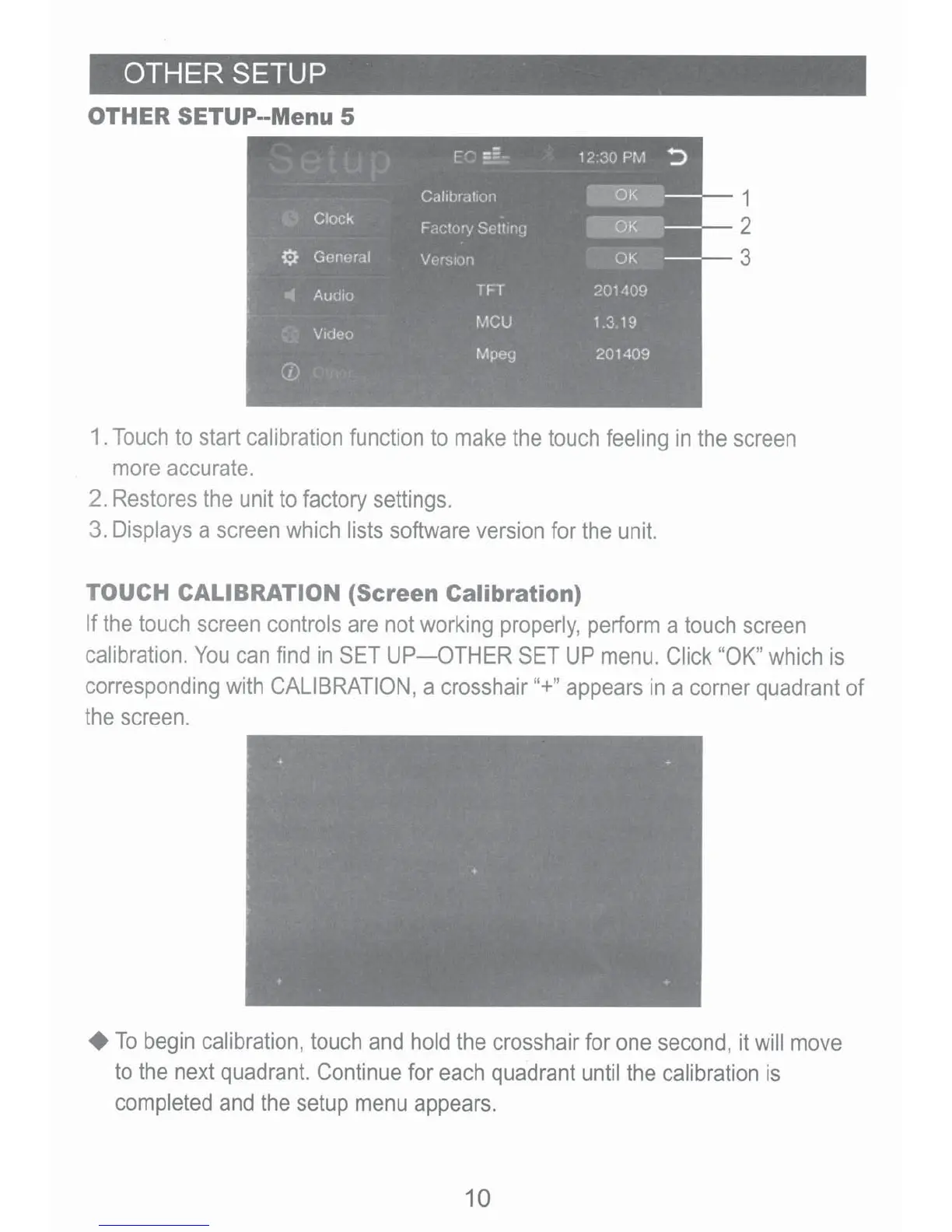
OTHER SETUP--Menu 5
1
2
3
1.
Touch
to
start
calibration
function
to
make
the
touch
feeling
in
the
screen
more
accurate.
2.
Restores
the
unit
to
factory
settings.
3.
Displays
a
screen
which
lists
software
version
for
the
unit.
TOUCH CALIBRATION
(Screen Calibration)
If
the
touch
screen
controls
are
not
working
properly,
perform
a
touch
screen
calibration.
You
can
find
in
SET
UP-OTHER
SET
UP
menu.
Click
"OK,
which
is
corresponding
with
CALIBRATION,
a
crosshair
"+,
appears
in
a
corner
quadrant
of
the
screen.
+To
begin
calibration,
touch
and
hold
the
crosshair
for
one
second,
it
will
move
to
the
next
quadrant.
Continue
for
each
quadrant
until
the
calibration
is
completed
and
the
setup
menu
appears.
10