RADIO OPERATION
RADIO OPERATION
2
3
5
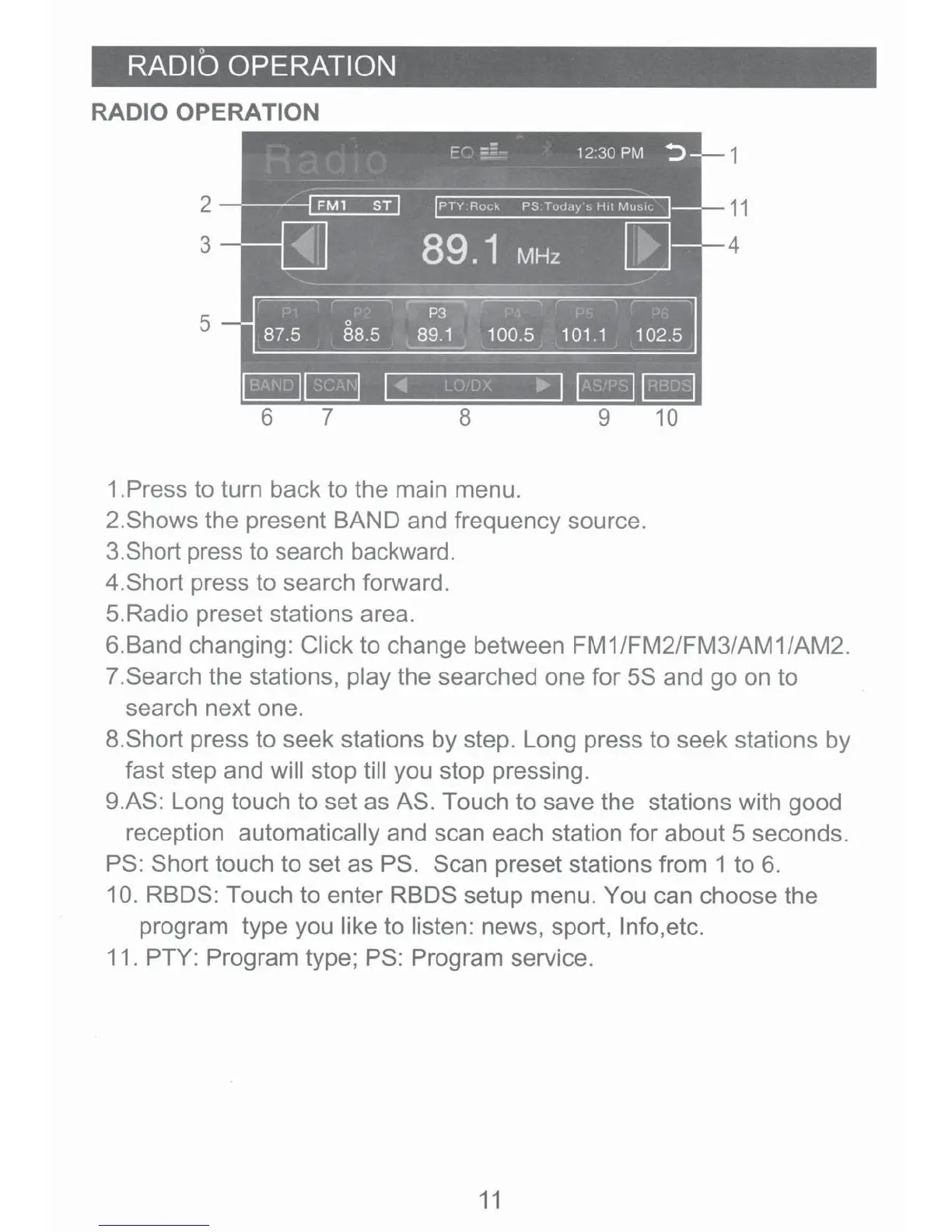
1.Press to turn back to the main menu.
2.Shows the present BAND and frequency source.
3.Short press
to
search backward.
4.Short press to search forward.
5.Radio preset stations area.
1
11
4
6.Band changing: Click to change between FM1/FM2/FM3/AM1/AM2.
7 .Search the stations, play the searched one for 5S and go on to
search next one.
8.Short press to seek stations by step. Long press to seek stations by
fast step and will stop till you stop pressing.
9.AS: Long touch to set as AS. Touch to save the stations with good
reception automatically and scan each station for about 5 seconds.
PS: Short touch to set
asPS.
Scan preset stations from 1 to
6.
10. RBDS: Touch to enter RBDS setup menu. You can choose the
program type you like to listen: news, sport, lnfo,etc.
11. PTY: Program type;
PS
: Program service.
11













 To Next Page