1 2
3
5
6
7
8
9
10
REMOTE CONTROL OPERATION
4
4
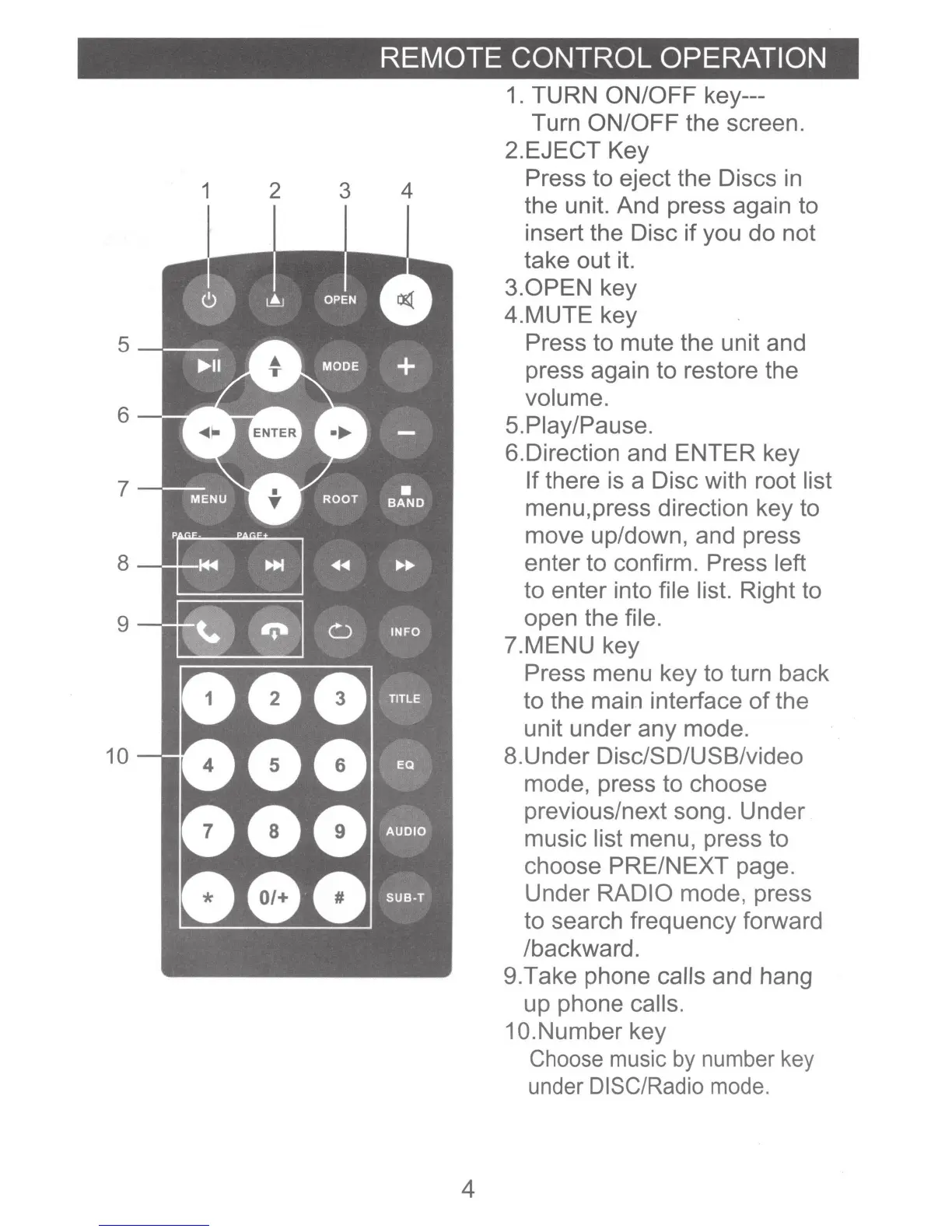
1.
TURN ON/OFF key---
Turn ON/OFF the screen.
2.EJECT Key
Press to eject the Discs
in
the unit. And press again to
insert the Disc
if
you do not
take out it.
3.0PEN
key
4.MUTE key
Press to mute the unit and
press again to restore the
volume.
5.Piay/Pause.
6.Direction and ENTER key
If there is a Disc with root list
menu,press direction key to
move up/down, and press
enter to confirm. Press left
to enter into file list. Right to
open the file.
?.MENU key
Press menu key to turn back
to the main interface
of
the
unit under any mode.
8.Under Disc/SD/USB/video
mode, press to choose
previous/next song. Under
music list menu, press to
choose PRE/NEXT page.
Under RADIO mode, press
to search frequency forward
/backward.
9.Take phone calls and hang
up phone calls.
1 O.Number key
Choose
music
by
number
key
under
DISC/Radio
mode.













 To Next Page