EasyManua.ls Logo

Soundstream VR-74H2B - Page 7

Soundstream VR-74H2B
31 pages
Print Icon
To Next Page IconTo Next Page
To Previous Page IconTo Previous Page
Loading...
REMOTE CONTROL OPERATION
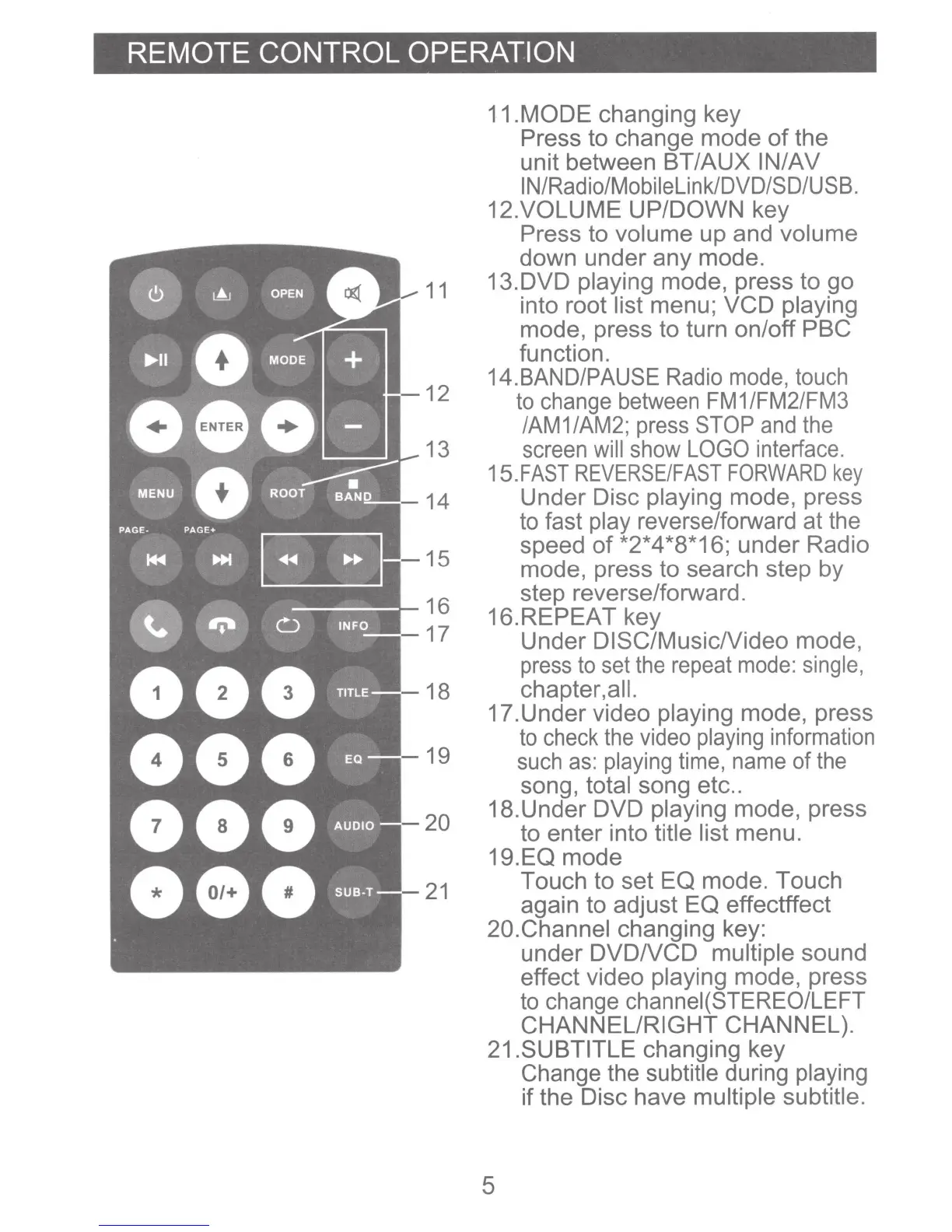
11
12
13
14
15
16
17
18
19
20
21
11.MODE changing key
Press
to
change mode
of
the
unit between
BT/AUX
IN/AV
IN/Radio/Mobilelink/DVD/SD/USB.
12.VOLUME UP/DOWN key
Press to
volume
up and
volume
down under
any
mode.
13.DVD playing
mode, press to
go
into root
list
menu;
VCD
playing
mode, press to turn on/off PBC
function.
14.BAND/PAUSE
Radio
mode,
touch
to
change between
FM
1 /FM2/FM3
/AM1/AM2; press STOP
and
the
screen
will show
LOGO
interface.
15.FAST
REVERSE/FAST
FORWARD
key
Under
Disc
playing
mode, press
to fast
play
reverse/forward at the
speed
of
*2*4 *8*16; under Radio
mode, press
to
search step by
step reverse/forward.
16.REPEAT key
Under
DISC/MusicNideo
mode,
press
to
set
the
repeat
mode:
single,
chapter,all.
17.Under video
playing
mode, press
to
check
the
video
playing
information
such
as:
playing
time,
name
of
the
song,
total
song etc
..
18.Under DVD
playing
mode, press
to enter into title list
menu.
19.EQ mode
Touch to set
EQ
mode. Touch
again
to
adjust
EQ
effectffect
20.Channel
changing key:
under
DVDNCD
multiple
sound
effect video
playing
mode, press
to
change channei(STEREO/LEFT
CHANNEL/RIGHT
CHANNEL).
21.SUBTITLE
changing key
Change the
subtitle
during
playing
if
the Disc have multiple subtitle.
5

Related product manuals