EasyManua.ls Logo

Soundstream VR-74H2B - Panel Picture Function

Soundstream VR-74H2B
31 pages
Print Icon
To Next Page IconTo Next Page
To Previous Page IconTo Previous Page
Loading...
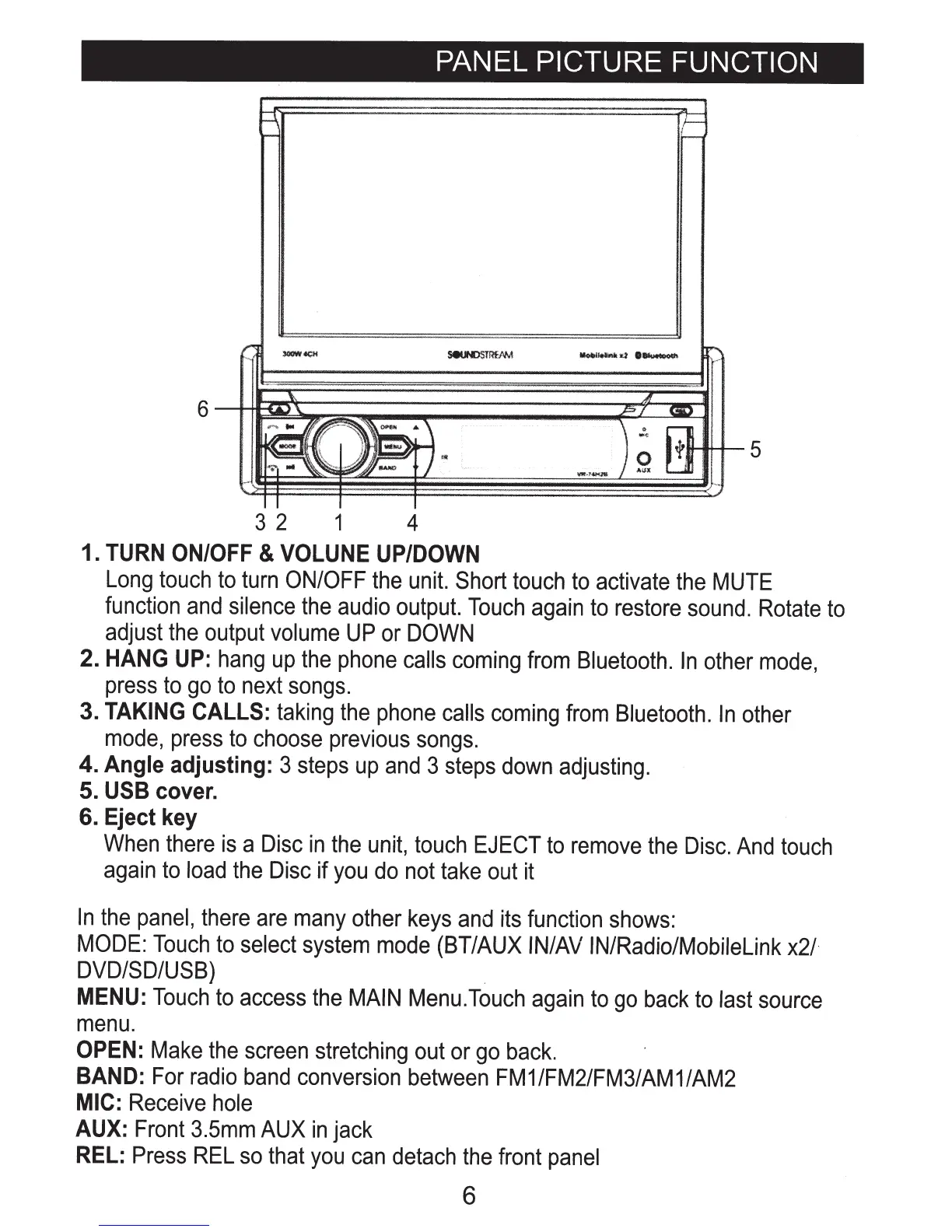
PANEL
PICTURE FUNCTION
3 2 1 4
1.
TURN
ON/OFF
&
VOLUNE
UP/DOWN
Long
touch
to
turn
ON/OFF
the
unit.
Short
touch
to
activate
the
MUTE
function
and
silence
the
audio
output.
Touch
again
to
restore
sound.
Rotate
to
adjust
the
output
volume
UP
or
DOWN
2.
HANG
UP:
hang
up
the
phone
calls
coming
from
Bluetooth.
In
other
mode,
press
to
go
to
next
songs.
3.
TAKING
CALLS:
taking
the
phone
calls
coming
from
Bluetooth.
In
other
mode,
press
to
choose
previous
songs.
4. Angle
adjusting:
3
steps
up
and
3
steps
down
adjusting.
5.
USB
cover.
6. Eject key
When
there
is
a
Disc
in
the
unit,
touch
EJECT
to
remove
the
Disc.
And
touch
again
to
load
the
Disc
if
you
do
not
take
out
it
In
the
panel,
there
are
many
other
keys
and
its
function
shows:
MODE:
Touch
to
select
system
mode
(BT/AUX
IN/AV
IN/Radio/Mobilelink
x2/-
DVD/SD/USB)
MENU:
Touch
to
access
the
MAIN
Menu.Touch
again
to
go
back
to
last
source
menu.
OPEN:
Make
the
screen
stretching
out
or
go
back.
BAND:
For
radio
band
conversion
between
FM1/FM2/FM3/AM1/AM2
MIC:
Receive
hole
AUX:
Front
3.5mm
AUX
in
jack
REL:
Press
REL
so
that
you
can
detach
the
front
panel
6

Related product manuals