10
CALIBRATING THE DIGITAL PROTRACTOR
Refer to the “Identification” section of this manual.
ZERO AND SPRING BACK SET UP
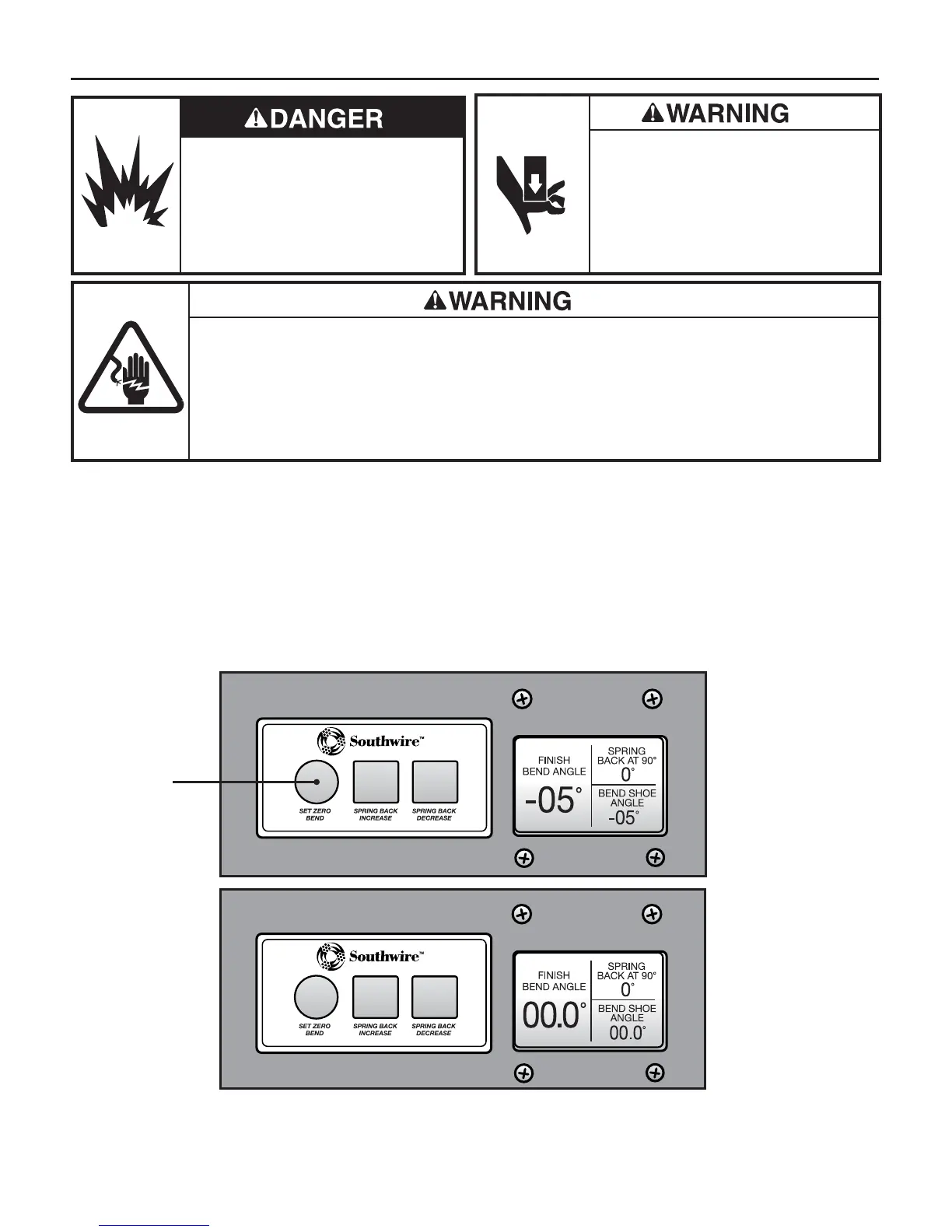
1. To Zero the Digital Protractor place yellow “Arrow” on bending shoe
to zero on the analog protractor and press the “SET ZERO BEND”
soft key on set up panel (4) as shown in (Figs. 6 and 7).
2. To set spring back, start at 4 degrees of spring back.
Minor adjustments can be made after a test bend has been made.
Fig. 7
Fig. 6
Press
OPERATION
Do not use this tool in a hazardous
environment. Hazards include flammable
liquids, gases, or other materials. Using
this tool in a hazardous environment can
result in a fire or explosion.
Failure to observe this warning could
result in severe injury or death.
Pinch points:
• Keep hands away from bending shoe,
rollers, and conduit when bender is in use.
• Support conduit when unloading.
Conduit can become loose and fall if
not properly supported.
Failure to observe these warnings could
result in severe injury or death.
Electrical Shock Hazard:
• Inspect the power cord before use. Repair or replace the cord if damaged.
• Connect the power cord to a 120 volt, 20 amp receptacle on a ground fault protected circuit only.
Refer to “Grounding Instructions.”
• Do not modify the power cord or plug.
• Disconnect the unit from power before servicing.
Failure to observe this warning could result in severe injury or death.


 To Next Page