SOYAL
ACCESS CONTROL SYSTEM
®
AR-725-E
V220916
- 7 -
2
4
5
3
1
Firmware Upgrade
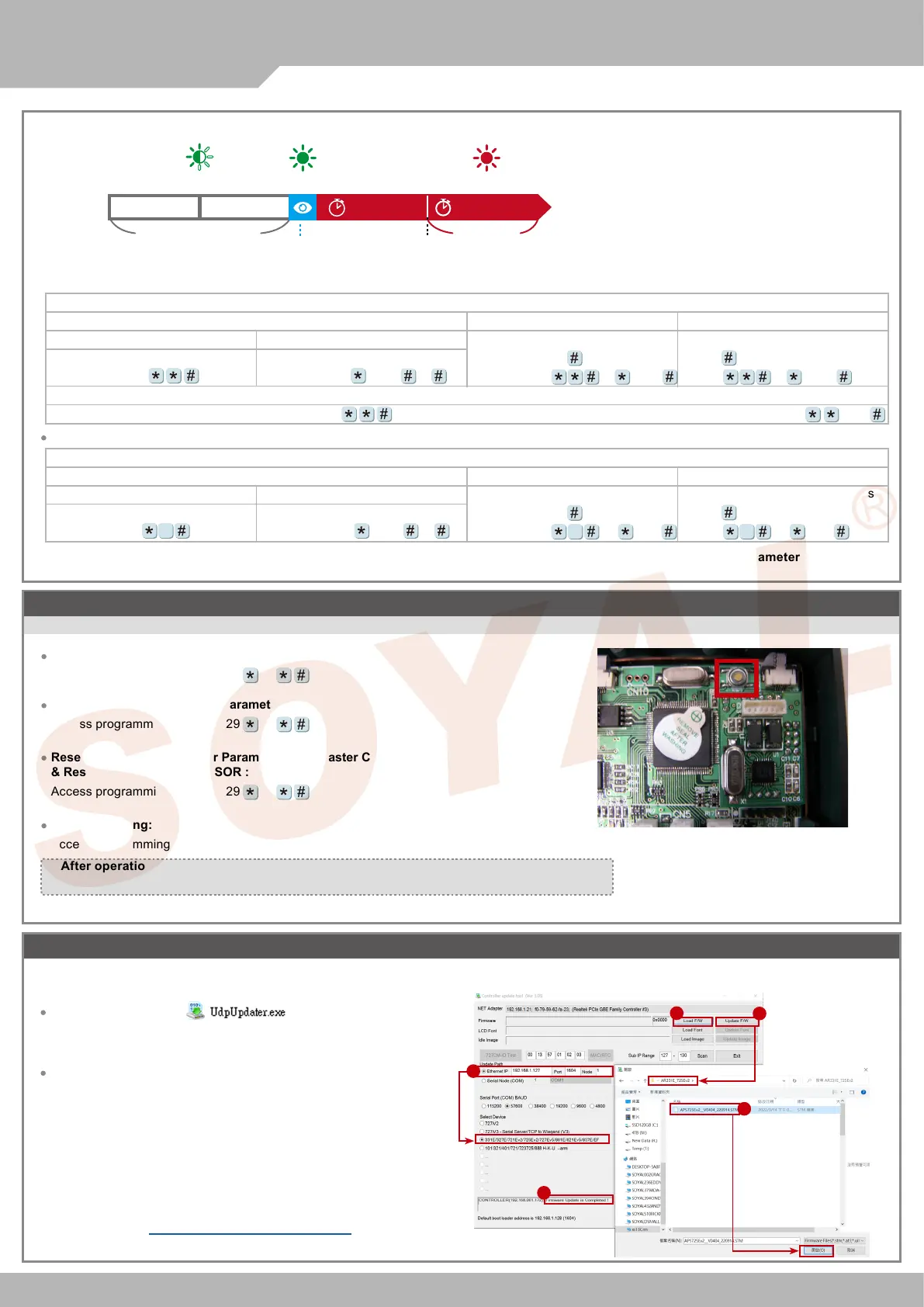
Get the upgrade software from SOYAL or our distributor and run “UdpUpdater” software
Update the rmware
[Please login the SOYAL web to download the new ISP Firmware.]
1. Input the Target Address and Port
2. [Load F/W] open the documents that have the new ISP Firmware
3. Click the new ISP Firmware and [Open] it
4. Click [Update Device] to start the rmware update
5. Till the screen shown [Firmware Update is Complete]
Execute the software
The software is Login the SOYAL web to downloads
Restoring Factory Settings
Reset all device parameters and user card data
Reset User Data &Controller Parameter :
Access programming mode
→
29
20
Reset User Data &Controller Parameter (incl. Master Code)
& Reset Parameter Setting- SOR :
Access programming mode
→
29
21
Reset IP Setting:
Access programming mode
→
Press “IP Resent Button” of main board for few seconds. (Reference to picture)
Reset User Data :
Access programming mode
→
29
29
Enable all devices: Access programming mode
→
Enable particular device: Access programming mode
→
0 or 1
Disable Arming status:
Standby Mode
Standby Mode
Enter Program Mode
Card only
Card only
Card or Passcode
Card or Passcode
Card and Passcode
Card and Passcode
※
Factory default armingcode is: 1234. 0 or 1=Reader unit (0=Main Controller Parameter Setting,1=WG Input Port Parameter Setting ).
Enable all devices
Induct valid card
→
Input 4 digit
arming code
→
Enable particular device
Induct valid card
→
Input 4 digit
arming code
→
0 or 1 or
Disable particular device
Induct valid card
→
Input 4 digit
arming code
→
0 or 1 or
Input 5 digit user address
→
Input 4
digit pass code
→ →
Input 4 digits
arming code
→
or
0 or 1
Induct valid card
→
Input 4 digit pass
code
→
→
Input 4 digits arming
code
→
or
0 or 1
Disable all devices
Induct valid card
→
Input 4 digit
arming code
→
9
Input 5 digit user address
→
Input 4
digit pass code
→ →
Input 4 digits
arming code
→
or 0 or 1
9
Induct valid card
→
Input 4 digit pass
code
→
→
Input 4 digits arming
code
→
or 0 or 1
9
※
After operation as above, you will hear the long reminder sound,and wait until the
sound disappear then reset the power of the controller,the device will restore factory setting.
2.
Abnormal Opening
Enable
Arming Status
Alarm Trigger
Green Led Flash Quickly Red Led Flash Quickly
Green Led Flash
Arming Delay TMEnable Arming
Standby Mode
(Arming is not enable)
Alarm Relay TM
Alarm Delay TM
Alarm trigger
※
More Details
:
Software Manual - UDP UPDATER


 To Next Page