C. Simple Programming
Simpleprogrammingassignsasinglecodetoabutton.
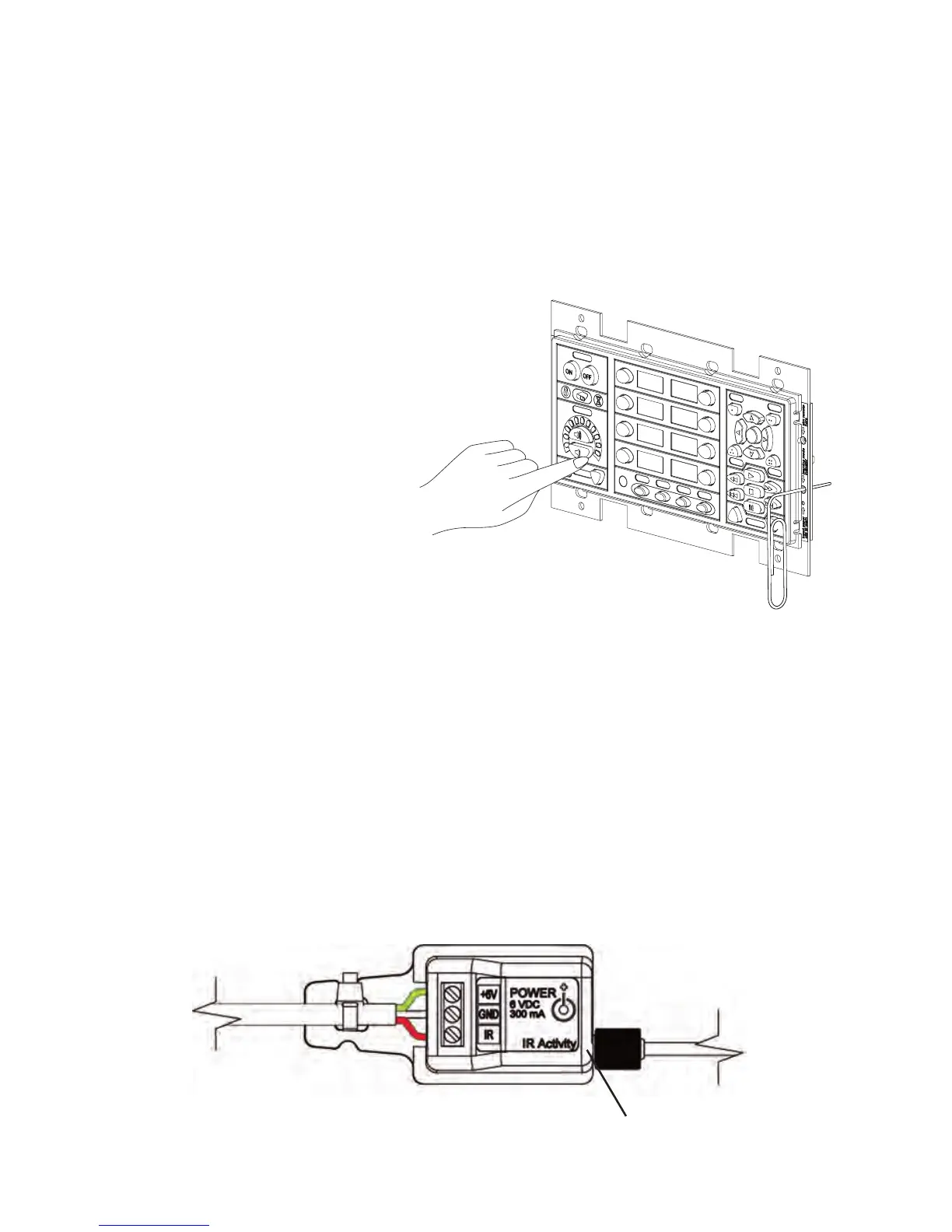
1. Press a Button on the PixiePro: Pressthebuttonyouwanttoprogramasingletimetoarmit
forSimpleLearning.Itshouldbeeponce,andthebuttonwillslowlyblinktoindicatethatitisready.
Note:Ifthebuttonbeepstwice,youhaveaccidentallyarmedthebuttonforComplexLearning.
PressanyotherbuttontobringthebuttonoutofComplexLearning,andthenrearmthebuttonfor
SimpleLearning.
2. Aim the Remote Control at the IR Window: Positiontheremotecontrolinthesweetspotyou
previouslyidentified.
3. Zap the PixiePro: Pressandhold
theremotecontrolbutton for approxi-
mately one second.Youshouldsee
theLearningModeIndicatorLEDflicker,
indicatingthatthecodeisbeing
received.ThePixieProwillbeepthree
timesquicklytoindicatesuccessful
learning.
Armingwilltimeoutinapproximately30
secondsifnoIRcodeisreceived.
Youmayselectadifferentbuttonfor
learningatanytime,includingbuttons
thathavealreadybeenlearned.Ifyou
re-pressabuttonthathasbeenarmed
forlearning,itwillbedisarmed.
IfthePixieProbelievesitsuccessfullylearnedthecode,thebuttonwillbeginflashingquicklytoindi-
cateitisinVerificationMode.
4. Verify the IR Code was Learned Correctly: Immediatelyafterlearning,eachbuttonwillblink
rapidlytoindicatethatitisreadyforverification.Pressingthatbuttonwilltransmitthecodeasitwas
learned.IftheIRemitterhasbeenproperlyplacedonthedevice,youmaytestthatthelearned
codewillcorrectlycontrolthatdevice.
Note:TheIRbudwillnotilluminatewhilesendingcodes,butanLEDontheplasticassembly
labeled IR Activity willglowvisiblyuponinspection.
Tore-learnabuttonthatdidnotseemtolearncorrectly,simplypressanyotherbuttononthebutton
pad,thenpressthetargetagaintore-armit.
Figure 11: Armbuttonforlearning
10
IRActivityLED
Figure 12: Close-upviewofIRemitter


 To Next Page