VI. Programming
A. Overview
ThePixieProcontrolsdevicesbylearningandduplicatingtheIRcodesoftheirremotecontrols.
Eachbuttonmayprogrammedwitheitherasinglecode(seeSimple Programming onpage10)or
asmanyas16codeswithaconfigurabledelaybetweeneach(seeComplex Programming onpage
11).
Eachbuttonmaybeconfiguredtosend:
-onesinglecode
-multiplecodesin“roundrobin”(alternatingcodessentonsubsequentbuttonpresses)
-multiplecodessentwithasinglebuttonpress(macros)
-multiplegroupsofcodessentroundrobin(“roundrobin”macros)
B. Programming Setup
1. Power the PixiePro: Whilepowered,theLED
backlightswillilluminate.
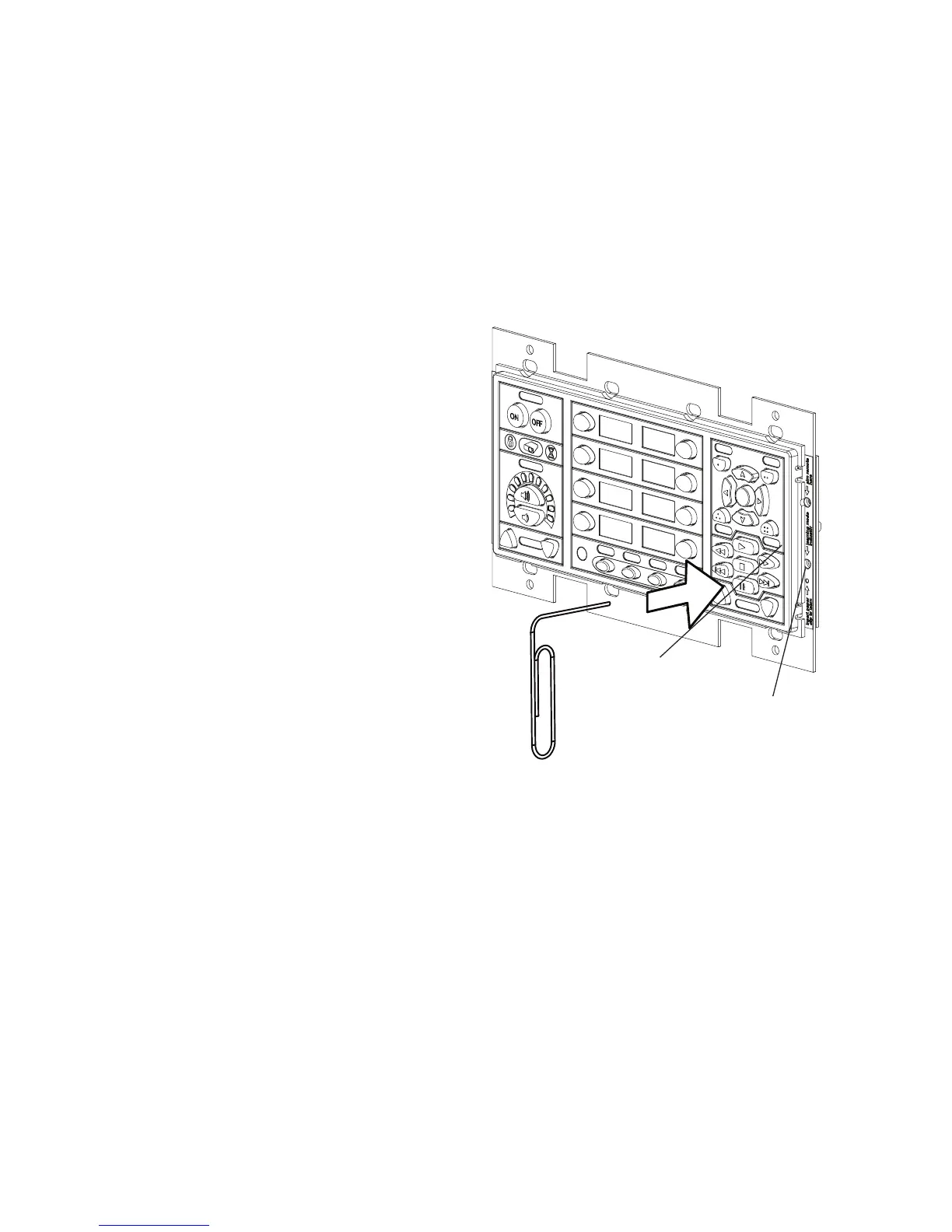
2. Enter Learning Mode: TosetthePixieProto
learningmode,gentlyinsertapaperclipintothe
smallholelabeledinsert paper clip to learn.
TheLearningModeindicatorLEDwillblinkred
whilethePixieProisinlearningmode.
Caution: Begentlewiththepapercliptoensure
thatyoudonotdamagetheswitchmechanism.
Somelighting,especiallyfluorescentlightand
sunlight,caninterferewiththeabilityofthe
PixieProtolearn.Iftheroomistoobrightforpro-
gramming,theLearningModeIndicatorwillillumi-
natesolidred,thebuttonswillbeepassoonas
theyarepressed,andtheywillnotarmforlearn-
ing.Shouldthisoccur,shieldthePixieProfrom
theambientlightwhilelearning.
Note:BesurenottodepressanybuttonswhileinsertingthepapercliporthePixieProwillenter
ConfigurationMode.YouwillknowitisinConfigurationModeifitbeginsclicking.
3. Test Remote and Identify Sweet Spot: Beforetryingtolearnanybuttons,positionyourremote
controlafewinchesfromtheIRlearningeye.Whenyoupressabuttonontheremote,youshould
seethePixieProLearningModeIndicatorLEDflicker.Noticethatasyoumovetheremotecloser
andfartherawayfromthereceiverwindow,orasyoumove"offaxis"(awayfromperpendicularto
thereceiverwindow)thebrightnessoftheredflasheswillfalloffandbecomeintermittent.Identifya
positionthatseemstoconsistentlyyieldclear,regularblinkingoftheredLearningModeIndicator
LED.Thisisthe"sweetspot"mostlikelytoprovidethecleansignalthatthePixieProneedstolearn.
IfyoudoNOTseetheLearningModeIndicatorLEDflickerrapidly,yourremotemayneednewbat-
teries,ormaybebeamingsomethingbesidesIR.
4. Learn IR Codes: ToprogramabuttonwithasingleIR code,seeSimple Programming onpage
10.Toprogramabuttonwithmultiplecodes,seeComplex Programming onpage11.
Insertpapercliptoenter
learningmode
9
LearningMode
Aperture
StatusLED
Figure 10: Enteringlearningmode


 To Next Page