VIII. Configuration
Overview
ConfigurationModeisusedtochangethevarioussettingsonthePixieProthatcontrolitsbehavior.
ToputthePixieProintoConfigurationMode,pressandholdanybuttonwhileinsertingthepaperclip
intotheprogrammingaperture.ThePixieProLearningModeIndicatorLEDwillflashandtheunitwill
emitaregularclickingsoundtoindicateithasenteredConfigurationMode.
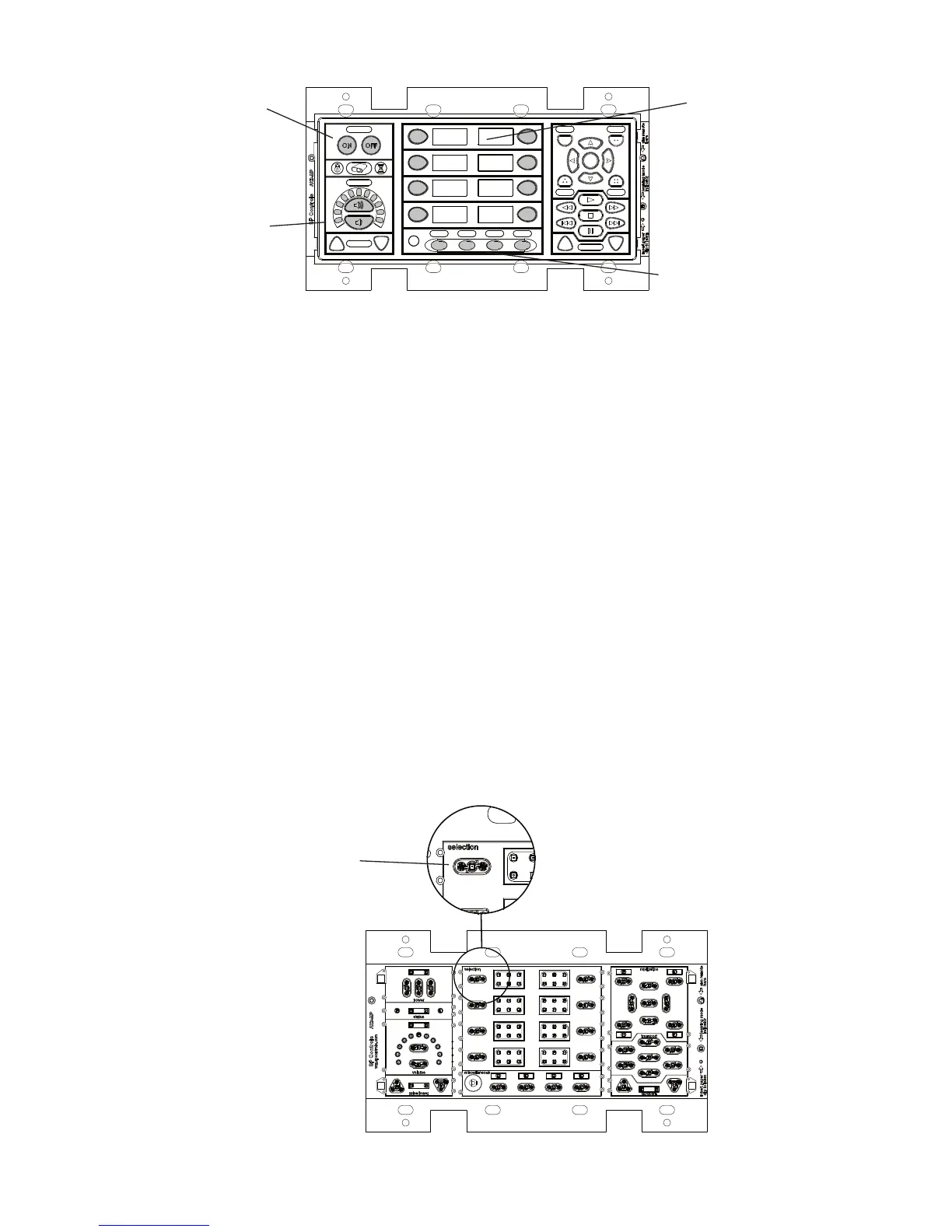
OnceinConfigurationMode,usethePixieProinterfacetonavigatethroughtheconfigurationset-
tings.TheAuxbuttonsareusedtosettheconfigurationgroup.Sourcebuttons1-8areusedto
selectthesettingyouwishtoadjustwithinthecurrentgroup.Volumebuttonsareusedtoselectthe
desiredvalueforagivensetting,withthevolumedisplayprovidingfeedback.Powerbuttonsare
usedtoconfirmselections.
TheVolumeControl/Displaymodule,allfourAuxbuttonmodules,andatleastsevenSourcebuttons
arerequired tofullyconfigurethePixiePro.Besuretoincludethesemodulesuntiltheunitisconfig-
ured.Afterconfiguration,theymaybereplacedwithblanks.Youmayclonesettingsfroman
already-configuredunitwithoutincludingthesemodules.
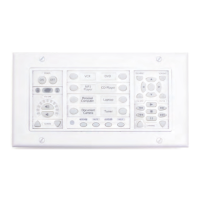
Inanemergencywherethebuttonmodulesareunavailable,youmaysimulatebuttonpressesby
removingtheblanksandcarefullyprobingthebuttonkeywithscrewdriverorthinmetalobject.
Powerbuttonsare
usedasan Enter key
inconfigurationmode
UseSource1-8
toselect Setting
AuxButtons1-4
selectConfiguration
Group
VolumeControland
Displayusedtoset
Levels
Ifthebuttonmodulesareunavail-
able,gentlytouchthesecontact
pointswithafinemetalimplement
tosimulateabuttonpress.
19
Figure 15: ConfiguringthePixiePro
Figure 16: Simulatingabuttonpresswhenbuttonmoduleisunavailable


 To Next Page