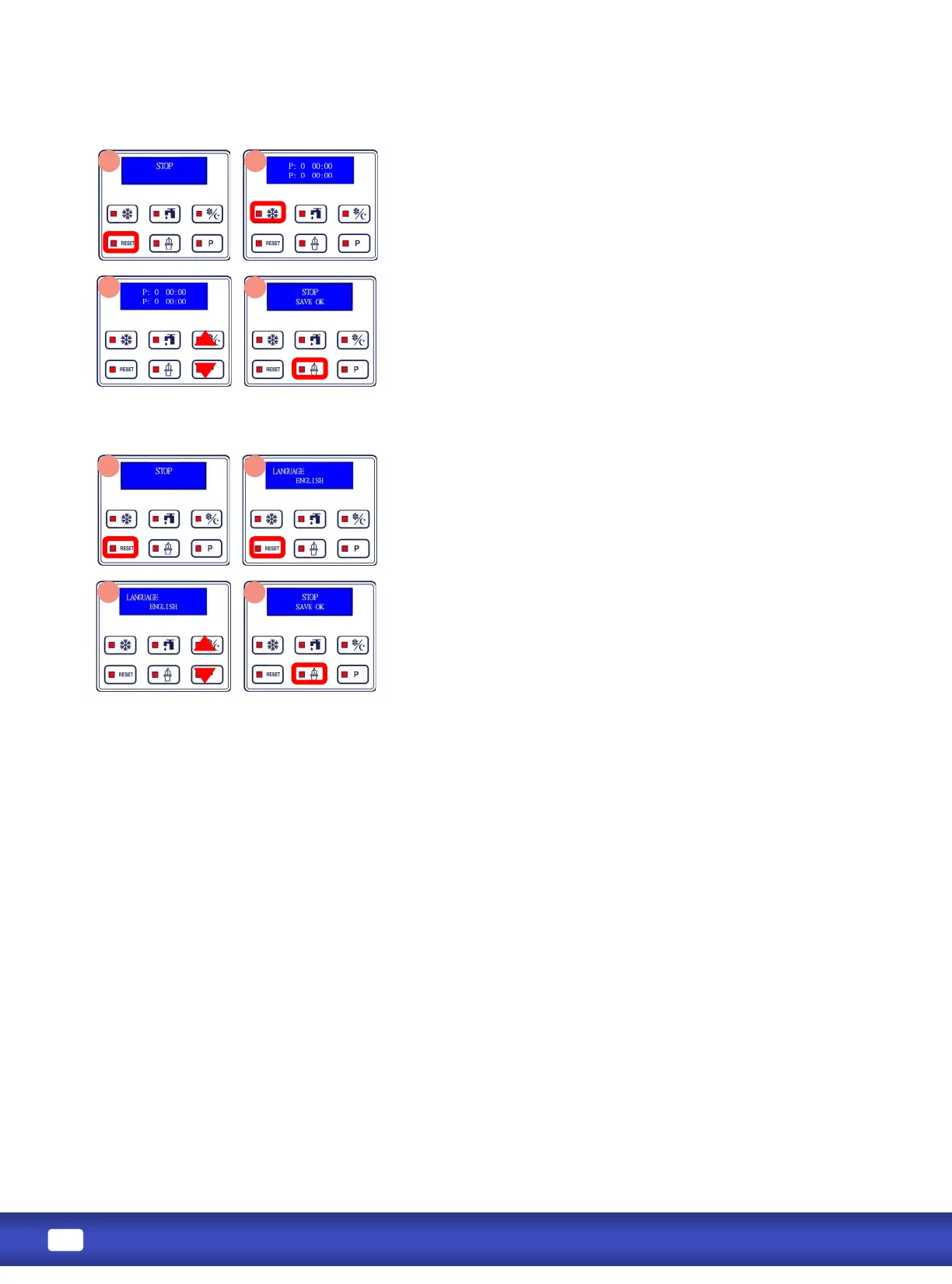
1. Press RESET to stop all machine funcons. Press and hold RESET
unl display shows sengs. Press RESET to reach the Auto
Programming seng. If you scroll past the Automac Mode
Programming seng, connue pressing RESET unl it comes back
around.
2. Press FREEZE to toggle cursor between elds. Once highlighted, a
eld can be changed.
3. Press STANDBY to increase highlighted number.
Press P to decrease highlighted number.
4. Press and hold ICE CREAM buon for 3 seconds to save changes.
1. Press RESET to stop machine funcons. Press and hold RESET unl
display shows sengs.
2. Press RESET to reach the Language seng. If you scroll past the
Language seng, connue pressing RESET unl it comes back
around.
3. Press STANDBY and P buon to change the language.
4. Press and hold ICE CREAM buon for 3 seconds to save changes.



 To Next Page