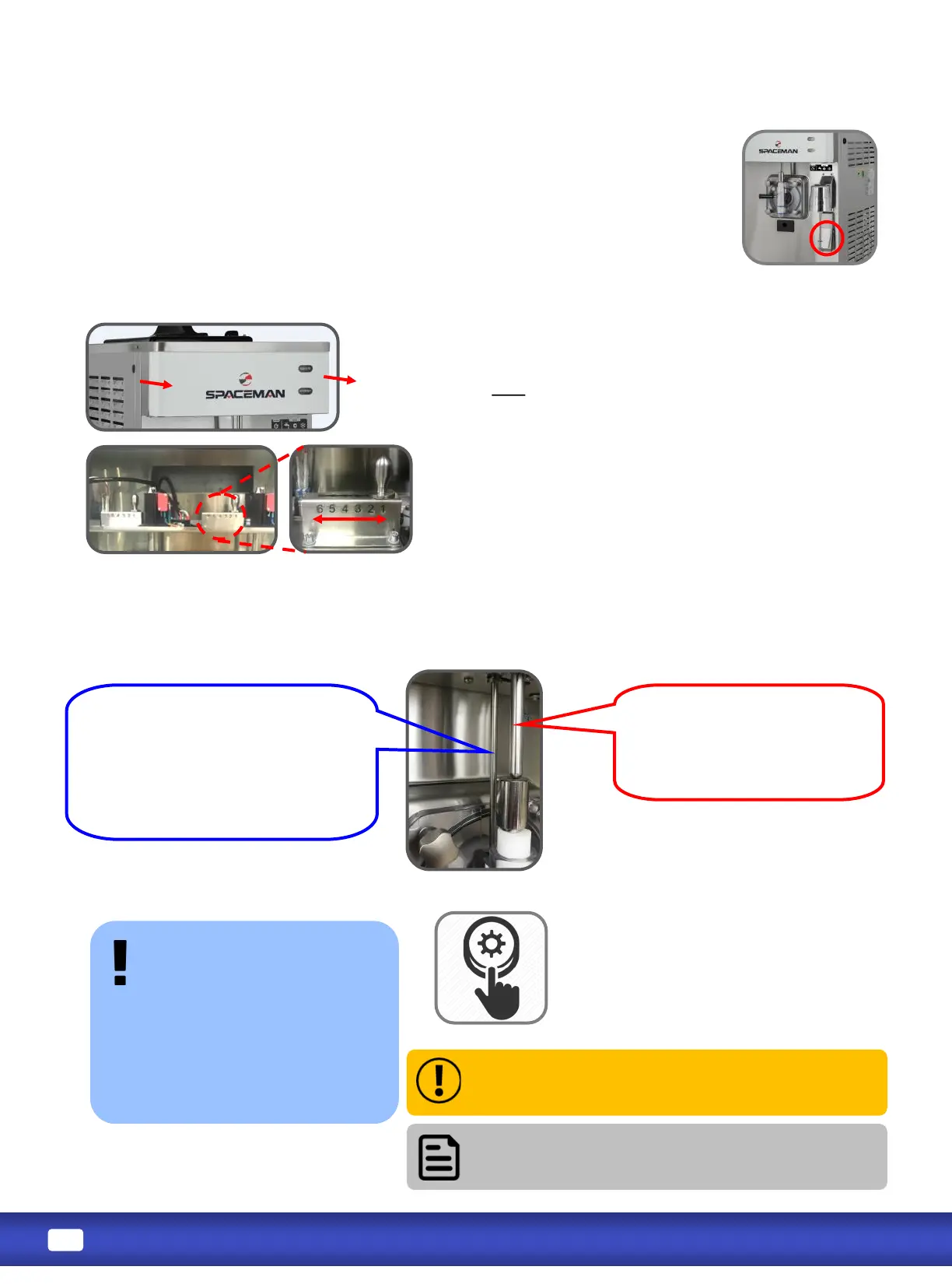
Located directly above the draw valve, this arm tells the machine when product is being dispensed
and how rm the product is. Beater and cooling systems are turned on and o based on
informaon from the sensor arms.
The viscosity adjustment, located behind the faceplate,
controls the rmness of dispensed product. The higher the
viscosity, the more rm the product. Viscosity sengs
should NOT need connuous adjustment.
Take o the faceplate. Viscosity is from Soer to Harder
from level 1 - 6. Make small adjustments each me, and
allow at least 10 to 15 minutes between adjustments to
evaluate product rmness.
Arm moves up and down and
tells machine when product is
being dispensed.
It moves UP when draw handle
is in the OPEN posion.
Flat arm moves le and right and
tells machine when product is at
desired consistency.
Switched RIGHT means consistency
is correct. Switched LEFT or IN THE
MIDDLE means consistency is not
yet correct.
If machine doesn’t turn on, turn power switch
OFF, wait 30 minutes, and repeat steps 1 to 4. If
problem persists, contact service team.
If machine makes any abnormal noise
during reset, immediately turn power switch OFF
and contact service team.
-(usually
because the viscosity is set too
high for the selected product to
prevent motor damage.
Use the green reset buon on
the machine’s back panel to
return the machine to normal
operaon.
1. Turn power switch to OFF.
2. Firmly press green reset buon.
3. Wait 15 to 20 minutes.
4. Turn power switch to WASH.
5. Observe machine performance.
Spinner operaon is controlled by the paddle switch on lower poron of the
spinner mount.
The paddle switch is designed for one-hand operaon. Hold cup up towards
the spindle while pressing in the paddle switch with the same hand. Spinner
will turn on and stay on. Spinner will stop as soon as paddle switch is released.


 To Next Page