INTRODUCTION 9
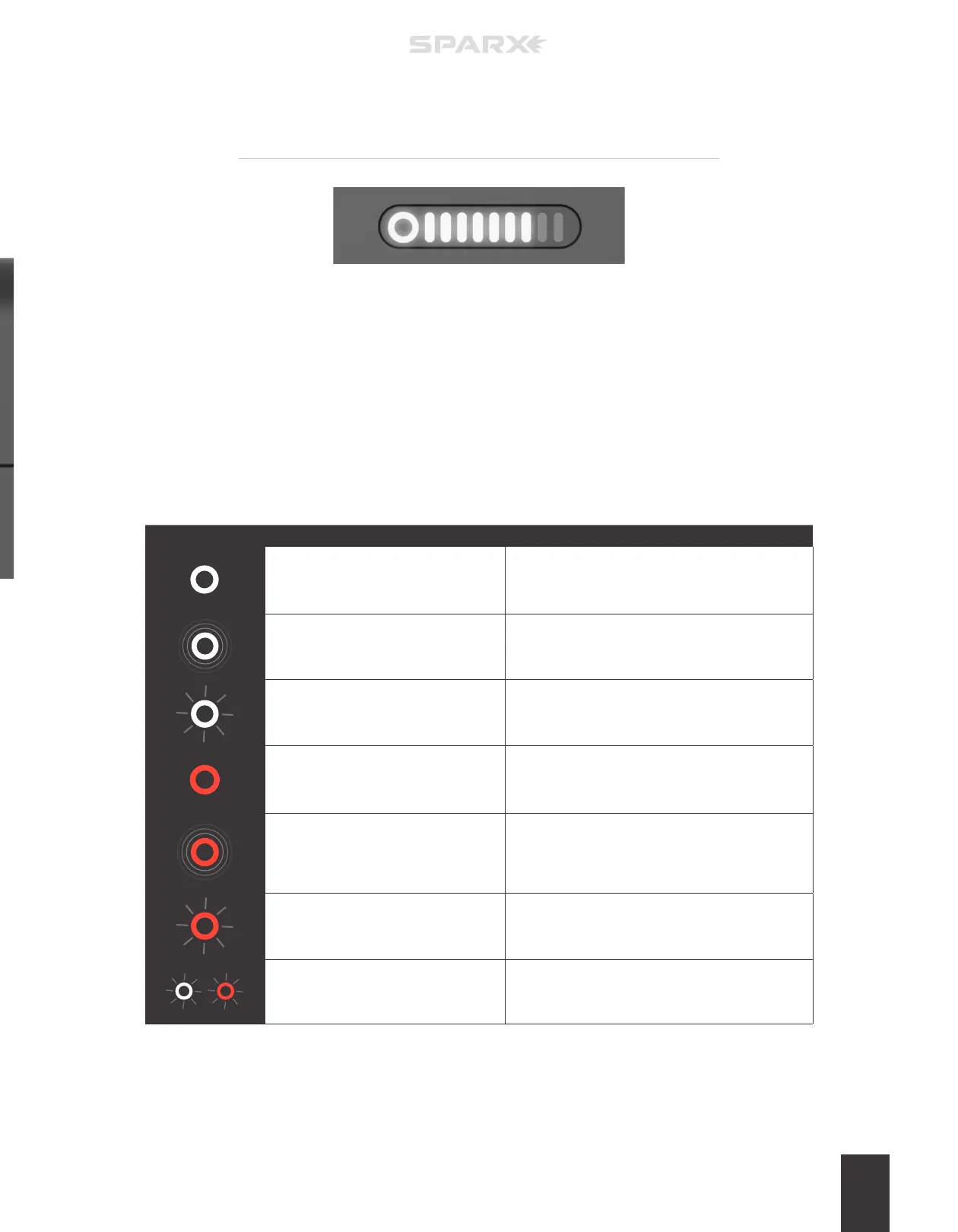
ICON ACTION DESCRIPTION
Circle is white and steady.
The Grinding Ring has more than 10% of life
remaining.
Circle is white and pulsing.
Grinding Ring has less than 10% of life remaining.
We Recommend that the user order a replacement
Grinding Ring by visiting www.sparxhockey.com.
Circle is white and blinking.
User has attempted to start Alignment Mode while a
Grinding Ring is installed.
Circle is red and steady. No Grinding Ring installed.
Circle is red and pulsing.
During sharpening, the Grinding Ring has less than
10% of life remaining. We Recommend that the user
order a replacement Grinding Ring by visiting www.
sparxhockey.com.
Circle is red and blinking. Grinding Ring is Empty.
Circle half red/half white - alternate
blinking.
User has attempted to sharpen with a cycle count
greater than the number of cycles remaining on the
Grinding Ring.
GRINDING RING LIFE
INDICATOR BEHAVIOR
In normal operation, each part of the Grinding Ring Life Indicator corresponds to 10% of
the Grinding Ring’s life. These parts are the one circle and the nine bars to the right (10
parts total or 100%). The circle represents the final 10% of Grinding Ring life and each
bar to the right is an additional 10%. When a part is illuminated, that corresponding 10%
life is present on the Grinding Ring. When the part is no longer illuminated that amount
of the wheel life has been consumed.
The circle of the Grinding Ring Life Indicator can also behave in other ways to indicate
dierent operating conditions to the user. Refer to the table below for more information.


 To Next Page