User’s Manual
DVR-4TN/8TN/16TN/16TS/16TT Series
SPECO TECHNOLOGIES 01/08
15
Connecting Short-term Device
If you plan to install any short-term external devices, such as USB CD-RW,
USB Hard Disk Drive, etc, to the DVR-4TN/ 8TN/ 16TN/ 16TS/ 16TT series
and want to use them as part of the unit system, make sure those devices
are connected only after the DVR-4TN/ 8TN/ 16TN/ 16TS/ 16TT is
powered up. The DVR-4TN/ 8TN/ 16TN/ 16TS/ 16TT series unit can only
recognize the external devices after the power-up process is completed.
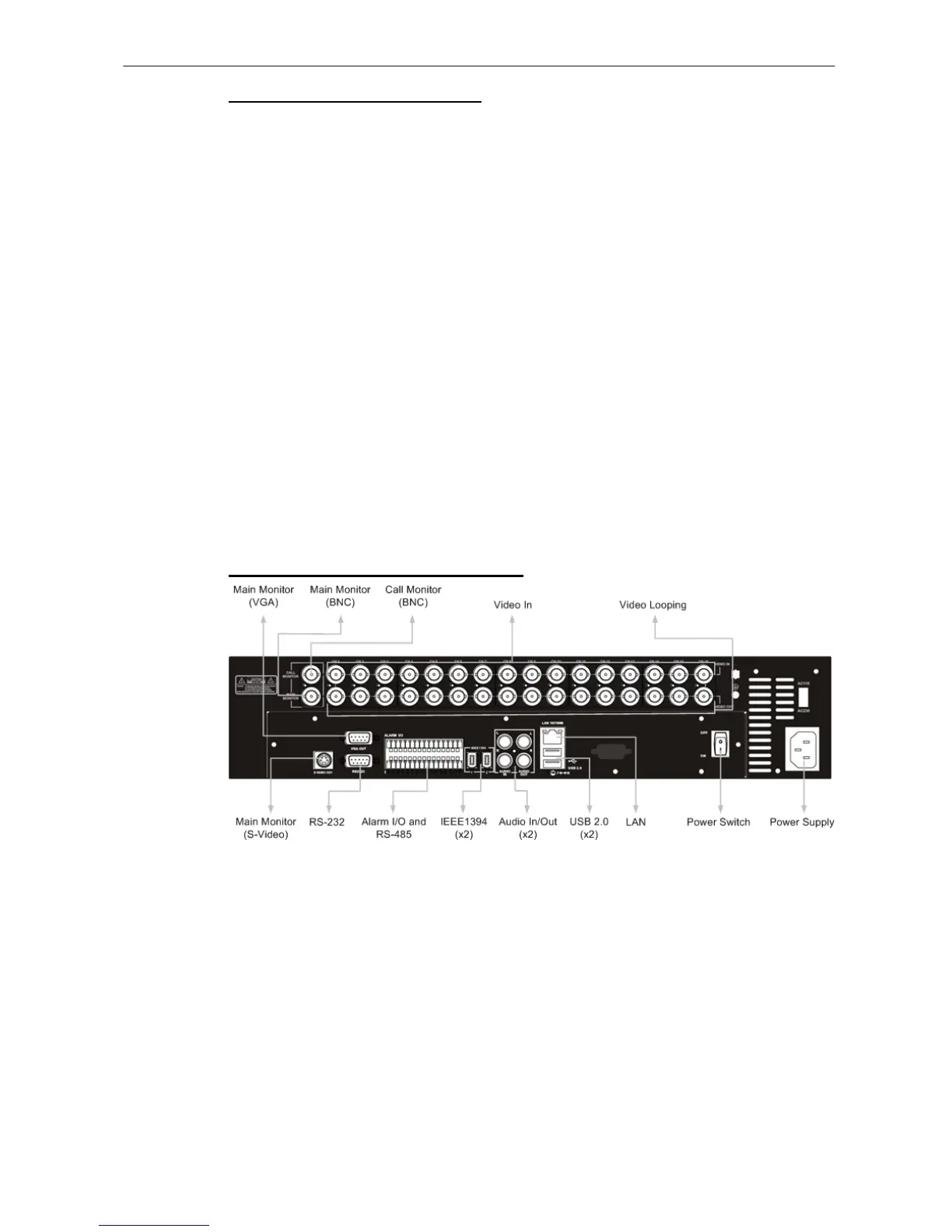
2.4 Rear Panel Connections
There are several connectors on the rear panel of the DVR-4TN/ 8TN/ 16TN/
16TS/ 16TT series unit available for installations. The following figure shows
the connectors by name and a detailed description of each connector follows.
There is one difference between the rear panels of different models;
DVR-4TN/ 8TN/ 16TN has two IEEE 1394 connectors and DVR-16TS/ TT has
one 1000M LAN Port instead, shown as below figures.
Rear Panel of DVR-4TN/ 8TN/ 16TN:



 To Next Page