User’s Manual
DVR-4TN/8TN/16TN/16TS/16TT Series
SPECO TECHNOLOGIES 01/08
46
4.6 Dome Control
The DVR-4TN/ 8TN/ 16TN/ 16TS/ 16TT series unit allows the user to control a
dome camera at the front panel.
In Live mode, the user can press the CHANNEL key to display the appropriate
dome camera in full view. To enter Dome Control mode, press the DOME key
and press channel key 2 to display the hint screen. To exit the Dome Control
mode and go back to live mode, press ESC or DOME. To configure the dome
control settings, see the following sections.
4.6.1 Dome Connection
Follow the steps below to install a dome camera.
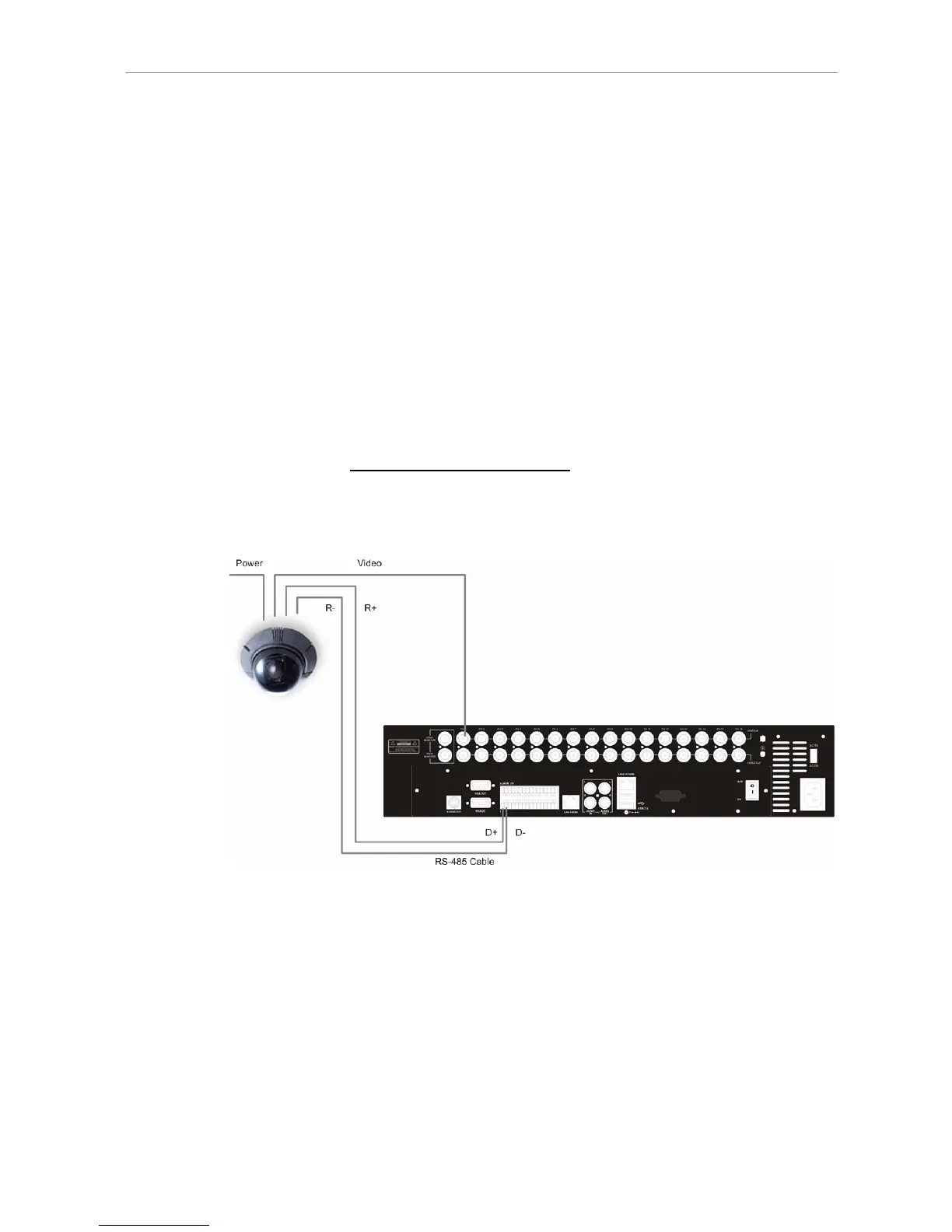
• See section 2.4 Rear Panel Connections for RS-485 port pin definition.
• Using a RS-485 cable, connect the R+, R- terminals from the dome
camera to the D+, D- terminals on the RS-485 port respectively. Refer to
the following illustration.
4.6.2 Dome Protocol Setup
The Dome Protocol item lists the dome protocols available for communicating
with dome cameras connected to the DVR-4TN/ 8TN/ 16TN/ 16TS/ 16TT
series unit. From the Main menu, select <Camera Setup> and press ENTER.
The following menu is displayed.



 To Next Page