User’s Manual
DVR-4TN/8TN/16TN/16TS/16TT Series
SPECO TECHNOLOGIES 01/08
67
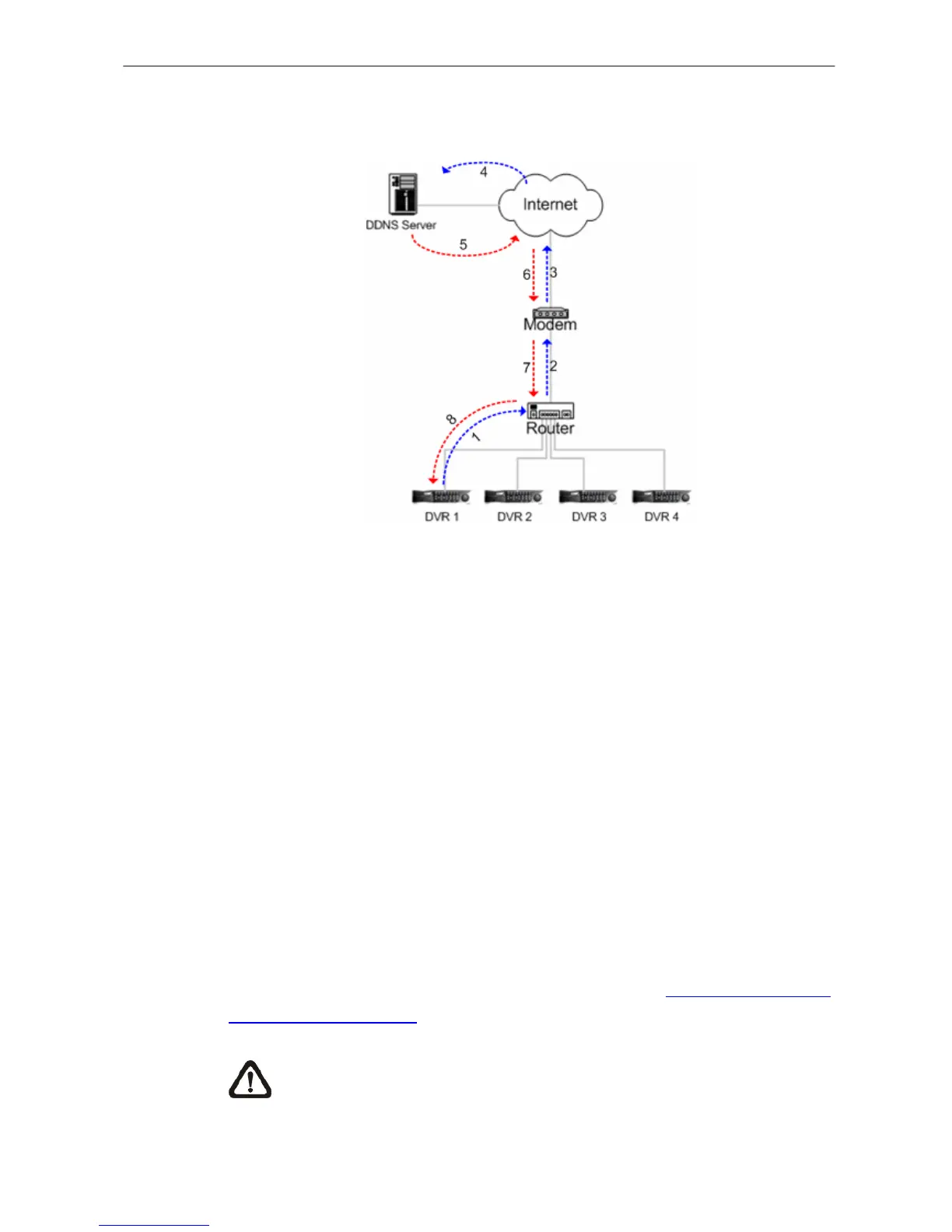
<DDNS submitted>: This message tells the user if the DVR 1 has registered
for the host name successfully or unsuccessfully (illustrated in Fig. 5.2).
Figure 5.2
The DVR 1 connects to the DDNS server through the router, modem, and the
Internet to check if the host name of the DDNS can be registered in your
DDNS server.
<WAN connection>: This message shows the user if the DVR 1 is connected
to the WAN (Wide Area Network) or the Internet (illustrated in Fig. 5.2). The
DVR 1 connects to the WAN or the Internet through the router, and modem to
check if the connection is valid.
5.1.6.3 Dial-in Setup
The Dial-in function enables the user to establish dial-up modem
communication to and from the DVR-4TN/ 8TN/ 16TN/ 16TS/ 16TT series unit
for remote software use. The user is allowed to connect only one modem to a
DVR-4TN/ 8TN/ 16TN/ 16TS/ 16TT series unit.
For more information on dial-up setting on PC, see Appendix D: Dial-up
Connections via Modem.
NOTE: The Dial-in Service is not available if there is no modem
connected to the unit.



 To Next Page