2) Event-Out
SMTP(E-Mail)
This n
etwork camera can be configured to send event and error email messages via SMTP (Simple
Mail Transfer Protocol).
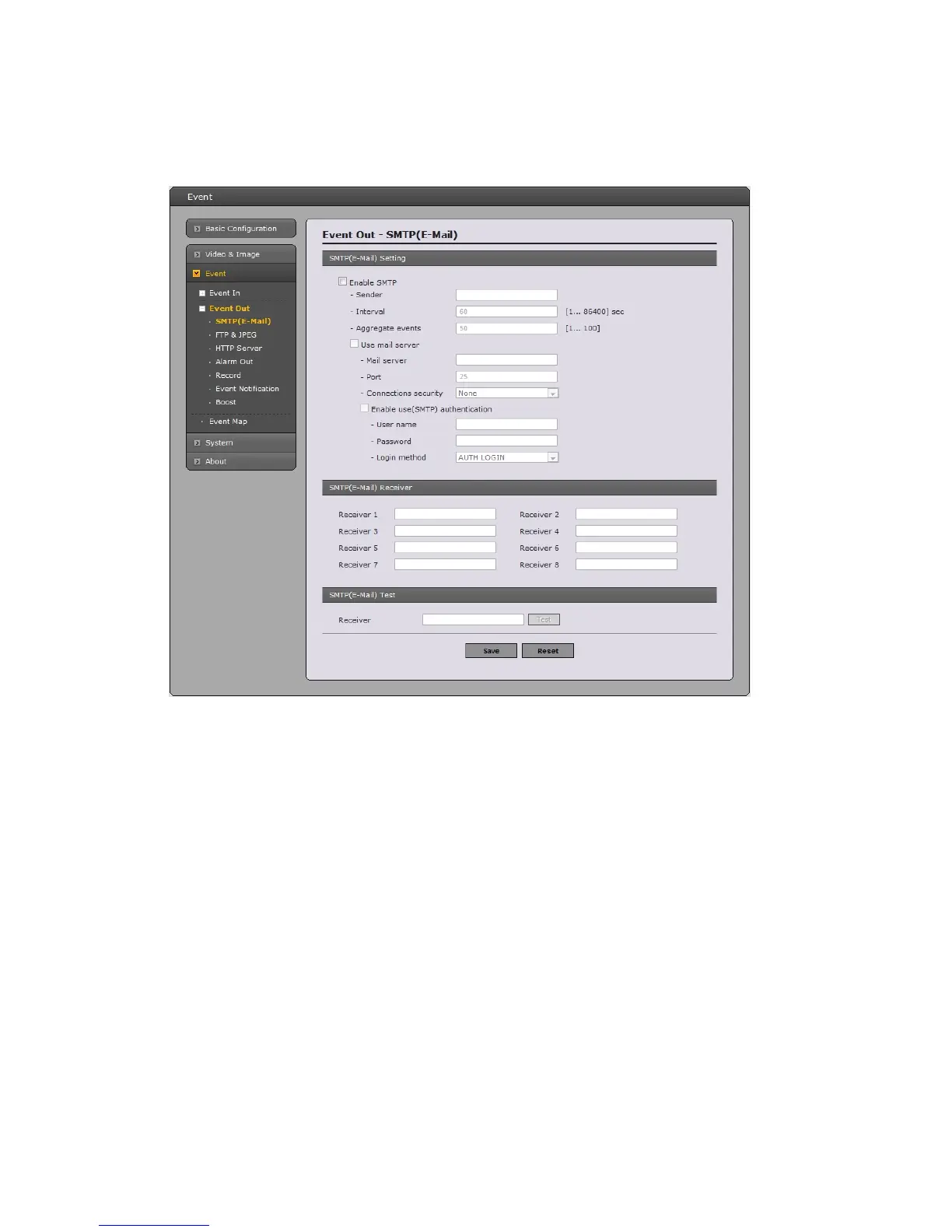
• SMTP(E-Mail) Setting
Select “Enable” to activate the SMTP operation.
- Mail Server / Port: Enter the host names (or IP addresses) and port numbers for your
mail server in the fields provided, to enable the sending of notifications and image email
messages from the camera to predefined addresses via SMTP.
- Sender: Enter the email address to be used as the sender for all messages sent by the
Network Camera.
- Interval: Represents the frequency of the email notification when an event occurs.
- Aggregate events: Shows the maximum number of emails sent within each interval.
If your mail server requires authentication, check the box for Use authentication to log in to this
server and enter the necessary information.
- User Name/Password: Enter the User Name and Password as provided by your network
administrator or ISP (Internet Service Provider).
To ensure that the login procedure is performed as securely as possible when using SMTP
authentication, you must define the weakest authentication method allowed.
35



 To Next Page