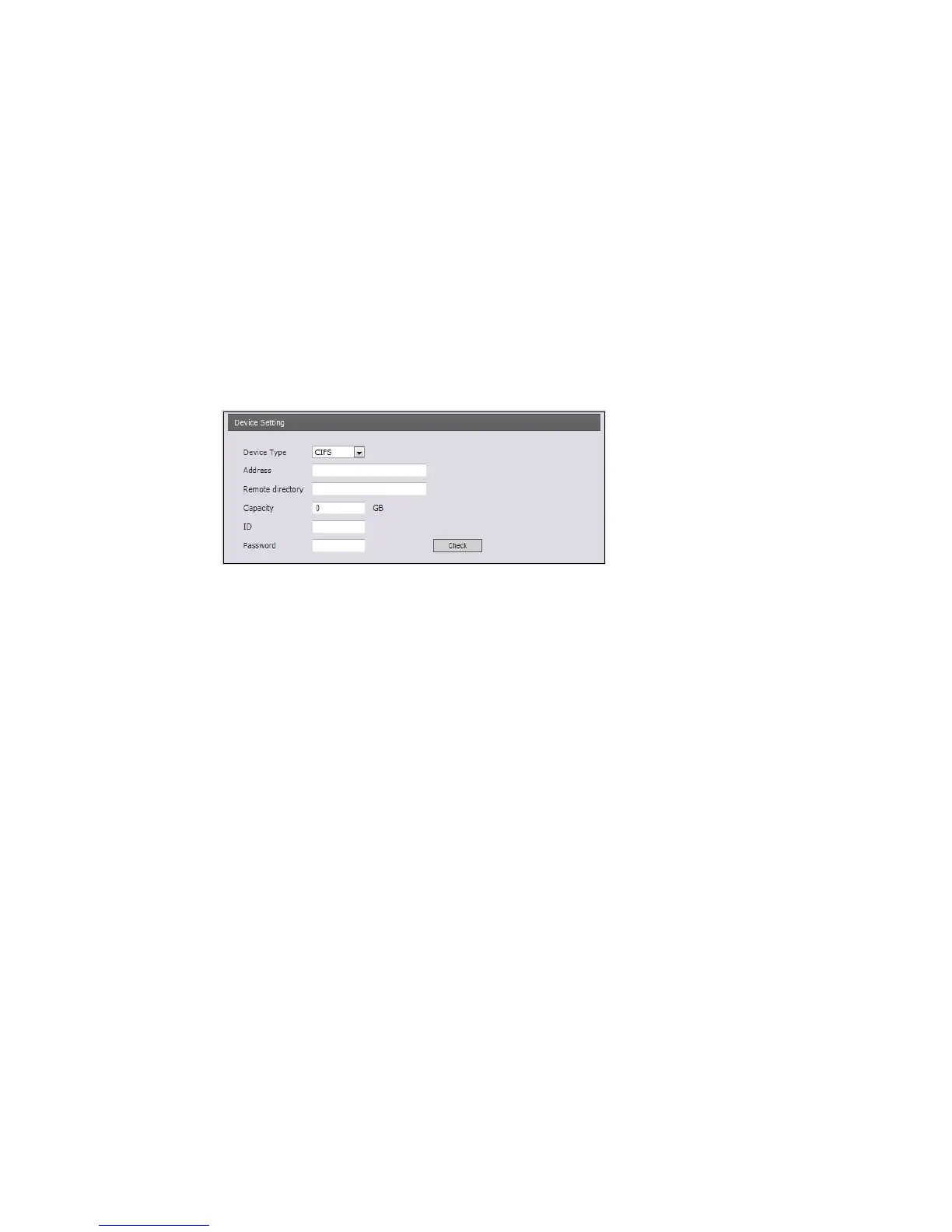
• Device Setting
Select Device Type to be recorded in the drop-down list.
- SD: built-in SD card
- CIFS: A file format for a NAS device.
- NFS: A file format for a NAS device.
Note1: Common Internet File System (CIFS) is a remote file access protocol that forms the
basis for Windows file sharing, network printing, and various other network services. CIFS
requires a large number of request/response transactions and its performance degrades
significantly over high-latency WAN links such as the Internet.
Note2: Network File System (NFS) is a network file system protocol, allowing a user on a
client computer to access files over a network in a manner similar to how local storage is
accessed. NF
S, like many other protocols, builds on the Open Network Computing Remote
Procedure Cal
l (ONC RPC) system.
* Address: Enter IP address f
or NAS device.
* Remote Directory: Enter directory or folder location to be recorded in the NAS device.
* Capacity: Enter the capacity of storage to be used. It must be less than the total storage
capacity.
* IP/Password: Enter ID and Password. This network camera will ask them whenever you
access NAS device.
* Check: Press the Check button to check the validity of Device Setting data.
• Format
Click the Format button to format SD card.
• Device Information
Show current SD card information.
40


 To Next Page