EasyManua.ls Logo

Spiderbox HD 9000 - Channel Manager 1; Delete; Lock; Move

Spiderbox HD 9000
60 pages
Print Icon
To Next Page IconTo Next Page
To Previous Page IconTo Previous Page
Loading...
MENU
GUIDE
MENU
GUIDE
I. CHANNEL
MANAGER
II. INSTALLATION
I
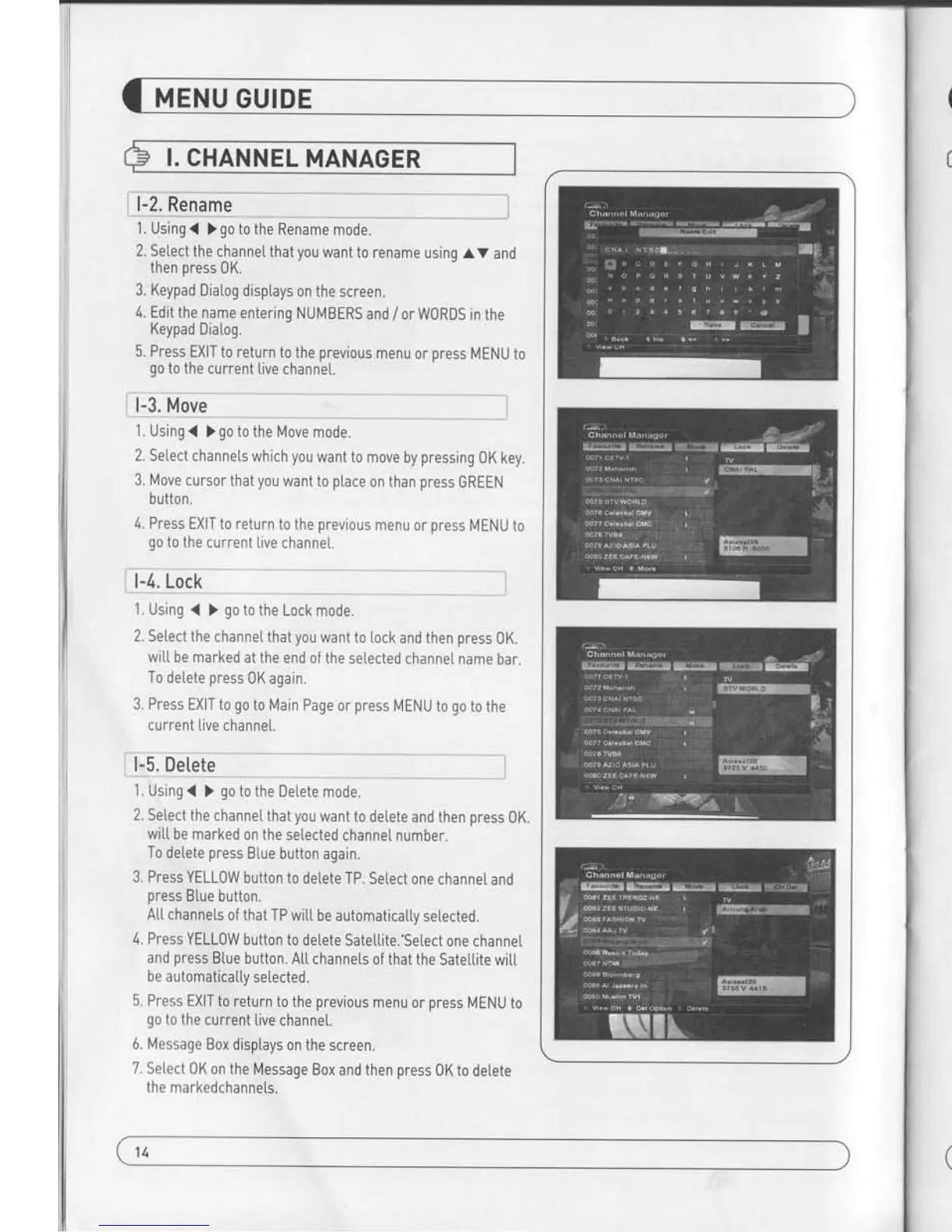
l-2, Rename
1 . Using
(
)
go
to
the Rename
mode.
2. Setect
the channel
that
you
want to
rename using
AV and
then oress 0K.
3. Keypad
Diatog disptays
on the
screen.
4.
Edit the name
entering
NUMBERS
and
/
or W0RDS in
the
Keypad
Diatog.
5. Press EXIT
to return
to the
previous
menu
or
press
MENU
to
qo
to the
current
live channet.
_
___*l
1.
Using
(
)
go
to the Move
mode.
2. Setect
channets which
you
want
to move
by
pressing
OK key.
3. lt4ove
cursor that
you
want
to
ptace
on
than
press
GREEN
button.
4. Press
EXIT to
return to the
previous
menu or
press
MENU to
go
to the current
live channet.
--"-
I
I
1.
Using
{ )
go
to the Lock
mode.
2. Select
the channel
that
you
want to lock
and then
press
0K.
witL be
marked at the
end of the
selected
channel name
bar.
To detete
press
0K again.
3. Press
EXIT to
go
to Main Page
or
press
MENU to
go
to the
current
live channet.
L5.Dilffi:*]
1. Using
(
)
go
to the
Detete mode.
2. Select
the channel
that
you
want to delete
and then
press
0K.
wit[ be
marked on the
setected
channel number.
To
delete
press
Blue button
again.
3. Press
YELLOW button
to delete
TP. Select
one channel
and
press
Btue button.
A[[ channels
of that
TP witt be
automaticatty
selected.
4.
Press YELLOW
button to
de[ete Satetlite.'Select
one channe[
and
press
B[ue button.
Atl channets
of that
the Satettite
wiLt
be automaticaIty
setected.
5. Press
EXIT
to return to the
previous
menu or
press
MENU to
go
to the
current
live channel.
6. Message Box
disptays on
the screen.
7. Setect 0K
on the
Message Box
and then
press
0K to
detete
the markedchannets.
This section may
hetp
you
to set up antenna
and
scan satellite or transponder,
etc, Select Insta[[ations
in Main Page
using
av
and
press
0K.
Press
EXIT
to
return to the
previous
menu or
press
MENU to
go
to the current
live channel.
ll-1. Satettite
Search
ll-2. DiSEqC
Switch
ll-3. Motor
Setup
ll-4. Home Streaming
ll-5. Factory Defautt
I
l,You can move the cursor
using
v
and
press
0K
when
you
select the value that
you
want.
alSateltite
-
Press 0K to
disptay the Satettite
List Box.
-
Select the
proper
Satettite
and then
press
0K.
bl DiSEqC
-
Press 0K to disptay the
DiSEqC Port List.
-
Select the
proper
DiSEqC
port
and then
press
0K
CI LNB
-
Press 0K
to disptay the LNB
Frequency List.
-
Seteci the
proper
LNB Frequency
and then
Dress 0K.
-
You can also input
directty the numbers using
NUMBER KEY on the
RCU.
dl 22KHz Tone
-
Setect
the one among
None, 0 KHz or 22 KHz
depending
on the user's
antenna switch box.
el Search Option
-
Press
0K to display the
Search 0ption tist.
-
Setect the Search Option
that
you
want and then
press
0K.
x
TP
EDIT : To Edit TP, Press
the RED
button on the RCU.
fl Search
-
Press
Search to start scan
channels.
-
SAT Rename
: To rename 5AT, Press
the
Green
button on the RCU.
1ll
15