MENU GUIDE
MENU GUIDE
II. INSTALLATION
II.
INSTALLATION
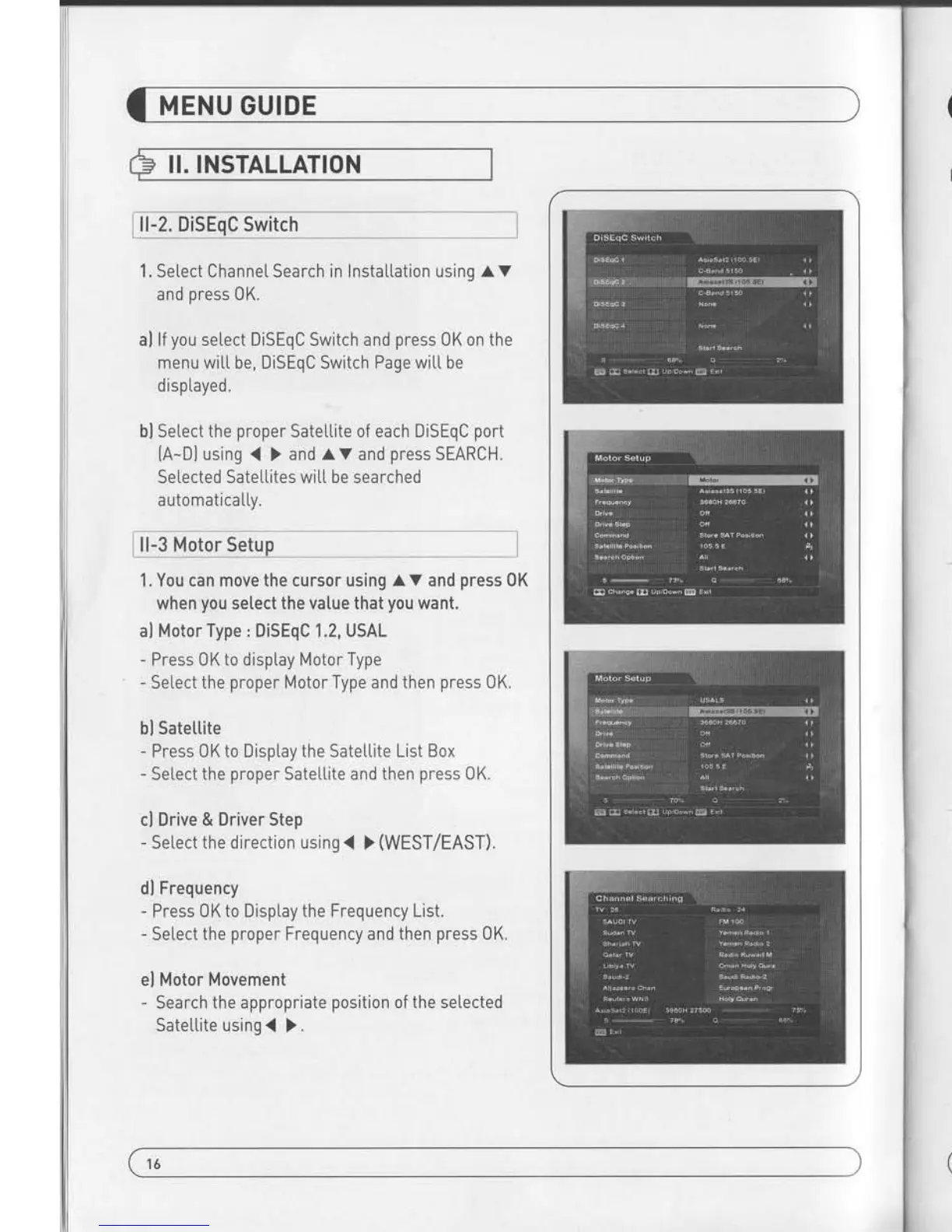
ll-2. DiSEqC Switch
1. Select Channel Search in
InstaLLation using a v
and
press
0K.
al
lf
you
seLect DiSEqC Switch and
press
0K on the
menu witl
be,
DiSEqC Switch Page witL be
d ispLayed.
bl Setect
the
proper
Satel.Lite of each DiSEqC
port
[A-D)
using
{ )
and av
and
press
SEARCH.
Setected Satellites
will
be searched
automatica
LLy.
I
ll-3 Motor
Setup
1. You can move
the
cursor
using A V and
press
0K
when
you
setect
the value that
you
want.
al Motor Type : DiSEqC 1.2, USAL
-
Press 0K to disptay Motor Type
-
Select the
proper
Motor Type and
then
press
0K.
bl Satettite
-
Press 0K to Disptay the Satettite List Box
-
Setect the
proper
SateLlite
and then
press
0K.
cl Drive & Driver Step
-
Select the direction using
{ >
(WEST/EAST).
dl Frequency
-
Press 0K to Display the
Frequency List.
-
Setect the
proper
Frequency and
then
press
0K.
el Motor Movement
-
Search
the appropriate
position
of the selected
Sateltite
using
{
).
fl Motor ControI
Select the
position
using
{ )
and then
press
0K.
Message box dispLays on the screen.
-
Store Sat
position
: Stores the current
position
of the motor
for
the
seLected
sateLtite.
-
Goto Sat Position : Moves ihe motor to the stored
position
of
the selected sateltite
-
Goto Center : Goes to the
center of the motor.
-
Limit off : disabLe East,
West timit.
-
Set East Limit:Set current
position
as East Limit.
gl
Satettite Position
-
Input directly the
position
using NUMBER KEY on
the RCU
- Setectthe direction using
{ )
{WEST/
EASTI.
hl Search Option
- Press 0K to disptay the
Search 0ption List.
- Setect the Search 0ption that
you
want and then
press
0 K.
Set West Limit : Set current
position
as
West Limit
Recatuation Position.
Reset Position
: Resets aL[ stored
position
of the motor.
il Search
-
Press
Search to start scan channets
- Press 0K to start scanning.
I
X TP EDIT : To Edit TP
Press the RED button on
the RCU.
2. Edit my [oca[
position
- Press Green Button to
edit locat Position.
al Longitude
-
Input directly
the Longitude using NUMBER KEY on the RC-.
- Setect the direction using
.(
)
(WEST
/
EASTI.
bl
Latitude
- Input directly the
Latitude using UNMBER KEY on the RCU.
- Setect the direction using
{
) [N0RTH/S0UTHdl.
3. Press EXIT to return to the
previous
menu or
press
MENU to
go
to the current
live channet.
16
17


 To Next Page