MENU GUIDE
MENU
GUIDE
II. INSTALLATION
I
ll-4. Home Stre_aming
.. _..
j
1. PC setting
***Execute'Home
Streaming'
program.
al Go to'Preference'
Tab.
bl Setect DefauLt URL' check-box and assign the
downtoad
foLder by using Browse" button lt is
assigned to c:\downtoad"'but must specify
the
destination foLder
personatty
to
be abLe
to receive
movie files in PC.
x
Note: the defautt
server avaitable only
currentty.
2. 5TB setting
al Go to
Home streaming menu
I
Menu
-)
Accessory
i Network
-f
Home streaming
I
and
CLick Home Streaming.
bJ lP-Name Edit
Pad wiI appear & Input Server lP
by numeric buttons of RCU.
cl The lP address must be same as lP address
shown
in
preference
tap of Home Streaming
pr09ram.
3. Ptaying the Movie
Fite
by
Home Streaming
al Press Fn" key of RCU in normaI
view of STB and
then the movie fite List in PC wil[ be appeared
in
TV Screen.
bl Setect the fiLe
which
you
want to see by using
navigation keys
of RCU and
press
0K" buttons to
pLay
ihe movie
fi[e.
x
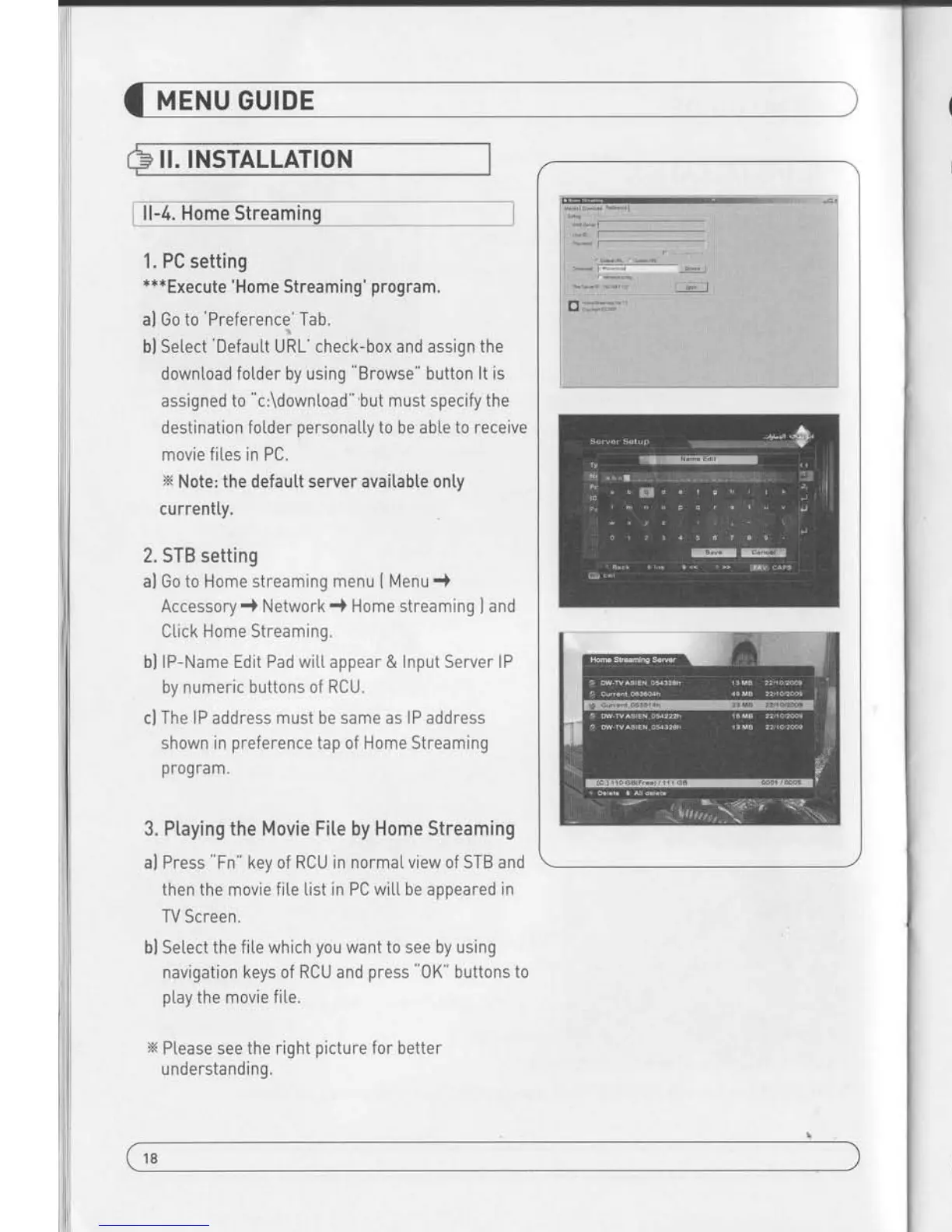
Ptease see
the right
picture
for better
u ndersta nd ing.
II.
INSTALLATION
iLL.q-jlitqfieriutt,,
--,
--,,,
-
l
Use Factory Defautt
function only when
you
want to return
the receiver to the
condition of factory defau[t.
A[[ settings
and channets wiL[
be deleted.
1. Select Factory
Default in lnsta[[ations
using
a V and
press
0K.
2. Message box
disptays on the screen.
3. Select 0K to return
the receiver to
the condition of factory
defautt and then
press
0K
4. Press EXIT to
return to the
previous
menu or
press
MEN-
to
go
to the current
live channet.
18
19


 To Next Page