MENU GUIDE
MENU GUIDE
ilt.0PTtoNs
This section may hetp
you
to
set up OSD [anguage,
time,
etc. Select Options in Main Page using V
and
press
0K.
Press EXIT to return to the
previous
menu or
press
MENU to
go
to the current [ive
channet.
lll-1. 0SD Setup
lll-2. Controt Panet
lll-3.
Time Setting
lll-4.
ParentaI Control
ill.0PTt0N5
tltt{,
contt.tP*"t
-
*--*l
1. Select TV Setup in Options using
t v
and
press
0K.
al HD Type
- Setect HD video Outout.
bl TV Type
- Select
your
TV type.
cl Aspect Ratio
-
Select screen ratio.
dl Screen Controt
- Select screen disptay modes.
el Brightness
- Adjustment of screen brightness.
fl Contrast
- Adjustment of screen conirasi.
gl
Saturation
- Adjustment of screen Saturation.
2. Press EXIT
to return to the
previous
menu or
press
MENU to
go
to the current live channet.
:
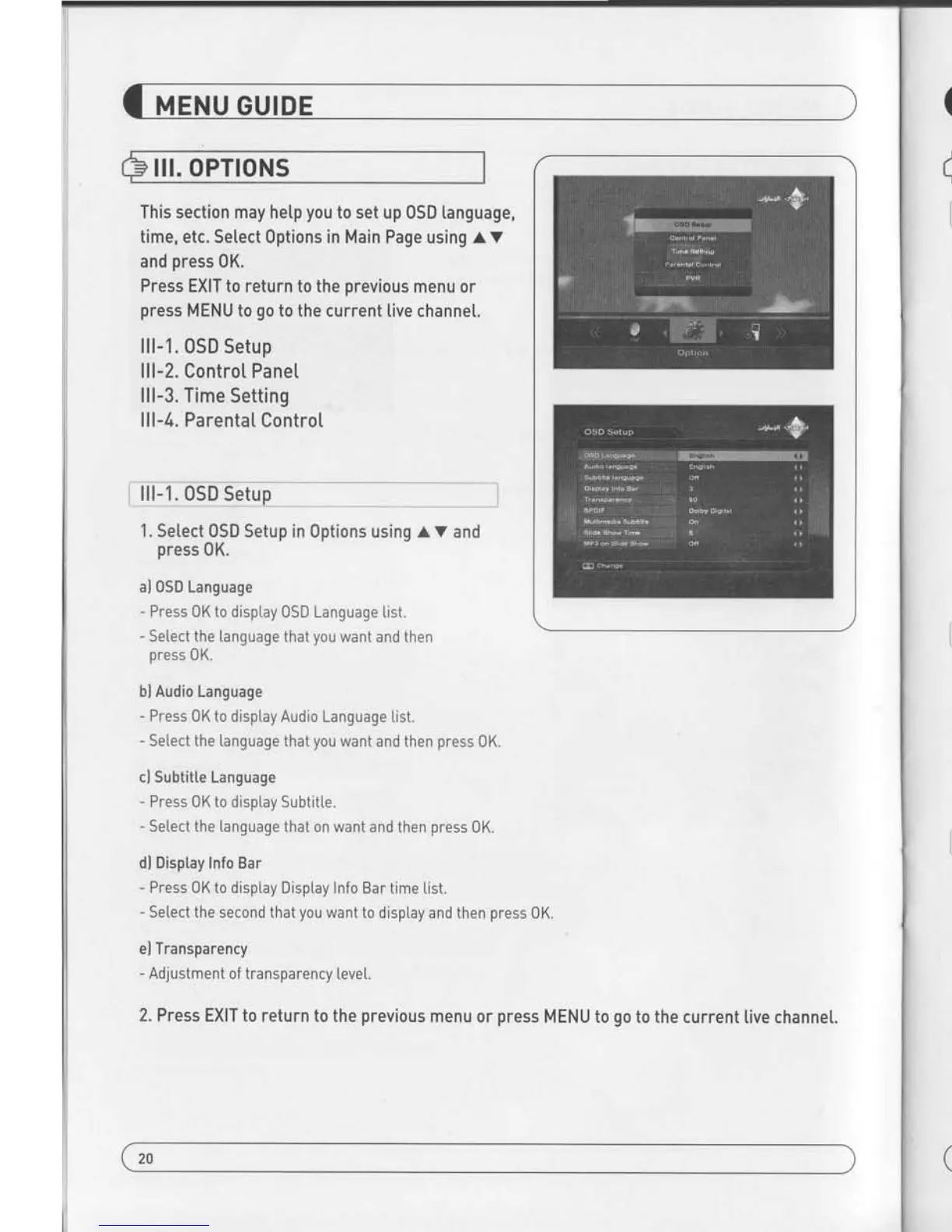
lll-1. O_S_D
Setup
I
,,*__.
_J
1. Setect
OSD Setup in Options using AV
and
press
0K.
al 0SD Language
- Press 0K
to disptay OSD Language [ist.
- Select the tanguage that
you
want and then
press
0K.
bl Audio Language
- Press
0K to disptay Audio Language
tist.
- Se[ect the language
that
you
want and then
press
0K.
cl Subtitte Language
-
Press
0K to disptay Subtitte.
- Select the [anguage
that on want and
then
press
0K.
dl Display Info Bar
-
Press 0K to
display Disptay Info Bar time
[ist.
- Setect the second that
you
want to display and then
press
0K.
el Transparency
- Adjustment of transparency
leve[.
2. Press EXITto return
to the
previous
menu
or
press
MENU to
go
to
the current live channel.
trn
.Set
your
[oca[ time according to
your
tocation.
1. Se[ectTimeSetup in 0piionsusing.(
)
and
press
0K.
2. Time
Setting
page
disptays on the screen.
3. Move the cursor using(
),
avand
press
0Kwhen
you
select the
value that
you
want.
ilnput
Hour directly using
number keys on the RCUJ
4. Press EXIT to return to the
previous
menu or
press
MENU to
go
to the current live channe[.
I
rri:r fii$iei,i-e-!llqi:-__:_,_'-
-
-
--
--_
l
1. Select
ParentalControlSetup
in
Options using(
]
and
press
0K.
2. ParentaI Control Page disptays on the
screen.
3. You can lock and unlock Parental Lock selectinq 0N or 0FF
using
{ }
lForChannetsl.
4.
You can lock and untock Insta[[ Lockselectinq
0N or 0FF
using
(
) [For
Instattation Settingsl.
5, Enter new
password
if
you
want to change the current
password.
6.
Confirm
your
new
password
entering new
password
again.
7. Press EXIT to return to the
previous
menu or
press
MENU to
go
to the current live channet.
Note. DEFAULT PASSWORD lS 0000
20
21


 To Next Page