PVR GUIDE
PVR GUIDE
PVR
GUIDE
This section may help
you
how to use
PVR function on
this 5TB.
l. Recommended
Devices
lf
you
want to use PVR function,
you
need
to
prepare
equipment
as below.
- Externa[
USB Hard Disk Drive.
- Ftash
memory stick
- Format
Type: FAT1 6/32
lSystem
does not support
NTFS
and other f i[e sysieml
I
ll.
Record Function
ll-1 Reserved Recording
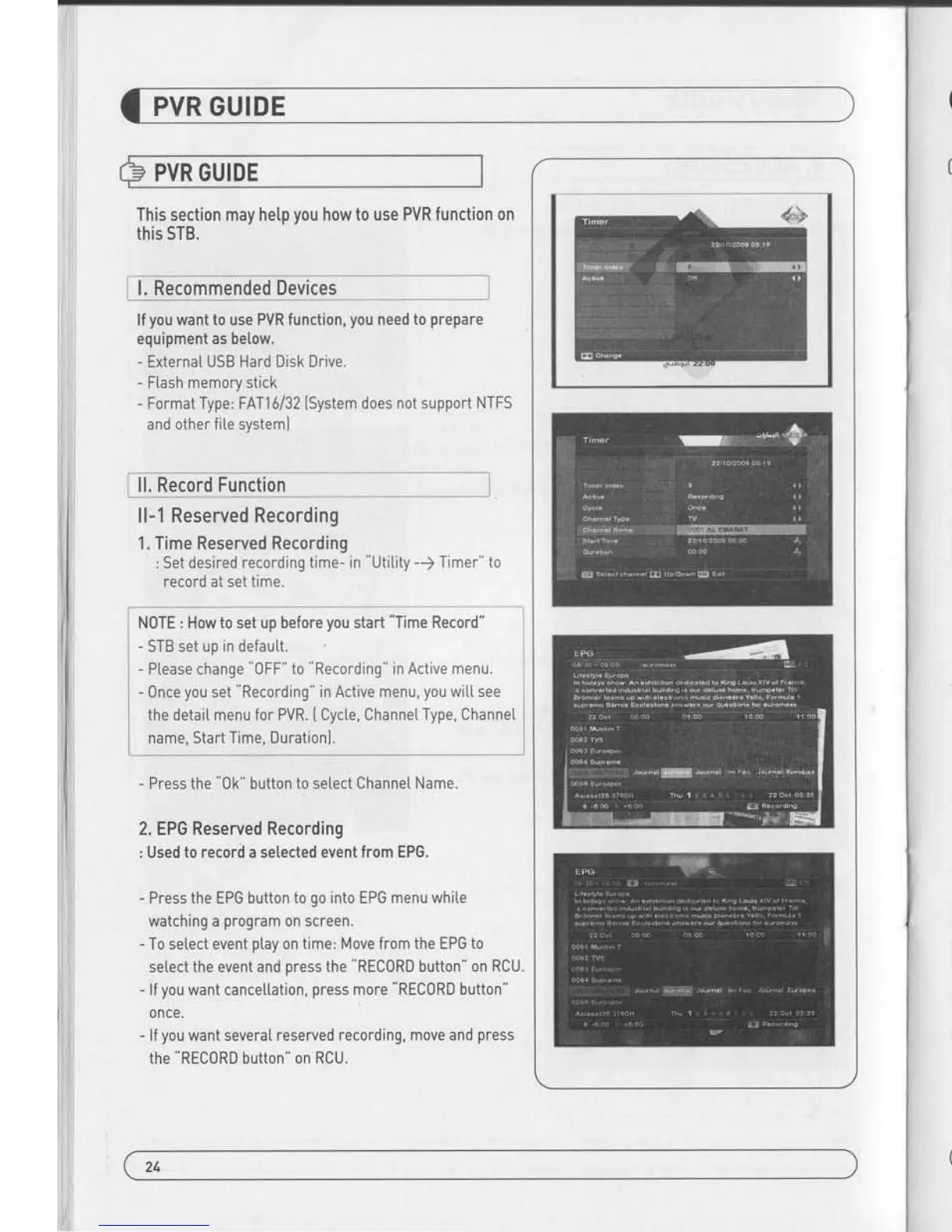
1. Time Reserved Recording
: Set desired recording
time- in Utitity -) Timer" to
record at sei time.
N0TE : How to set up before
you
start
"Time
Record"
-
STB set uo in default.
I
- Ptease change
"0FF"
to
"Recording"
in Active menu.
i
-
Press the
"0k"
button to setect Channet
Name.
2. EPG
Reserved Recording
: Used
to record a selected event from EPG.
- Press
the EPG button to
go
into EPG menu white
watching
a
program
on screen.
- To setect event
ptay
on time: Move from the EPG
to
select the event and
press
the
"RECORD
button" on
RCU.
- lf
you
want cancettation,
press
more RECORD button"
once.
- lf
you
want several
reserved recording, move and
press
the
"REC0RD
button" on
RCU.
PVR GUIDE
llnecoidTficiion----
--"-
*
*l
ll-2 Instant Recording
- Press REC0RD button" on RCU to start recoding
program.
- White Recoding
program
-
Press
'PAUSE"
key to execute
Time Shift"
- You can use
"LEFT/RIGHT
button" to view
desired time whi[e
recoding
program.
- Press
"0K
button" on RCU to disptay
Recording file tist
During Recording
you
can watch atso other channels which
are located in same TP. In case of watching
other channe[s
during recording,
You should
come back to the recording
channe[s in channel list to stop recording.
- lf
you
press
"STOP
button" on RCU, current
program you
are
watching wi[L stop and Live TV wit[ be stored in USB memory
space.
--
r "
l
- 0nce
you
set
"Recording"
in Active
menu,
you
wit[ see
I
the detait menu for PVR.
(
Cycte, Channet
Type, ChanneL
l
name, Start Time, Durationl.
I
24
/ ,")


 To Next Page