PVR GUIDE
PVR GUIDE
i
Lrl
Plqt!frierq!ier"---:-::i
-
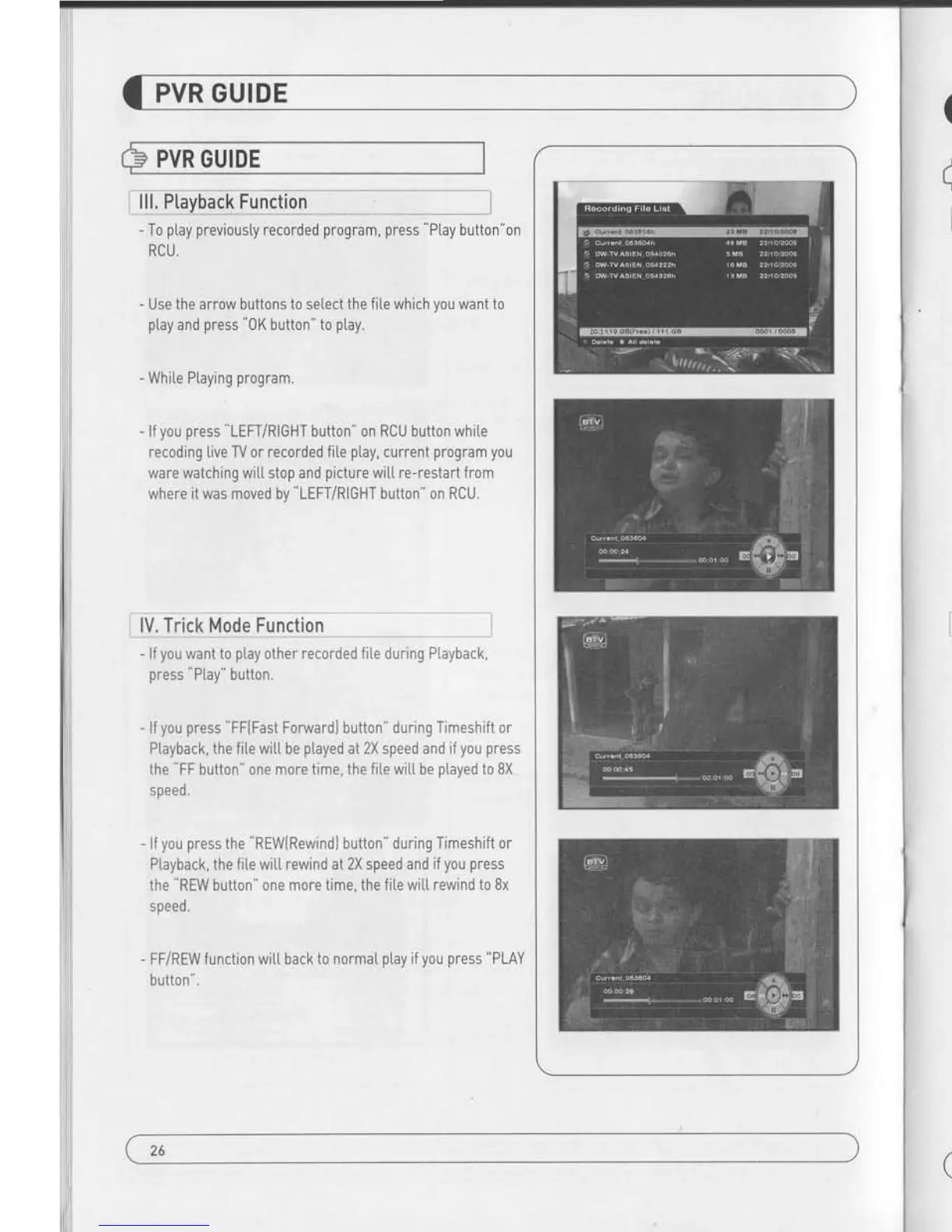
To
ptay previousty
recorded
program, press
"Ptay
button"on
RCU,
-
Use the arrow buttons to setect the fiLe which
you
want to
ptay
and
press
0K button'to
p[ay.
-
White Ptaying
program.
-
lf
you
press
"LEFT/RIGHT
button" on RCU button while
recoding live TV or recorded fi[e
ptay,
current
program you
ware watching wi[[ stop and
picture
witL
re-restart
from
where it was moved by
"LEFT/RIGHT
button
'
on RCU.
lV. Trick Mode Functqon
-
lf
you
want to
ptay
other recorded fite during PLayback,
press
"Ptay"
button.
-
lf
you press
'FF(Fast
ForwardI button" during Timeshift or
Ptayback, the fite
wilt be
played
at 2X speed and if
you press
the
'FF
button" one more time, the fiLe
witL be
ptayed
to 8X
speed.
- lf
you press
the
'REWlRewind)
button" during Timeshift or
Playback, the fite witt rewind at 2X speed
and if
you press
the REW button" one more time, the
f ite wilt rewind to Bx
speed.
-
FFiREW function wit[ back
to normaI
ptay
if
you press
"PLAY
button
".
26
PVR GUIDE
PVR GUIDE
V, Time Shift Function
- lf
youwantto
execute TimeShift" in Live modeYou should
set
"0n"
of
Time Shift
In
PVR Option
{Accessory
-) PVR
-)
TimeShift 0N"1.
-
To
star Time Shift in Live mode,
press
PAUSE to start.
- Time shift witt
ptayed
during 30 minutes in Live Mode.
-
To start
"P[ay
back" during
Timeshift
press
"PLAY"
key.
-
You
can
move
"play
position
'
using LEFT/RIGHT button
during Time Shift.
Vl, Fo,rmat
-
You can do FAT32 Format the HDD formatted by FAT32
and
NTFS atso.
- You can do Format atso the mutti
partitioned
HDD.
-
When NTFS formatted HDD is
inserted, P0PUP message
wit[ appear.
- Press 0K" button to move to C:, D:, E:, F: NEXT." in
case
of Mutti
partitioned
HDD.
- In case of NTFS mutti
partitioned
HDD,
you
must format by
FAT 32,
27


 To Next Page