38
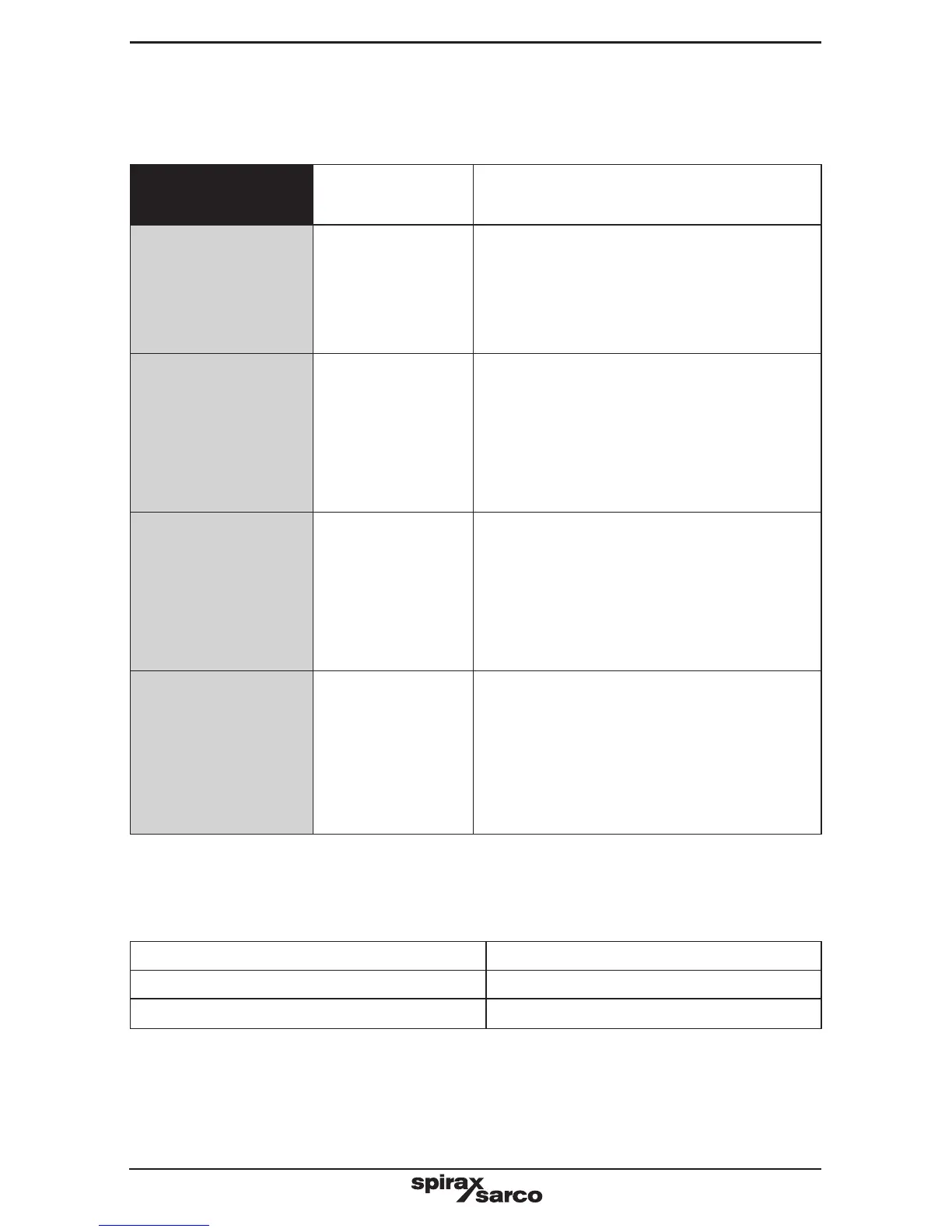
9.3 Operational error messages
Any operational errors that occur will be displayed in the run mode, on the alarms and
errors screen.
Error
message
Cause Action
1
Power out
There has been a
loss of power to
the product during
operation.
1. Remove the power from the product.
2. Check that all the wiring is correct.
3. Check that the power supply is secure,
i.e. does not suffer from 'brown outs'.
4. Reapply power.
2
Setup menu
time out
The operator
has entered the
commissioning
mode and has
not pressed a key
for 5 minutes or
more.
3. Re-enter the commissioning mode if
required.
3
Alarm 1
A high TDS alarm
has occurred.
1. Check the boiler operation. and the
alarm level setting.
The feedwater quality and treatment
regime should be checked as soon as
possible. Spirax Sarco offer boiler
water treatment advice and service.
4
Alarm is
latched!
Some errors latch
the alarm relay for
safety. Clearing
the error from
the error screen
just removes the
message.
1. Enter the commissioning (setup) mode.
If the correct password is entered all
the latched alarms will be cleared.
9.4 Determining the probe condition
The probe condition can be checked without removing it from the boiler.
From the run menu select probe factor (PF) and compare it with the following table:
Probe factors Typical
BCS1, BCS2, and BCS4 0.2 – 0.6
BCS3 0.3 – 0.7
A low cell constant indicates that the probe is able to conduct well, whereas a high cell constant
indicates that the probe tip has become less conductive, perhaps due to a build-up of scale.
A very low cell constant, however, could indicate an internal short circuit. The further the probe
tips from any part of the boiler, the higher the cell constant.


 To Next Page