Getting Started
Procedure 12: Connect to a DUT/SUT
54 | Getting Started with Spirent TestCenter
Procedure 12: Connect to a DUT/SUT
Connecting to a DUT (device under test) or SUT (system under test) involves two main
procedures:
• Connecting your chassis to a PC or network
• Connecting the Spirent test modules to the DUT/SUT
Connecting your Chassis to a PC or Network
To connect your Spirent chassis either to your PC or to the network to which your PC is
connected, use the chassis’ Ethernet port labeled
ETHERNET INTERFACE (RJ-45)
located on the chassis’ back panel.
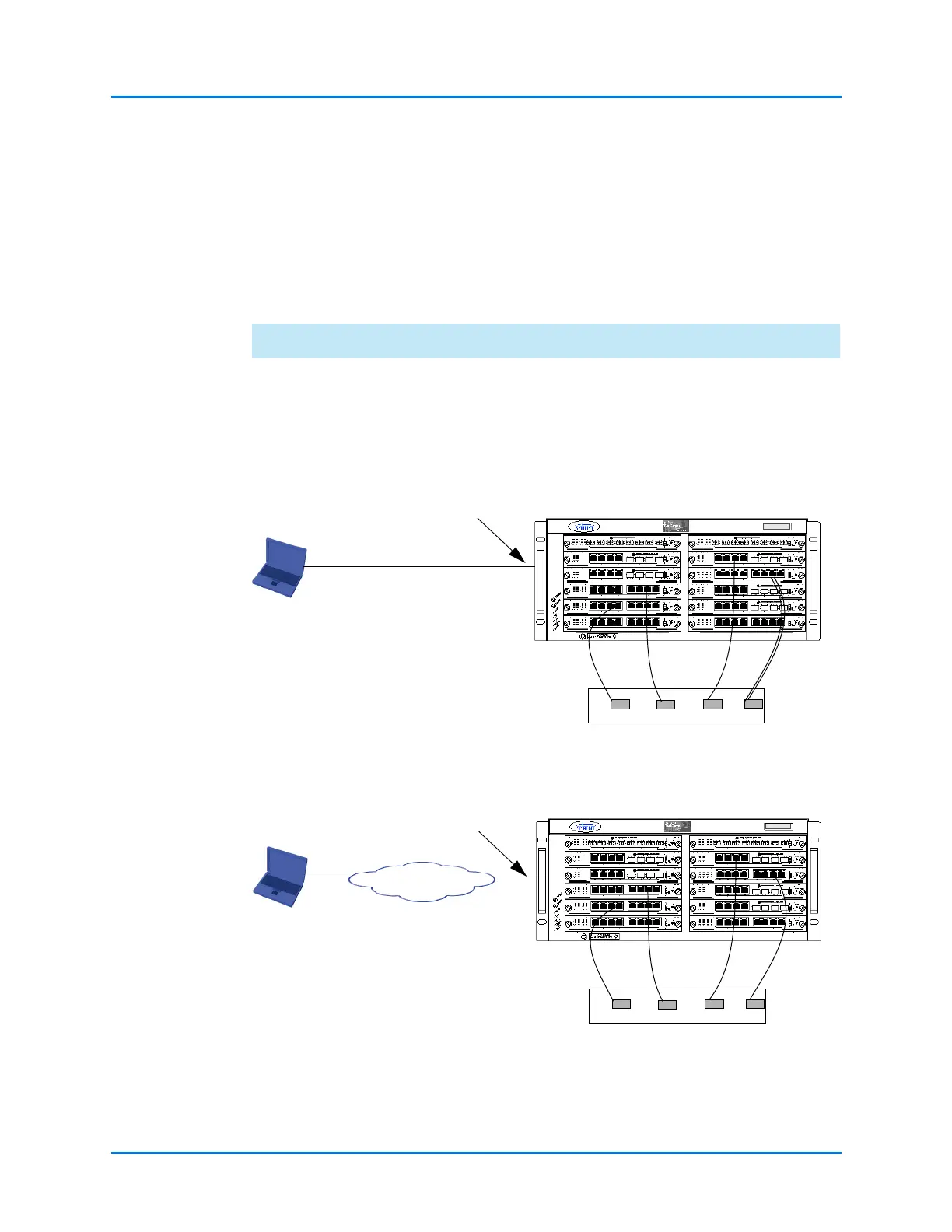
Connect the chassis to the desired device(s) or network to be tested via either of the
methods shown in Figure 1-18 or Figure 1-19.
Figure 1-18. Connecting the PC Directly to the Chassis and to the DUT/SUT
Figure 1-19. Connecting the PC via a WAN/LAN to the Chassis and to the DUT/SUT
DUT/SUT
Connect to the Ethernet
port on the chassis back
WAN/LAN
DUT/SUT
Connect to the Ethernet
port on the chassis back
panel



 To Next Page