About your appliance 13
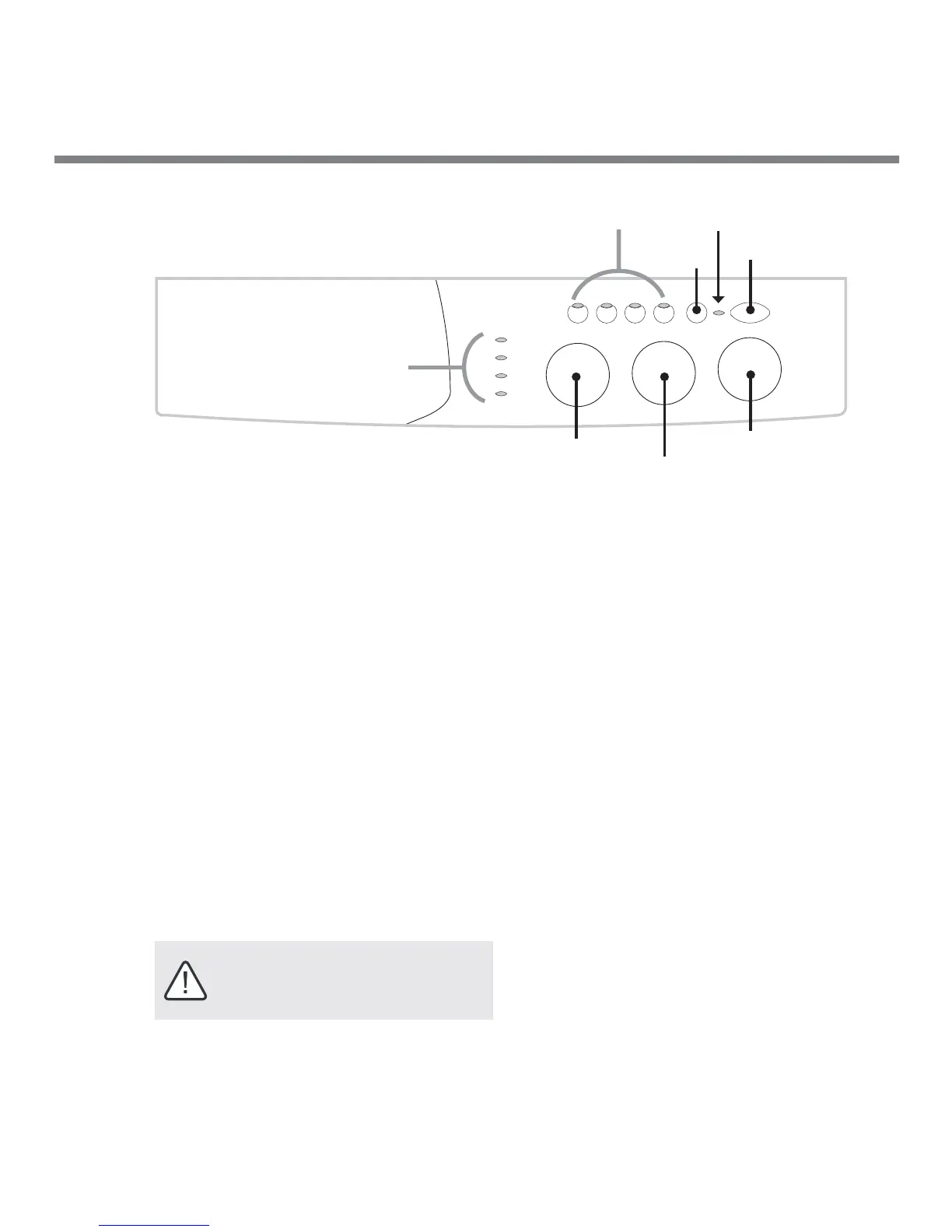
DOOR LOCK
LED
ON/OFF
OPTION
Buttons
DRY TIME
Selector
CYCLE
Selector
STATUS LED’s
WASH TEMP
Selector
START
ON/OFF (Door Open) Button
Turns power to the washer ON or OFF, unlocks the
door during the wash and dry cycles. Also restarts a
SILK or WOOL cycle that’s gone into Anticrease/
Soak.
DOOR LOCK LED
Indicates when the door is locked and when it can
be safely opened:
SOLID=Locked, FLASHING=Unlocked
Once locked, the door can be unlocked for up
to 5 MINUTES into any WASH cycle and at ANY
TIME during a DRY cycle.
To unlock the door: Press the ON/OFF button.
To resume the cycle: Close the door and press the
ON/OFF button again.
START (Cancel) Button
Press once to START the program, or press and hold
to CANCEL a program in progress.
OPTION Buttons
Use these buttons to modify the wash cycle
(see “Description of Option Buttons, page 12”)
.
STATUS LED’S
Indicates the cycle phase that’s underway.
DRY TIME Selector
Use this knob to select:
A. the desired drying minutes (20 to 120) or;
B. one of the AUTO dry cycles
• Less Dry: Slightly damp clothes, easy to
iron
• Very Dry: Very dry clothes, ready to be
put away. Recommended for towels or
bathrobes. NOTE: The DRY TIME knob
does not move during the dry cycle
WASH TEMP Selector
Use this knob to select the water tempurature
(when a WASH cycle is selected. NOTE: Rinse
water is always COLD.
CYCLE Selector
Use this knob to select a WASH or DRY cycle.
NOTE: This knob does not move during the
wash or dry cycle.
Description of the control panel
IMPORTANT: The rapid flashing of the
DOOR LOCK LED together with flashing of
atleast one other LED indicates an
abnormality (see Troubleshooting)



 To Next Page