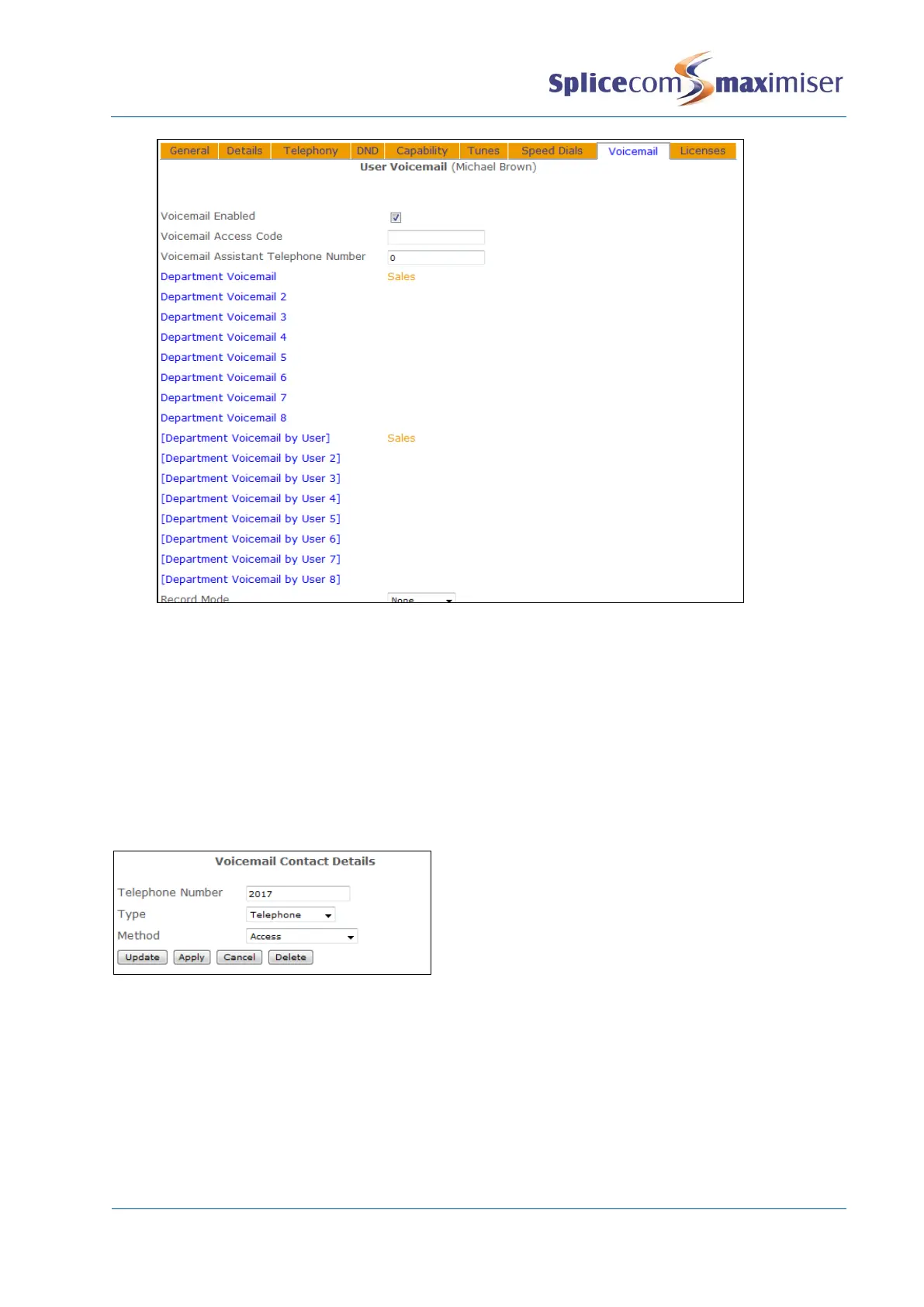
Please note that a User can only monitor up to 8 voicemail accounts at any one time. The Department
Voicemail fields allow you to select a Department’s voicemail account and the [Department Voicemail by
User] fields allow you to select a User’s voicemail account (as described in the Setting User Voicemail
Notification section from page 226). However the account selected will be displayed in both fields.
If this User is not a member of the Department(s) entered he/she will be prompted to enter the
Department’s Voicemail Access Code when attempting to listen to the Department’s messages.
Alternatively, a voicemail contact similar to the following example can be entered within the
Department’s Voicemail page. The User with the extension number entered in the Telephone Number
field will not be prompted for the Department’s Voicemail Access Code.
Please refer to the relevant PCS User manual for details on how to handle voicemail messages via a PCS.
Incoming calls answered and missed by the Department will also be logged in the User’s Incoming Calls
History.
Please note:
x These settings can be monitored and updated within Manager Assist>Configuration Aids>
Departments – View, Add, Remove Voicemail Monitors.
x One or more Voicemail Contacts can be added to multiple Departments simultaneously via Manager
Assist>Configuration Aids>Department – Bulk Add Voicemail Contacts.



 To Next Page