IP Paging Microphone User Manual
7
music to play the audio file. Press “cancel” key to end the music.
Remark: The contents of the file playlist can be set via the FTP server.
④Information: Display terminal parameters information. Press “ ” or 【info】 key, enter password 【123456】and login
into the system setting interface.
Basic Network Settings
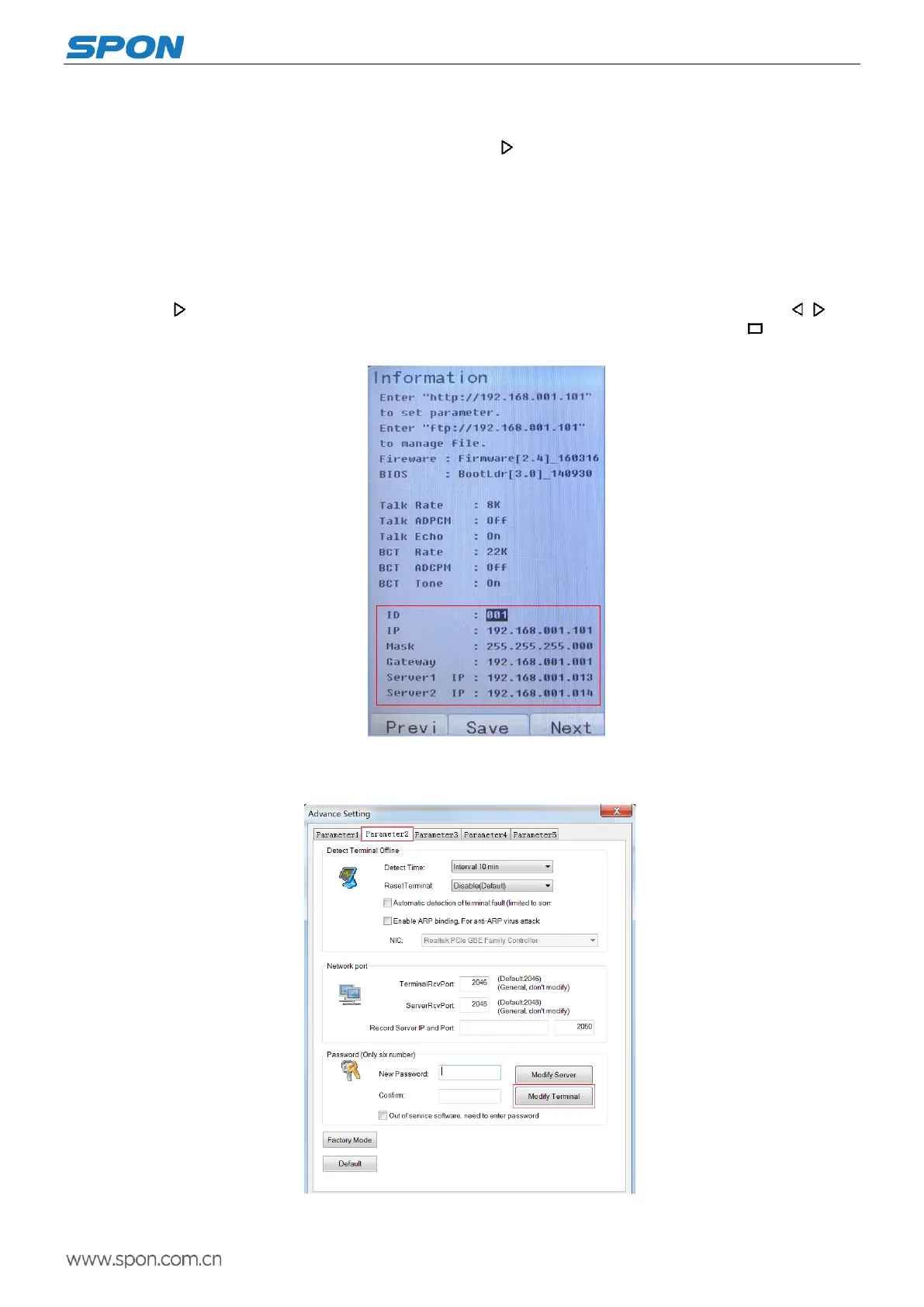
Connect the IP paging microphone terminal well as per the installation manual, plug in the power, press “info” key for network
parameters checking, and modify the network parameters according to the using environment, there are two methods:
Keyboard Operation
(1)Press or【info】 key, input the terminal password 【123456】enter the system setting interface. Press , key
to move, press numeric keys to modify equipment ID, IP address, server IP and other parameters, then press button to save.
(Note: ID and IP can not be same as other terminal or mainframe.)
Remark: modify the password only can through the server, the detailed steps are: setting-advanced setting-input default
password( default one is 123456)-parameter2-input new password-modify all terminal`s password -OK(confirm).
If you choose to modify all terminal`s password, then all the terminal`s password in the same server will be modified to the



 To Next Page