54
9.1 ENTER INTO SETTINGS AND ITS FUNCTIONS
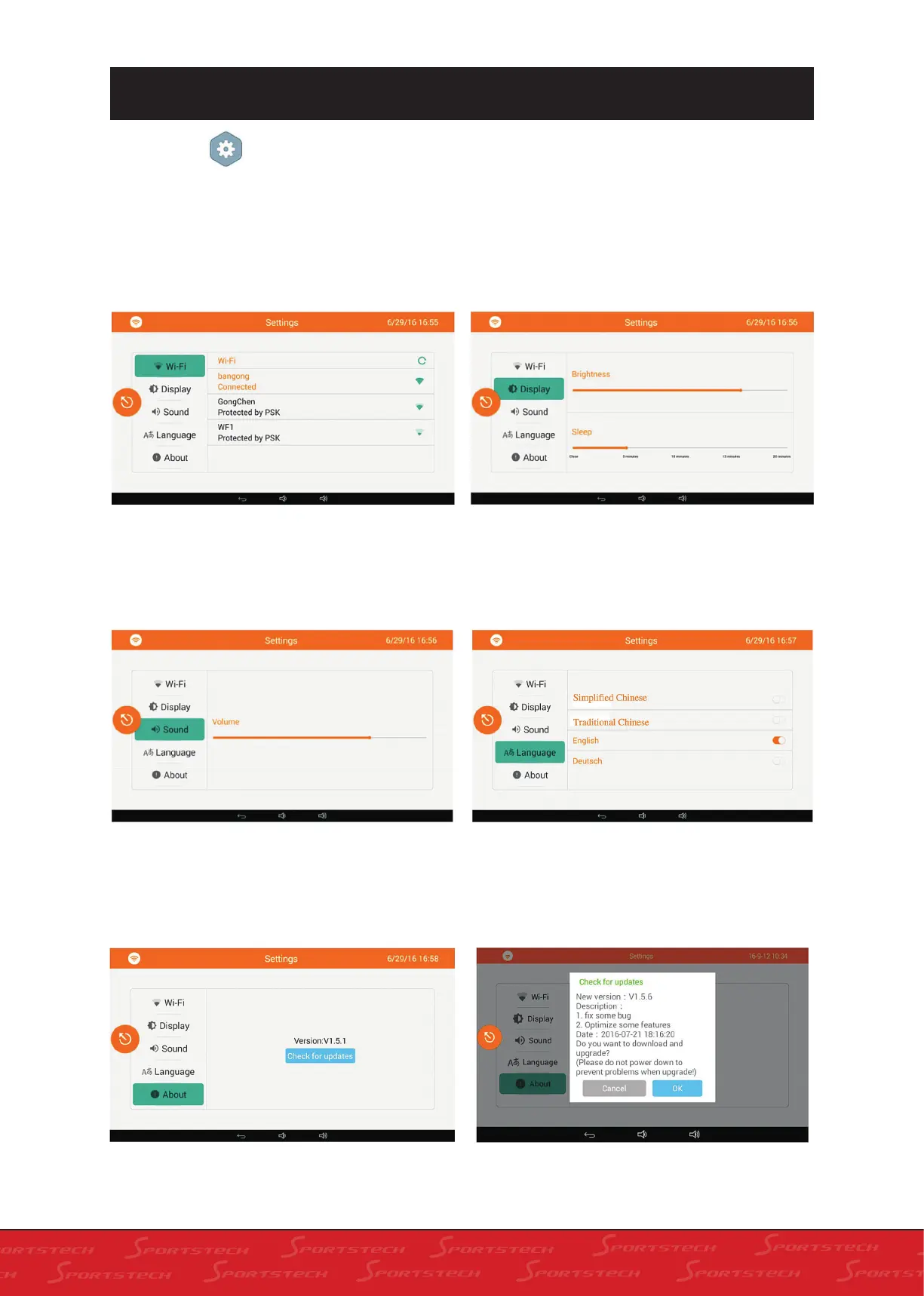
Click Settings on the home screen to enter
Settings (in this screen, there are foure selections
to be set: Wi-Fi, Display, Sound and Language)
or see Infos in the About option. The screen is
as below. You can connect to WIFI: click the WIFI
name you want to link, enter password and click
„OK“ to connect.
1. Click „Display“ to enter into display for adjust-
ment as below. In this screen you can adjust the
brightness and hibernation time.
2. Click „Sound“ to enter into sound adjustment
screen as below.
3. Click „Language“ to enter into language set-
4. Click „About“ to enter into related screen as
below. Treadmill edition and software update is
displayed on this screen.
ting screen as below. You can select the display
language of the system in the screen: Simplified
Chinese, Traditional Chinese, English and Deutsch.
5. Click „Check“ for updates to enter into system
updating screen (internet connection is required).



 To Next Page