56
9.3 ENTER INTO SPORTS SCREEN AND OPERATION
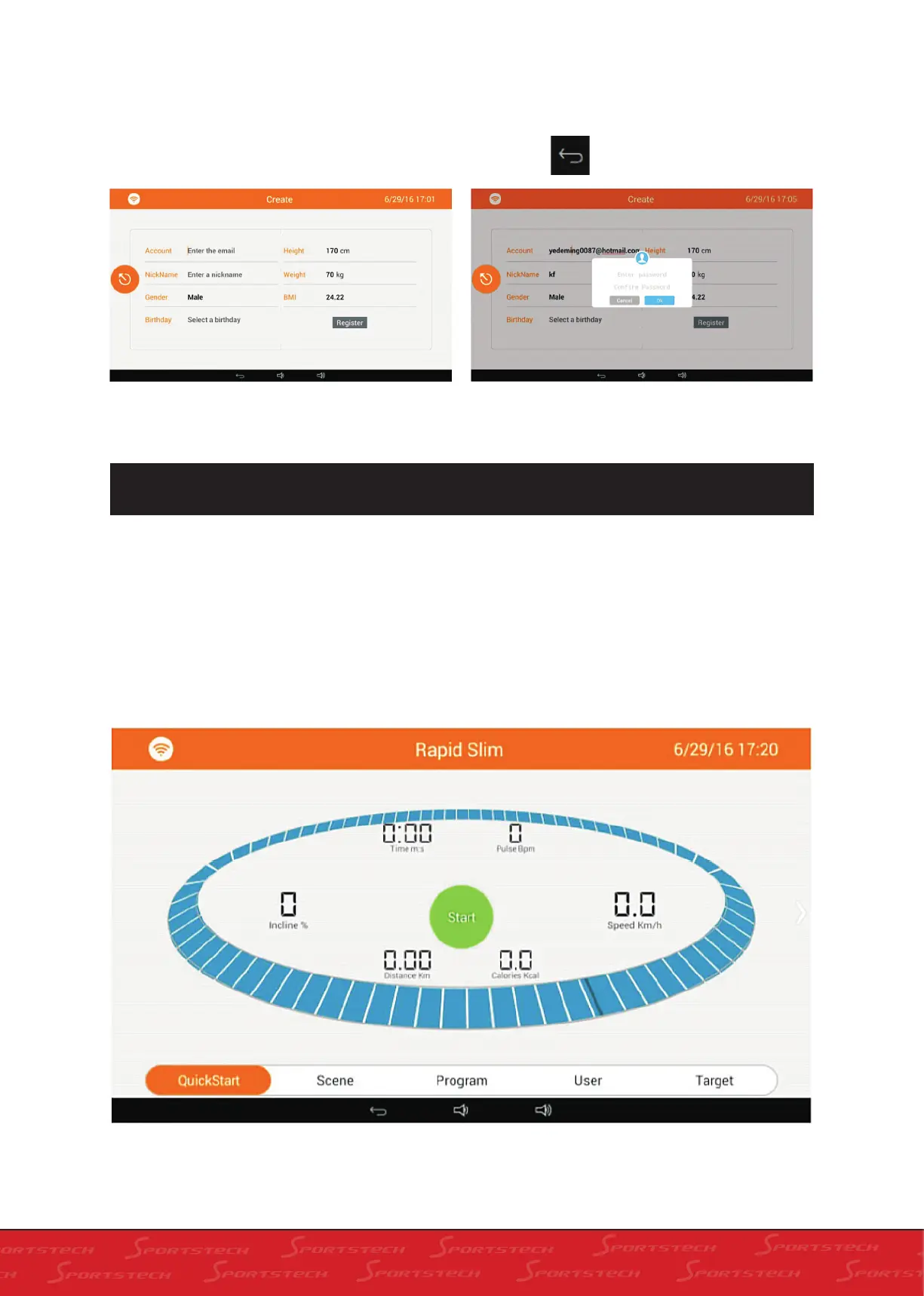
3. If you have no account please click „Create“ to
enter into registration screen as below. Fill in user
data, click „Register“ to register. A box will pop up
to input your password. Input password and click
„OK“ to register new account. You will be informed
of registration success. If not, the reason of failure
will shown and you should modify as per the hint.
Click Back to go back to the home screen.
1. Click „Sports“ on the home screen to enter into Rapid Slim as below.
Description of the screen
Opereation parameter of treadmill is successively exhibited on the screen. Time (M:S), Pulse (Bpm),
Speed (km/h), Incline (%), Distance (km) and Calories (Kcal). The circle in the middle means the pe-
rimeter of one circle is 400m, with Start in the middle. Below there are shortcut keys for running. You
can enter into corresponding running mode by pressing the keys or by sliding left or right on the screen
to select. All running modes are exhibited as below.



 To Next Page