57
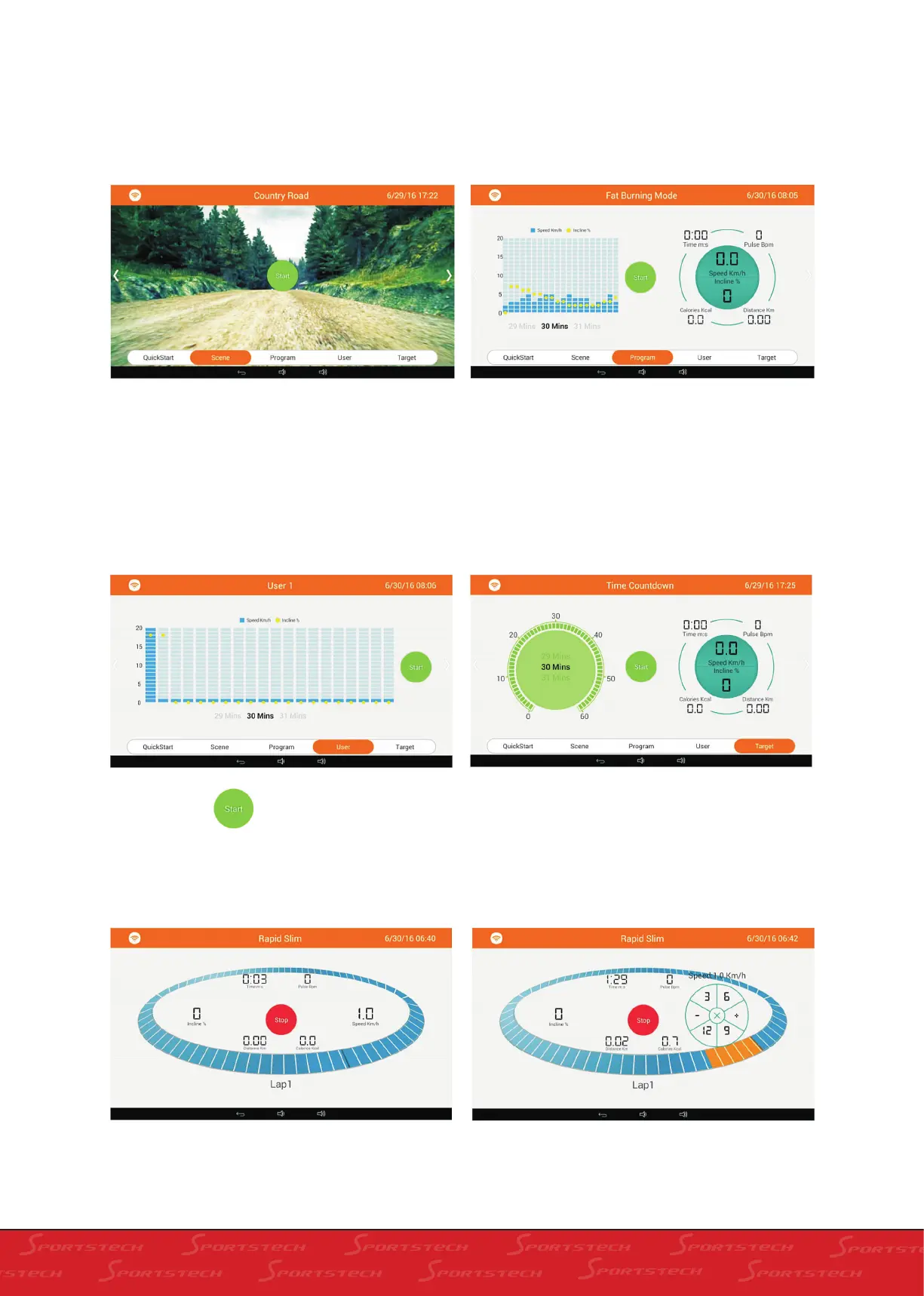
There are three real scenes in Real Scene mode.
Slide right and left on the screen to switch among
them. Click „Start“.
12 kinds of modes are available in the Programm.
Users can select a reasonable plan based on their
own needs to run. Slide left or right to switch
among different plans. Set the time after the
selection and then click „Start“.
There are three groups of Customized Fitness
models available for User to select. Slider left or
right to select. Drag the blue column in the middle
to set the speed of the current section. Drag the
yellow ball to setslope of current selection. After all
selections are set (automatically saved after set-
ting) set the time of running and then click „Start“.
There are three modes available in Target. User
can select the reasonable mode to run based on
ther own demands. Slide left or right to switch
among different plans. Then set time and click
„Start“.
2. Click Start to enter into running screen
of Rapid Slim.
3. Adjustment of slope and speed.
a: Click Speed window as exhibited above and
the following screen will shown. Press the „+“, „-“
or shortcut key of speed to change speed.
b: Please refer to adjustment of speed for adjust-
ment of slope.



 To Next Page