60
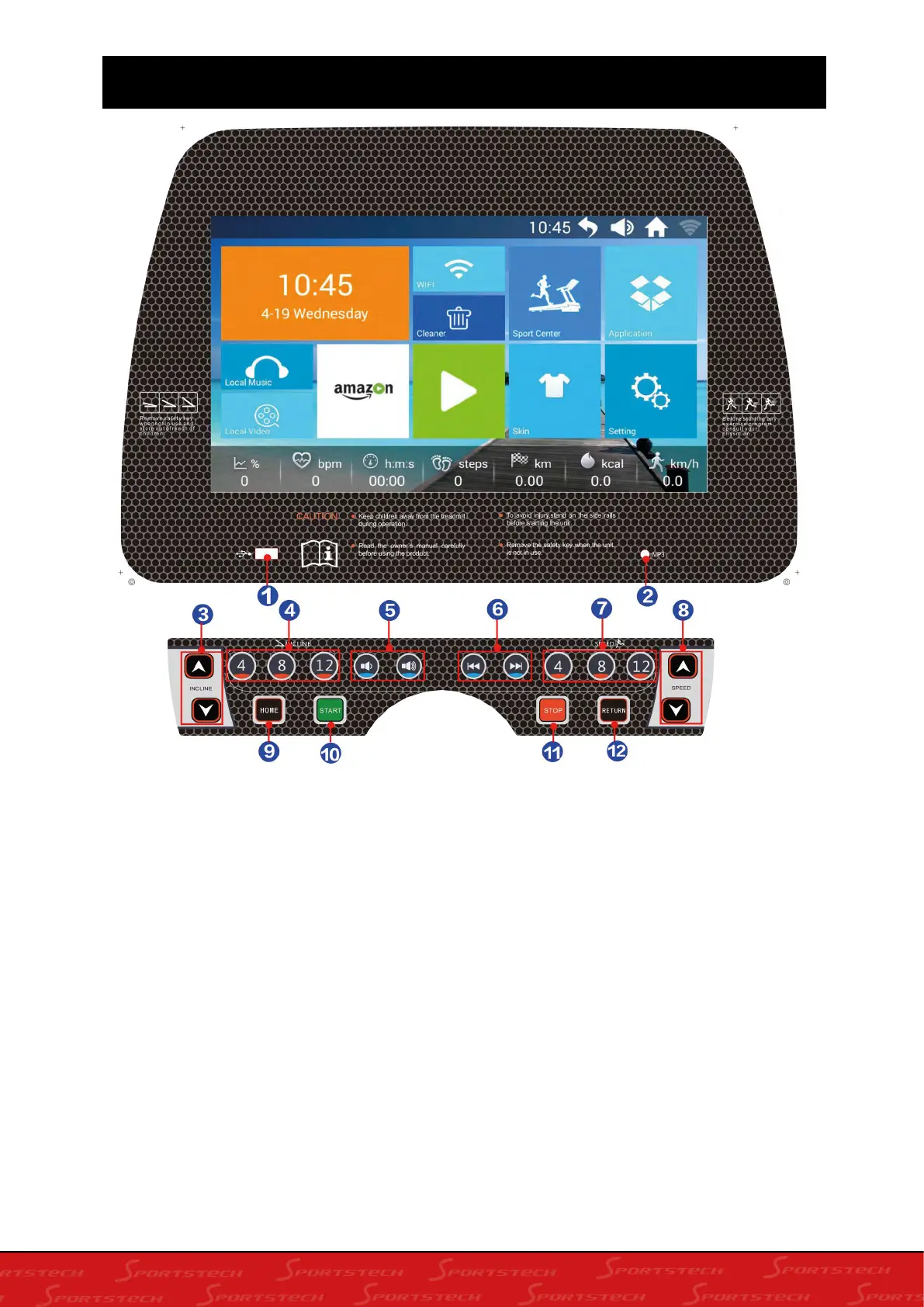
8. PANEL INSTRUCTION
1. USB interface: after operation, the system plays songs or video in the USB storage.
2. MP3 interface: insert MP3 audio, the speaker can play MP3 music.
3. Incline/decline button: incline and decline shortcuts:incline range:0-18%.The adjustment ran-
ge is 1 segment/time, and when continuously pressed for more than 0.5 seconds, the machine
automatic continuous incline/decline.
4. 4,8,12”incline shortcuts: set the slope quickly
5. Volume plus minus: increase or decrease the volume.
6. Video music adjustment button: Play the previous/next song of music or video
7. 4,8,12”speed shortcuts:set the speed quickly
8. Speed range shortcuts: speed range:1.0-20.8km/h adjustment range is 0.1km/time, and
when continuously pressed for more than 0.5 seconds, the machine automatic continuous
increase/decrease.
9. Home button: return directly to the main interface from any sub-interface





 To Next Page