64
Detailed explanation of each control of the main interface
Detailed function instruction
1. Weather forecast:
Used to manage the current time and local weather.
• Support users to manually correct current time and date
• Current time and date can update when connect with
internet
1.1. How to manually adjust the time, date and address.
Press weather forecast icon to manually adjust the time and date parameters
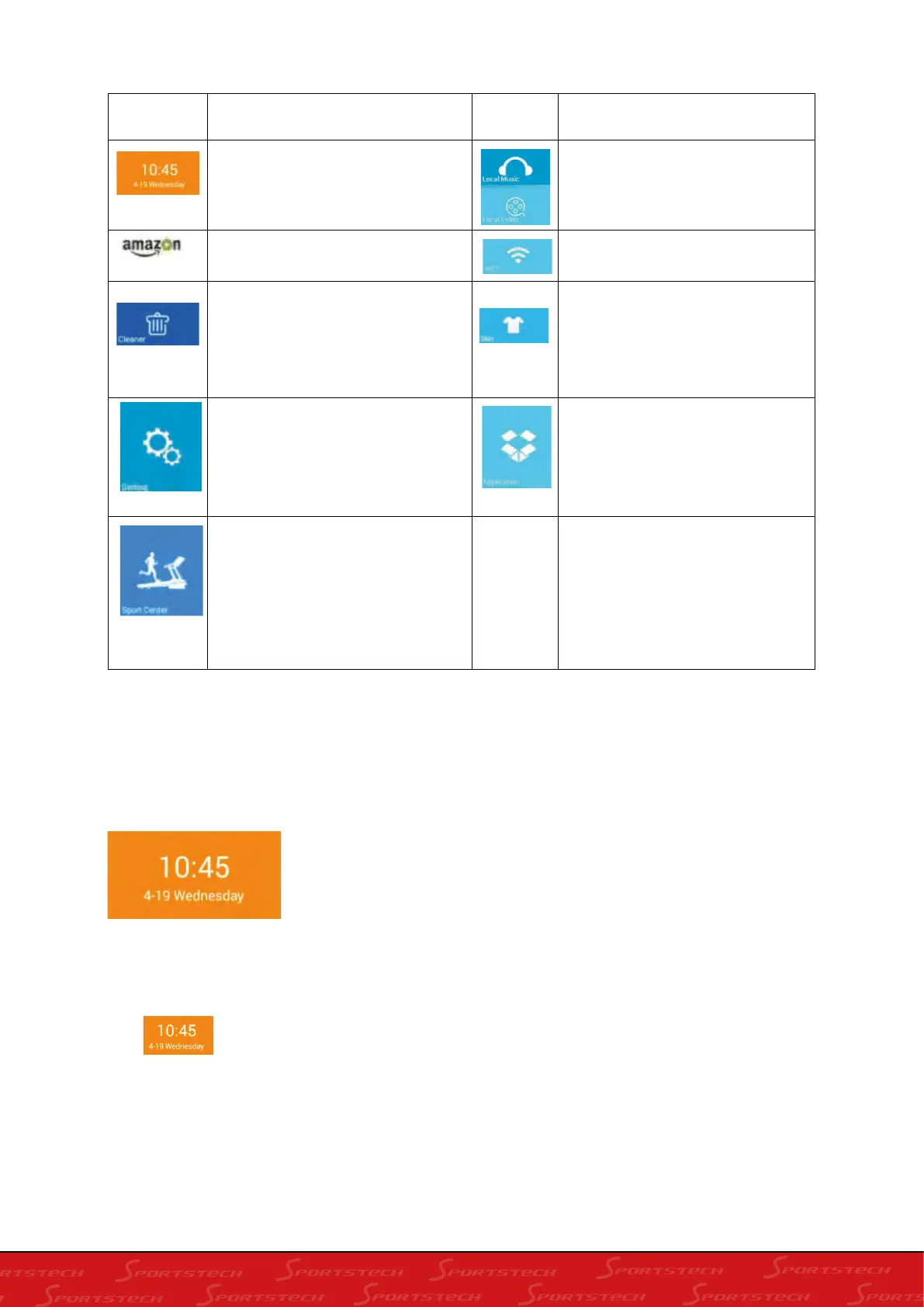
Icon
Function instruction
Icon
Function instruction
Weather forecast:Used to
display the current time and
location of the weather
local audio and video:Used to
manage audio and video files in
the system and in the external U
disk
Internet:Built-in third-party app
WIFI:connect internet
Cleaning:One-click cleanup
system cache and memory
shortcuts
Skin:You can choose the
built-in skin to change the
background skin of the machine
according to your preferences.
Setting:Built-in brightness
adjustment, language selection,
machine management, factory
mode four functions
Applications:Built-in
third-party music app,
third-party video app, internet,
social, news
sports center :built-in 9 kinds of
sports: time countdown, calorie
countdown, distance countdown,
step countdown, work out, heart
pulse control, runway mode,
realview run, custom mode)








 To Next Page