EasyManua.ls Logo

ST STM32G0 - User Manual

ST STM32G0
26 pages
Print Icon
To Next Page IconTo Next Page
Loading...
Introduction
The STM32G0 Nucleo-32 board based on the MB1455 reference board (NUCLEO-G031K8) provides an affordable and flexible
way for users to try out new concepts and build prototypes by choosing from the various combinations of performance and
power consumption features, provided by the STM32G0 microcontroller.
The Arduino
Nano V3 connectivity support allows the easy expansion of the functionality of the STM32 Nucleo open
development platform with a wide choice of specialized shields.
The STM32G0 Nucleo-32 board does not require any separate probe as it integrates the ST-LINK/V2-1 debugger/programmer.
The STM32G0 Nucleo-32 board comes with the STM32 comprehensive free software libraries and examples available with the
STM32CubeG0 MCU Package.
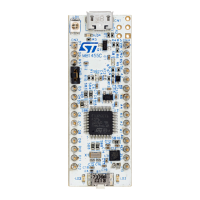
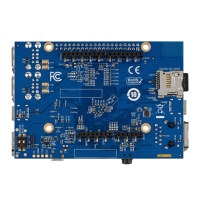
Figure 1. NUCLEO-G031K8 top view
Figure 2. NUCLEO-G031K8 bottom view
Pictures are not contractual.
STM32G0 Nucleo-32 board (MB1455)
UM2591
User manual
UM2591 - Rev 1 - June 2019
For further information contact your local STMicroelectronics sales office.
www.st.com
Question and Answer IconNeed help?

Do you have a question about the ST STM32G0 and is the answer not in the manual?

Summary

Introduction

Ordering Information

Product Marking

Details on product marking for identification and traceability.

Products and Codification

Explanation of product codification and available variants.

Development Environment

System Requirements

Specifies the necessary system requirements for development.

Development Toolchains

Lists supported development toolchains and IDEs for the board.

Demonstration Software

Information about preloaded demonstration software and its source.

Quick Start

Getting Started

Provides initial steps and guidance for starting with the Nucleo-32 board.

Hardware Layout and Configuration

PCB Layout

Details the physical layout of components on the PCB, including top and bottom views.

Mechanical Drawing

Shows the mechanical dimensions and drawings of the board.

Embedded ST-LINK;V2-1

Information about the integrated ST-LINK/V2-1 debugger and firmware upgrade.

Power Supply

Details board power supply options via USB and external sources, with configuration details.

Board Functions

Describes board functions including LEDs, push-button, current measurement, and VCP.

Solder Bridges

Explains the configuration and function of various solder bridges on the board.

Board Connectors

Arduino Nano V3 Connectors CN3 and CN4

Details the Arduino Nano V3 compatible connectors and their pinout.

Federal Communications Commission (FCC) and Industry Canada (IC) Compliance Statements

FCC Compliance Statement

FCC compliance information, including Part 15 rules and user modifications.

IC Compliance Statement

Industry Canada (IC) compliance statement and identification.

CE Conformity

Warning

Warning regarding CE conformity for Class A product and potential radio interference.

Revision History

Overview

The STM32G0 Nucleo-32 board, identified by the MB1455 reference board (NUCLEO-G031K8), serves as an accessible and adaptable development kit for users to explore new concepts and construct prototypes. It leverages the diverse performance and power consumption capabilities offered by the STM32G0 microcontroller.

Function Description

The core function of the STM32G0 Nucleo-32 board is to provide a platform for evaluating and developing with STM32G0 Series microcontrollers in an LFQFP 32-pin package. It integrates an ST-LINK/V2-1 debugger/programmer, eliminating the need for a separate probe and simplifying the development workflow. The board is designed to facilitate rapid prototyping and evaluation of the STM32G0 microcontroller's features.

The board's hardware architecture includes a Micro USB connector for power and communication, an embedded ST-LINK/V2-1 for debugging and programming, and the STM32 microcontroller itself. It also features a RESET button (B1 RST) and a user LED (LD3) for basic interaction and feedback. Input/output (I/O) lines from the STM32 microcontroller are exposed through connectors, allowing for interaction with external components and shields.

Usage Features

The STM32G0 Nucleo-32 board offers several features that enhance its usability for developers:

  • Arduino™ Nano V3 Connectivity: This feature allows for easy expansion of the board's functionality by supporting a wide range of specialized shields designed for the Arduino™ Nano V3 platform. This broadens the prototyping possibilities and simplifies the integration of various sensors, actuators, and communication modules.
  • Integrated Debugger/Programmer: The on-board ST-LINK/V2-1 debugger/programmer provides USB re-enumeration capabilities, including mass storage, a Virtual COM port, and a debug port. This integration streamlines the development process by allowing users to program and debug their applications directly from the board without additional hardware.
  • Flexible Power Supply Options: The board can be powered from multiple sources. It can draw power from the host PC via the USB cable connected to CN1. Alternatively, external power sources can be used, including VIN (7 V - 12 V), +5V (5 V), or +3V3 (3.3 V) through the CN4 pins. This flexibility allows the board to be used in various power environments and with different external components.
  • Virtual COM Port (VCP): The board supports a Virtual COM port via the USART interface, connected to the ST-LINK/V2-1. This enables serial communication between the target STM32 microcontroller and the host PC, which is crucial for debugging, data logging, and command-line interfaces.
  • Current Consumption Measurement (IDD): A dedicated jumper (JP1, labeled IDD) allows users to measure the current consumption of the STM32G0 microcontroller. By removing the jumper and connecting an ammeter, developers can monitor the power usage of their applications, which is vital for optimizing power-sensitive designs.
  • User LED (LD3): A green user LED (LD3) is connected to a GPIO pin of the STM32G0 microcontroller (PB3 or PC6, depending on solder bridge configuration). This LED can be controlled by the user's application, providing visual feedback for program status, debugging, or simple user interfaces.
  • Reset/User Push-button (B1): A push-button is connected to the NRST pin of the STM32G0 microcontroller. It can be used to reset the microcontroller or to generate a user-defined event within the application, offering a simple input mechanism.
  • Comprehensive Software Support: The board comes with the STM32 comprehensive free software libraries and examples, available through the STM32CubeG0 MCU Package. This rich software ecosystem accelerates development by providing ready-to-use drivers, middleware, and application examples.
  • Wide IDE Support: The STM32G0 Nucleo-32 board supports a broad range of Integrated Development Environments (IDEs), including Keil® MDK-ARM, IAR™ EWARM, and GCC-based IDEs. This allows developers to choose their preferred development environment, leveraging existing expertise and toolchains.

Maintenance Features

The STM32G0 Nucleo-32 board incorporates features that aid in its maintenance and ensure its longevity and adaptability:

  • ST-LINK/V2-1 Firmware Upgrade: The embedded ST-LINK/V2-1 includes a mechanism for in-situ firmware upgrades via the USB port. This allows users to keep the debugger/programmer updated with the latest functionalities, bug fixes, and support for new microcontroller families, ensuring compatibility and optimal performance over time.
  • Solder Bridges for Configuration: The board utilizes several solder bridges (SBx) for flexible hardware configuration. These bridges allow users to enable or disable specific functionalities, such as USB power limits, ST-LINK reset, VCP connections, SWCLK connections, BOOT0 pull-down resistors, MCO from ST-LINK, and LSE quartz. This modularity enables customization for different application requirements and troubleshooting.
  • LED Indicators for Status: Multiple LED indicators provide visual feedback on the board's status:
    • LD1 (ST-LINK COM LED): A bicolor (red/green) LED indicates the ST-LINK communication status, showing states like USB enumeration, initialization, programming/debugging in progress, and communication success or failure. This helps in diagnosing connectivity issues.
    • LD2 (PWR LED): A red LED indicates that the STM32G0 part is powered and 5 V power is available on CN4 pin 4, confirming basic power supply.
    • LD4 (USB Power Fault LED): A red LED indicates if the board's power consumption on the USB ST-LINK exceeds 500 mA. This serves as a critical warning for overcurrent conditions, prompting users to check for root causes or switch to an external power supply to prevent damage.
  • Clear Documentation and Support: The availability of a user manual, datasheets, and a dedicated webpage (www.st.com/stm32nucleo) provides comprehensive information for setup, usage, and troubleshooting. This ensures that users have access to the necessary resources for maintaining and effectively utilizing the board.
  • Robust Design for Evaluation: The board is designed for evaluation and prototyping, implying a certain level of robustness for repeated use and experimentation. While not intended for final production, its construction supports iterative development and testing.

ST STM32G0 Specifications

General IconGeneral
SeriesSTM32G0
CoreARM Cortex-M0+
Operating FrequencyUp to 64 MHz
ADC Resolution12-bit
Operating Voltage1.7 V to 3.6 V
Communication InterfacesUSART, SPI, I2C, USB, CAN
Operating Temperature-40°C to 85°C
Package OptionsLQFP, UFQFPN, TSSOP

Related product manuals